USAID’s Khyber Pakhtukhwa Revenue Mobilization (KPRM) Activity
Building Good Workflow Habits
- I will show you the tools to make your workflow:
- Reproducible
- Computer- and Human-Readable (!)
- Automated
- All in one program

For Example
library(gapminder)
library(gganimate)
gapminder |>
  filter(continent != "Oceania") |>
ggplot(aes(x = gdpPercap,
           y = lifeExp,
           color = country,
           size = pop))+
  geom_point(alpha=0.3)+
    scale_x_log10(breaks=c(1000,10000, 100000),
                  label=scales::dollar)+
  scale_size(range = c(0.5, 12)) +
  scale_color_manual(values = gapminder::country_colors) +
    labs(x = "GDP/Capita",
         y = "Life Expectancy (Years)",
         caption = "Source: Hans Rosling's gapminder.org",
         title = "Income & Life Expectancy - {frame_time}")+
  facet_wrap(~continent)+
  guides(color = F, size = F)+
  theme_minimal(base_family = "Fira Sans Condensed")+
  transition_time(year)+
  ease_aes("linear")
Agenda : 5 Important verbs for handling data
View, glimpse, structure, head, tail
select() for column selection
filter() for data filtering
arrange() Data Ordering
mutate() Creating Derived Columns
summarise() Calculating Summary Statistics
group_by()
Gapminder dataset
The dataset is provided in the gapminder library
| country | continent | year | lifeExp | pop | gdpPercap |
|---|---|---|---|---|---|
| Sweden | Europe | 1952 | 71.86 | 7124673 | 8528 |
| Sweden | Europe | 1957 | 72.49 | 7363802 | 9912 |
| Sweden | Europe | 1962 | 73.37 | 7561588 | 12329 |
| Sweden | Europe | 1967 | 74.16 | 7867931 | 15258 |
| Sweden | Europe | 1972 | 74.72 | 8122293 | 17832 |
| Sweden | Europe | 1977 | 75.44 | 8251648 | 18856 |
| Sweden | Europe | 1982 | 76.42 | 8325260 | 20667 |
| Sweden | Europe | 1987 | 77.19 | 8421403 | 23587 |
| Sweden | Europe | 1992 | 78.16 | 8718867 | 23880 |
| Sweden | Europe | 1997 | 79.39 | 8897619 | 25267 |
| Sweden | Europe | 2002 | 80.04 | 8954175 | 29342 |
| Sweden | Europe | 2007 | 80.88 | 9031088 | 33860 |
Information in gapminder data
View command opens data in new worksheet while glimpse lists nature of variables (numeric/character/factor…) and total number of rows and columns.
glimpse(gapminder) # We see that there are 1704 rows for 6 columns and also tells nature of variableRows: 1,704
Columns: 6
$ country <fct> "Afghanistan", "Afghanistan", "Afghanistan", "Afghanistan", …
$ continent <fct> Asia, Asia, Asia, Asia, Asia, Asia, Asia, Asia, Asia, Asia, …
$ year <int> 1952, 1957, 1962, 1967, 1972, 1977, 1982, 1987, 1992, 1997, …
$ lifeExp <dbl> 28.801, 30.332, 31.997, 34.020, 36.088, 38.438, 39.854, 40.8…
$ pop <int> 8425333, 9240934, 10267083, 11537966, 13079460, 14880372, 12…
$ gdpPercap <dbl> 779.4453, 820.8530, 853.1007, 836.1971, 739.9811, 786.1134, …#View(gapminder) # This opens up full data in a new windowSummary
summary(gapminder) country continent year lifeExp
Afghanistan: 12 Africa :624 Min. :1952 Min. :23.60
Albania : 12 Americas:300 1st Qu.:1966 1st Qu.:48.20
Algeria : 12 Asia :396 Median :1980 Median :60.71
Angola : 12 Europe :360 Mean :1980 Mean :59.47
Argentina : 12 Oceania : 24 3rd Qu.:1993 3rd Qu.:70.85
Australia : 12 Max. :2007 Max. :82.60
(Other) :1632
pop gdpPercap
Min. :6.001e+04 Min. : 241.2
1st Qu.:2.794e+06 1st Qu.: 1202.1
Median :7.024e+06 Median : 3531.8
Mean :2.960e+07 Mean : 7215.3
3rd Qu.:1.959e+07 3rd Qu.: 9325.5
Max. :1.319e+09 Max. :113523.1
dplyr features
filter() to keep selected observations
select() to keep selected variables
arrange() to reorder observations by a value
mutate() to create new variables
summarize() to create summary statistics
group_by() for performing operations by group
Select()
Column Selection
For example PDHS files have more than 5000 columns in some files and maybe 40 or 50 or even fewer than that are needed for your analysis. Select() function of R’s dplyr is used to select columns of your interest
gapminder |> select(country, pop, lifeExp)select most of the variables and drop one or two
gapminder |> select(-gdpPercap)Data Filtering
filter() funtion
gapminder_07<- gapminder |> filter(year==2007)
kbl(gapminder_07[1:10,])|>kable_styling(fixed_thead=T)| country | continent | year | lifeExp | pop | gdpPercap |
|---|---|---|---|---|---|
| Afghanistan | Asia | 2007 | 43.828 | 31889923 | 974.5803 |
| Albania | Europe | 2007 | 76.423 | 3600523 | 5937.0295 |
| Algeria | Africa | 2007 | 72.301 | 33333216 | 6223.3675 |
| Angola | Africa | 2007 | 42.731 | 12420476 | 4797.2313 |
| Argentina | Americas | 2007 | 75.320 | 40301927 | 12779.3796 |
| Australia | Oceania | 2007 | 81.235 | 20434176 | 34435.3674 |
| Austria | Europe | 2007 | 79.829 | 8199783 | 36126.4927 |
| Bahrain | Asia | 2007 | 75.635 | 708573 | 29796.0483 |
| Bangladesh | Asia | 2007 | 64.062 | 150448339 | 1391.2538 |
| Belgium | Europe | 2007 | 79.441 | 10392226 | 33692.6051 |
##>Have we accidently deleted all other rows? Answer is no.
Nope: If you don’t believe me try entering gapminder at the console.
gapminder |> filter(year==2007)Filtering with respect to two variables
One can apply multiple filters
Now we are selecting multiple countries for year 2007.
Filtering data for South Asia countries
Sort data with arrange()
gapminderSA |> arrange(gdpPercap)
arrange() sorts in ascending order. Sort in descending order, desc().
Life Expectancy in South Asia in 2007
What is the lowest and highest life expectancy among South Asian countries?
What was it in 1952?
mutate() to change existing or create new variable
gapminderSA |> mutate(pop=pop/1000000)If we want to calculate GDP, we need to multiply gdpPercap by pop.
But wait! Didn't we just change pop so it's expressed in millions? No: we never stored the results of our previous command, we simply displayed them. Just as I discussed above, unless you overwrite it, the original gapminder dataset will be unchanged. With this in mind, we can create the gdp variable as follows:
gapminderSA |> mutate(gdp = pop * gdpPercap)How to calculate new variables
As mentioned above, mutate is used to calculate new variable. Here we have calculated a new variable gdp and then arrange() data and selected top_n(10) countries to see whether higher lifeExpectancy and higher gdp are linked or not?
transmute() keeps only the derived column. Let’s use it in the example from above:
Ordering
arrange data by life expectancy, we use arrange() function
top to bottom, then use arrange(desc()) command as follows:
Top 5
Summarising data
Another feature of dplyr is summarise data
Summarising data by groups
mean, maximum, and mean life expectancy
LE for each year
if_else command alongwith mutate
Total Population by Continets in 2007
Percentiles
Bottom side
So it makes sense that higher the GDP, higher the lifeExp. This is not formal testing but exploratory data makes lot of sense here.
Advanced Analysis
Filtering data as done in introductory analysis seems quite difficult if you are not familiar with these simple things. But if you are working with dplyr for quite sometime, there is not anything very advanced or difficult.
For example, let’s say you have to find out the top 10 countries in the 90th percentile regarding life expectancy in 2007. You can reuse some of the logic from the previous sections, but answering this question alone requires multiple filtering and subsetting:
In case you are interested in bottom 10 (worst lifeExp countries from the bottom), use top_n with -10.
Visualizing data to get data insight
Visualizing data is one of the most important aspect of getting data insight and may provide a better data insight than a complicated model. Visualizing large data sets were not an easy task, so researchers relied on mathematical and core econometric/regression models. ggplot2 which is a set of tidyverse package is probably one of the greatest tool for data visualization used in R. In the following sections we are going to visualize gapminder data.
Stat graphics is a mapping of variable to aesthetic attributes of geometric objects.
3 Essential components of ggplot2
- data: dataset containing the variables of interest
- geom: geometric object in question line, point, bars
- aes: aesthetic attributes of an object x/y position, colors, shape, size
Scatter plot
gapminder2007<-gapminder |> filter(year==2007)
p1<-ggplot(data=gapminder2007,mapping = aes(x=gdpPercap,y=lifeExp,color=continent,size=pop))+geom_point()
p1+facet_wrap(~continent)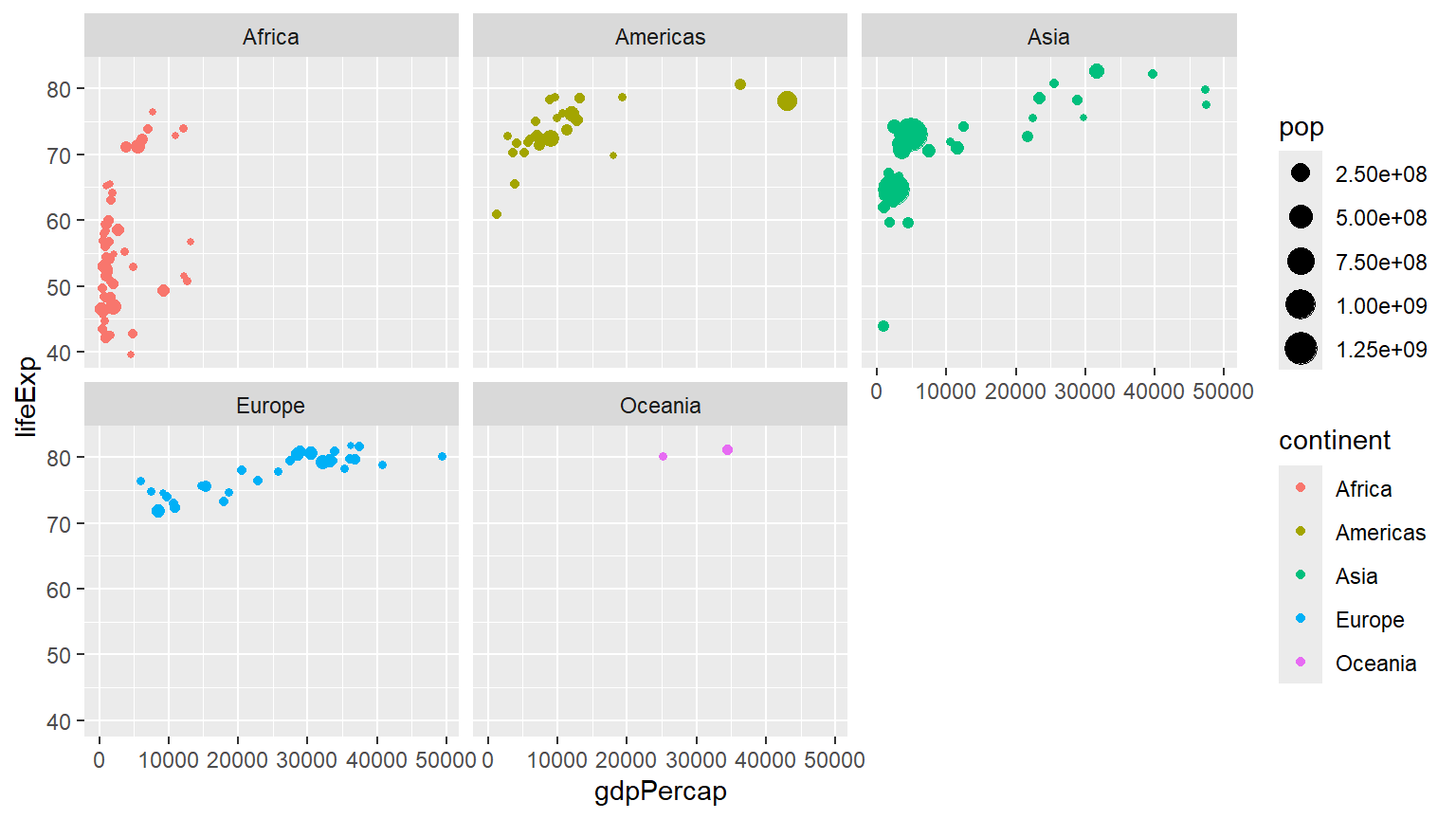
p1+  labs(x = "GDP Per Capita", y = "Life Expectancy in Years",
       title = "Economic Growth and Life Expectancy",
       subtitle = "Data points are country-years",
       caption = "Source: Gapminder.")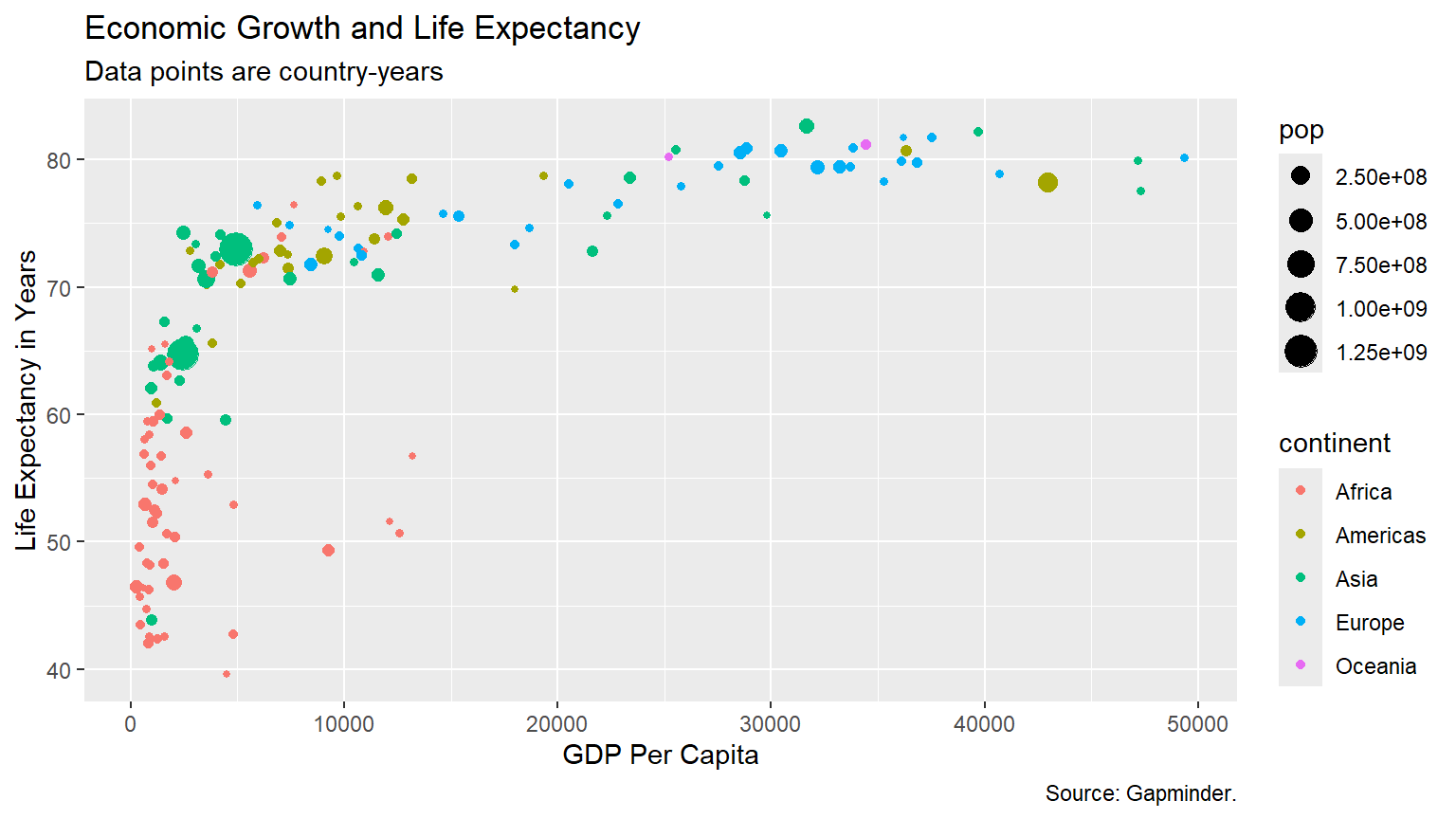
Bubbleplot
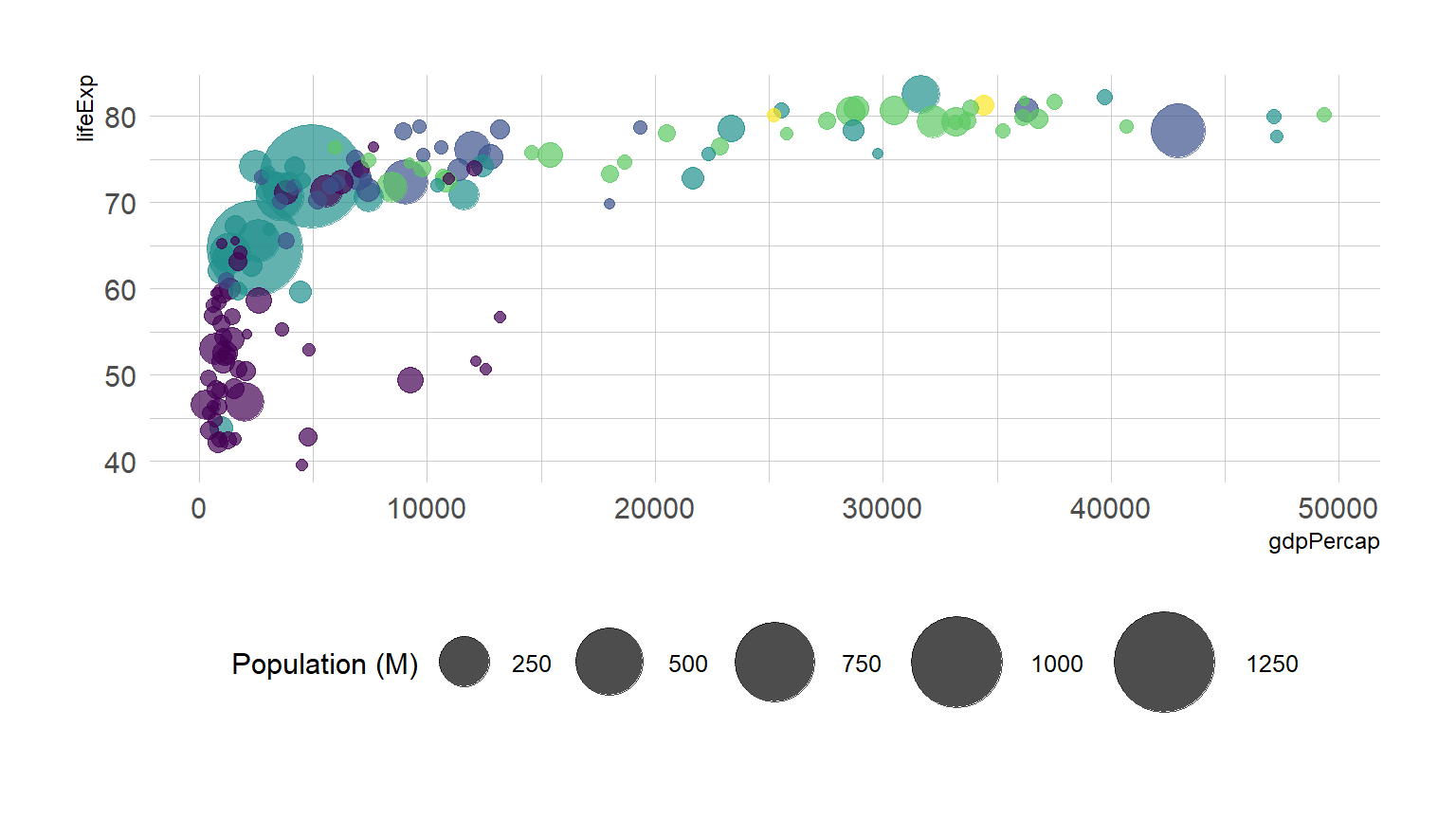
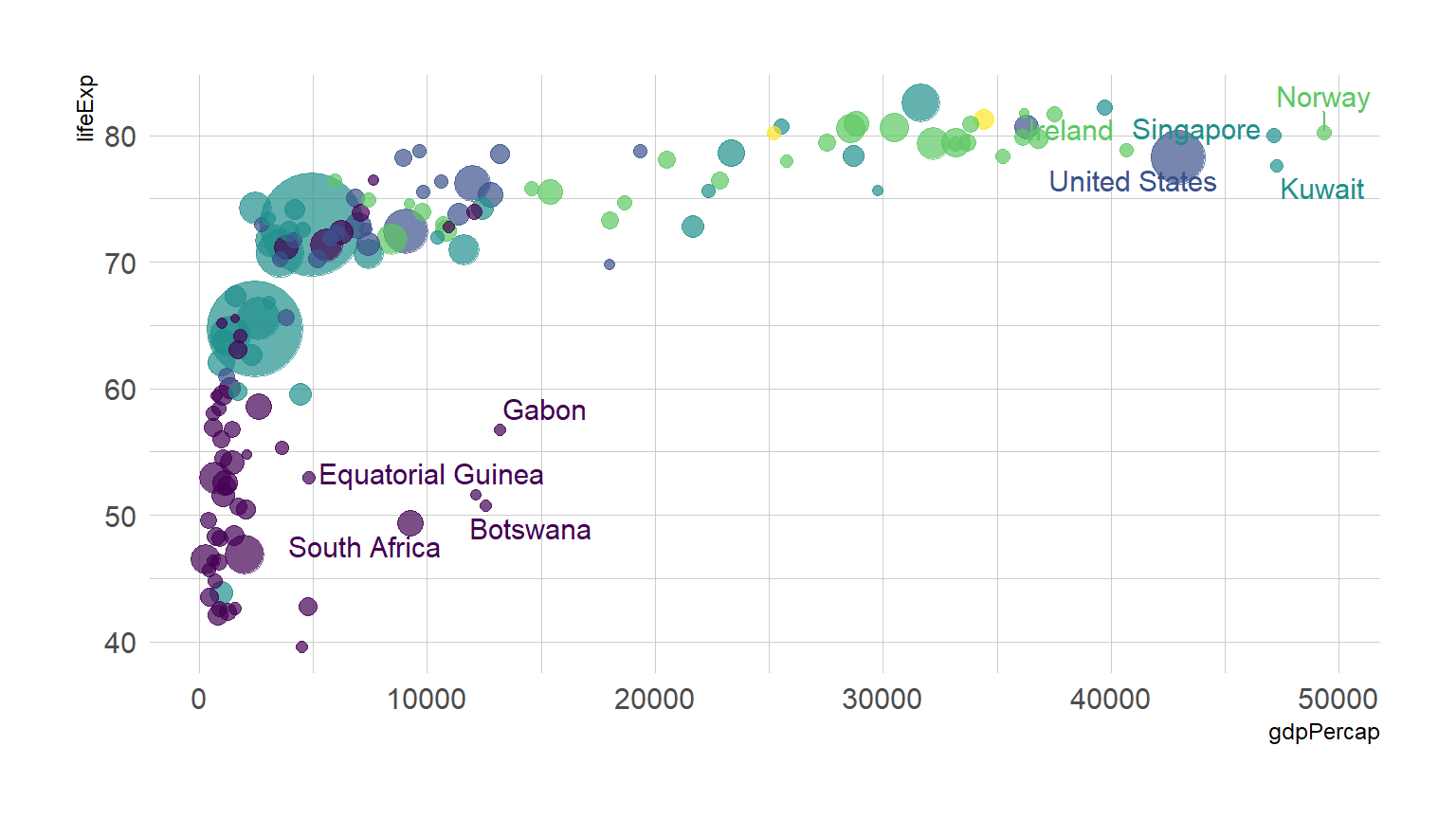
##This is a table of data about a large number of countries, each observed over several years. Let's make a scatterplot with it.
P<-ggplot(data=gapminder,mapping = aes(x=gdpPercap,y=lifeExp))

P+geom_point()+geom_smooth()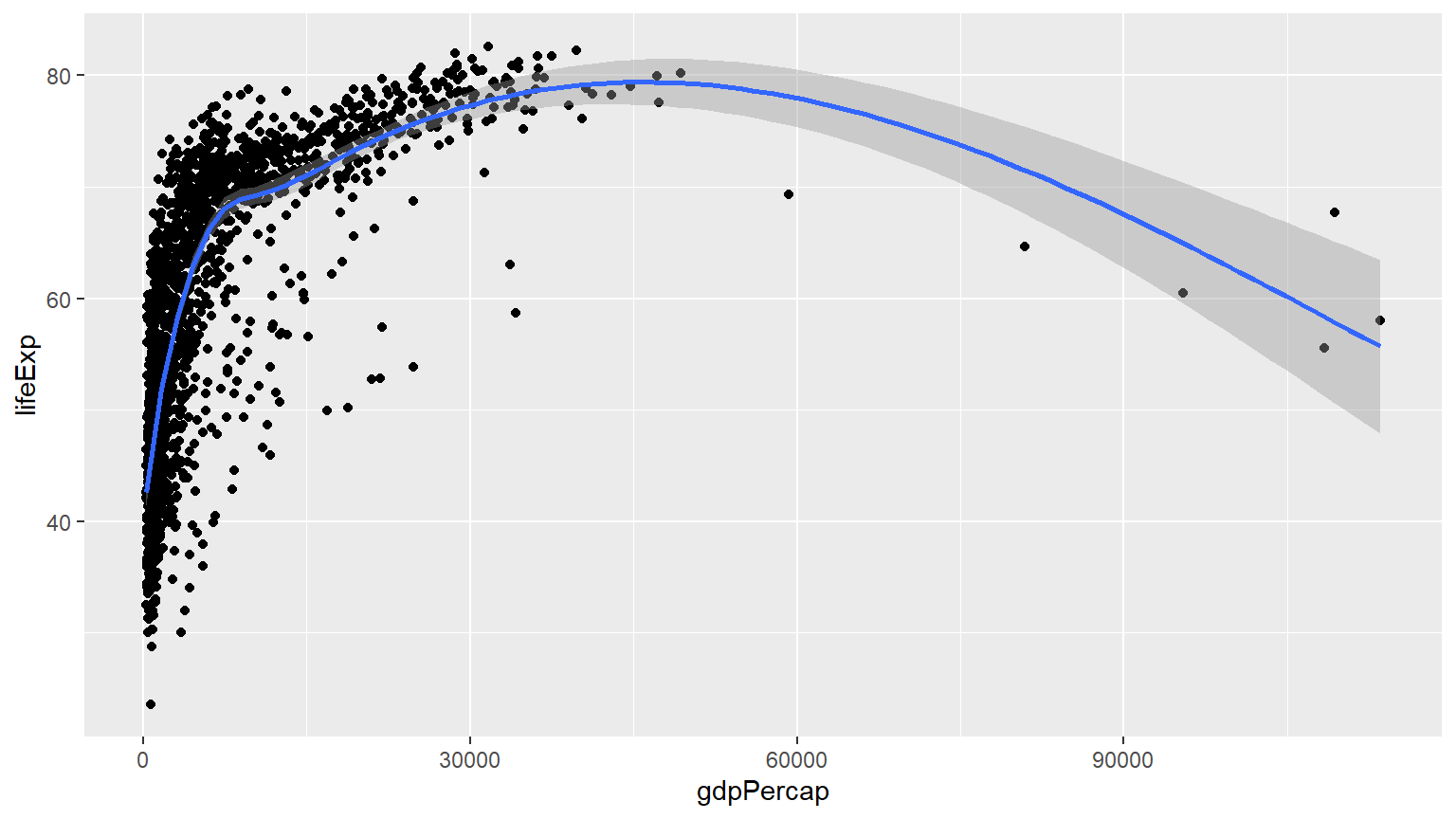
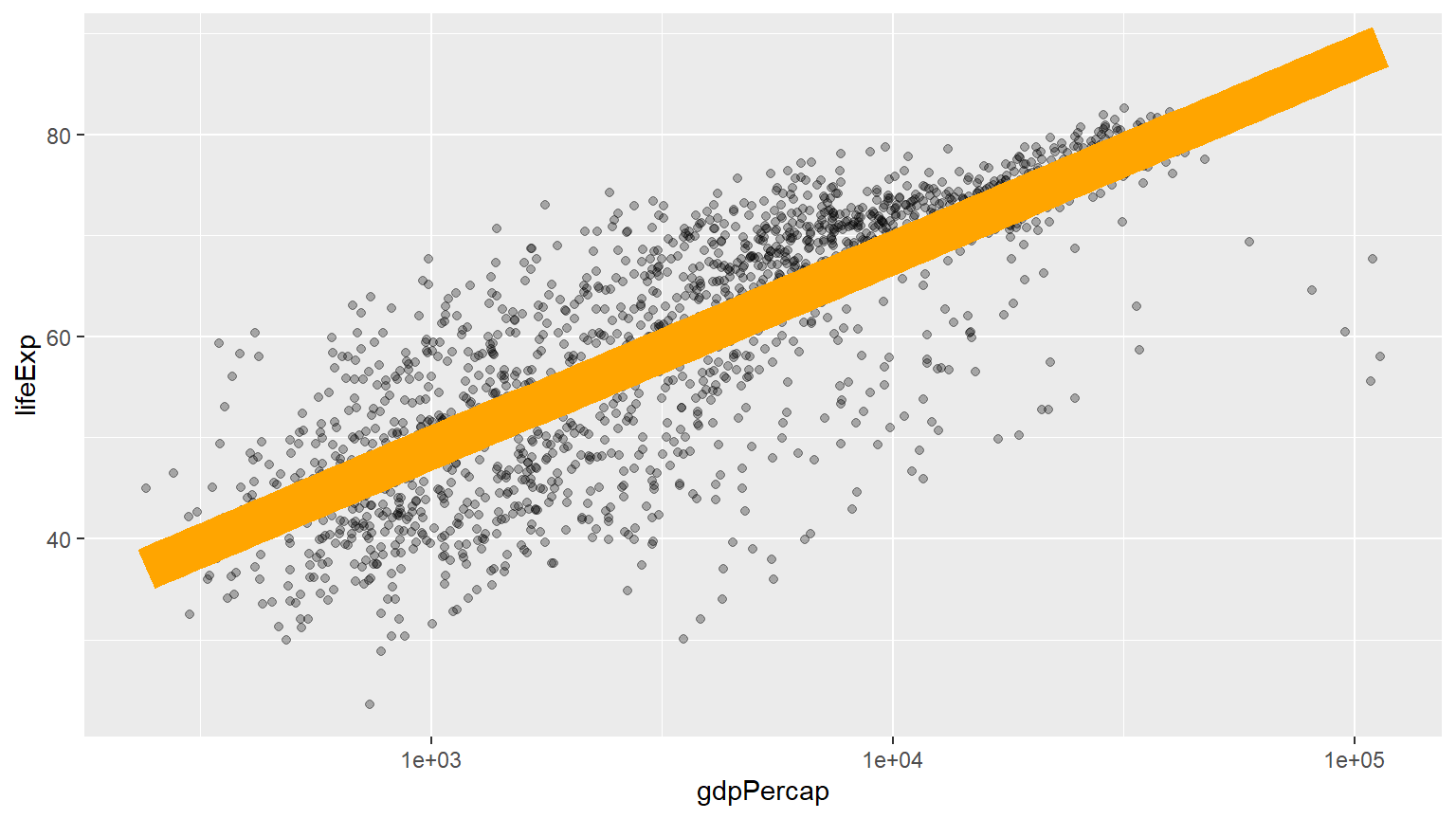
P+geom_point()+geom_smooth(method = "lm")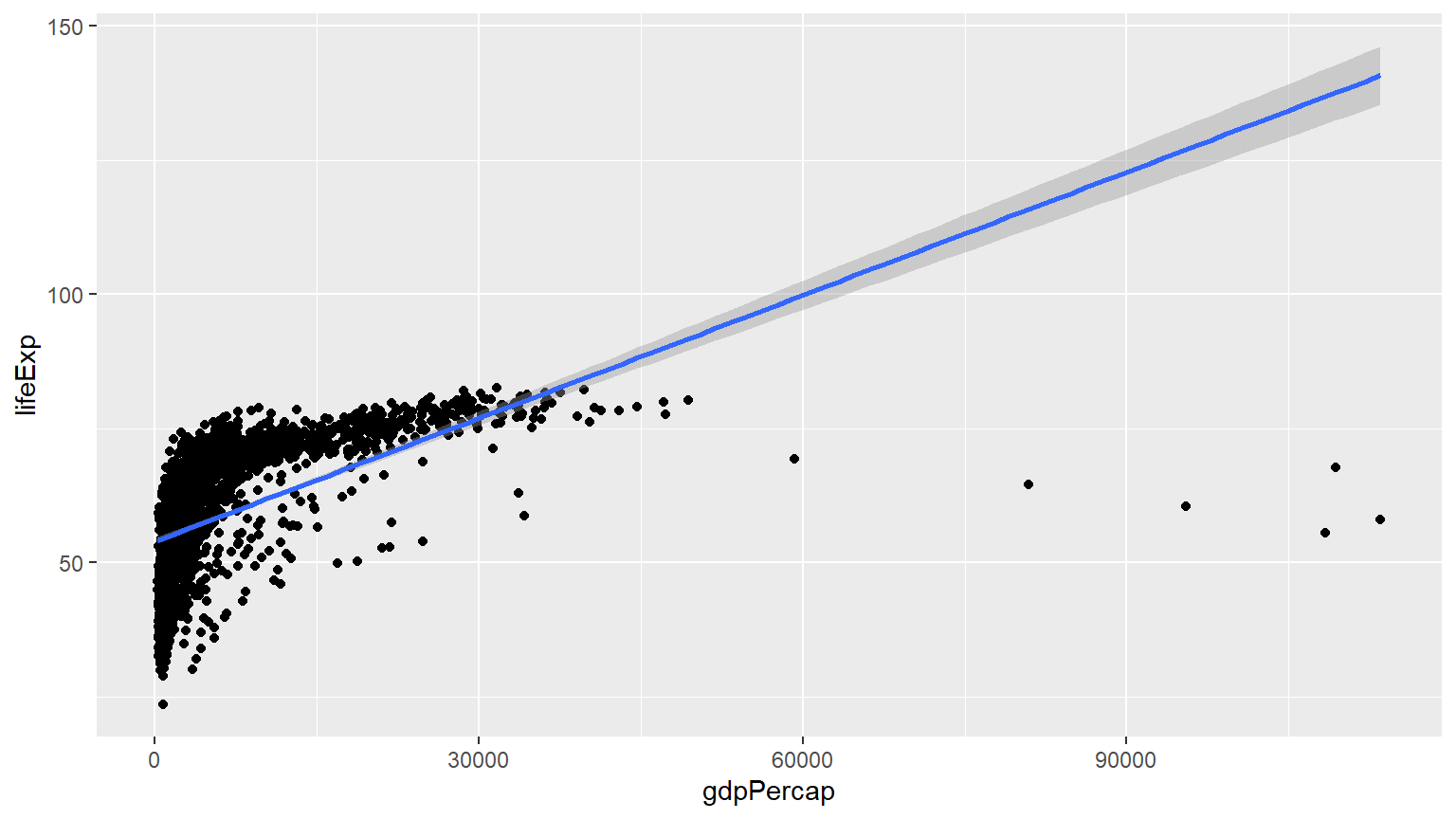
P+geom_point()+geom_smooth(method = "gam")+scale_x_log10()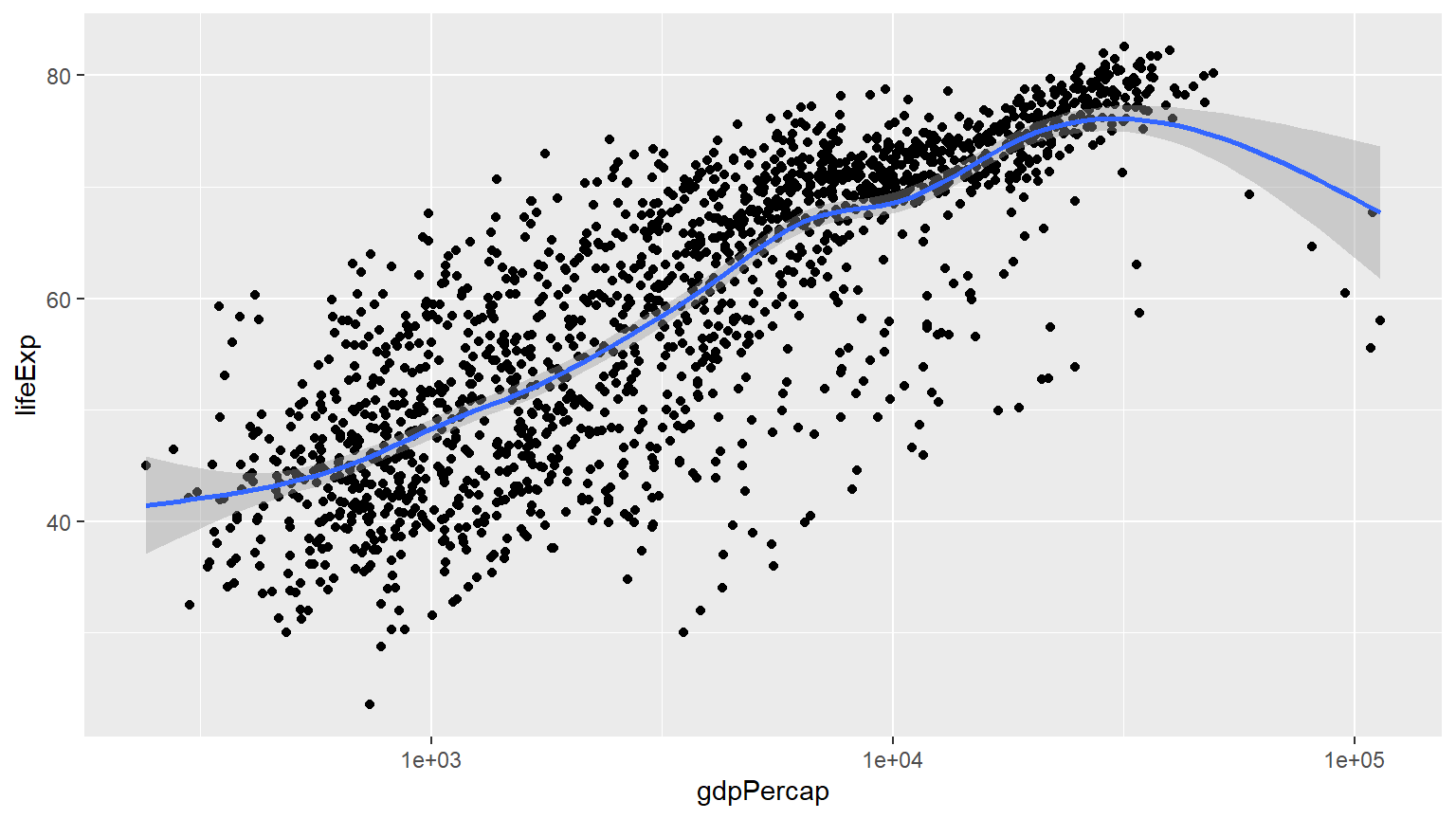
P+geom_point()+geom_smooth(method = "gam")+scale_x_log10(labels=scales::dollar)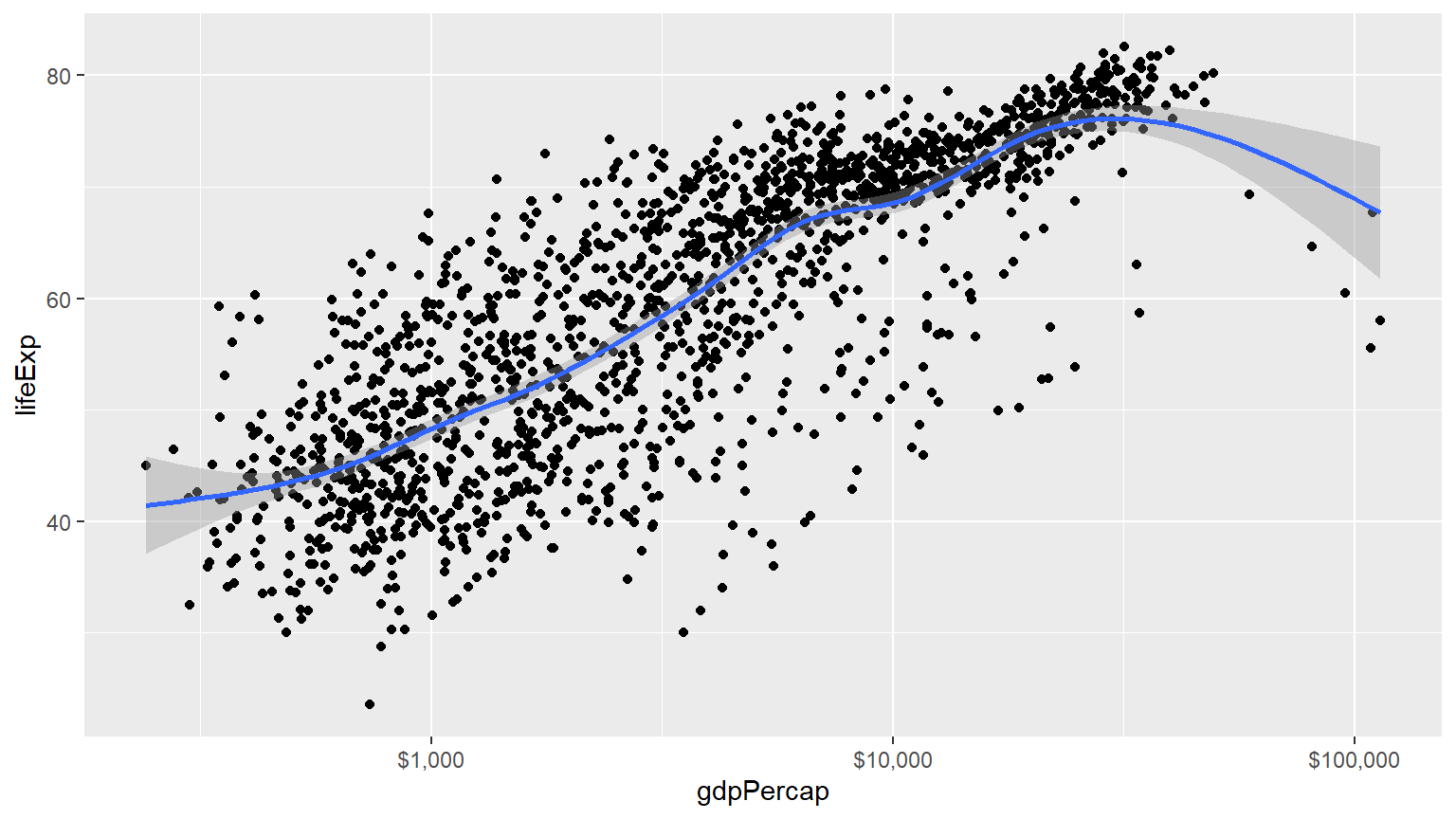
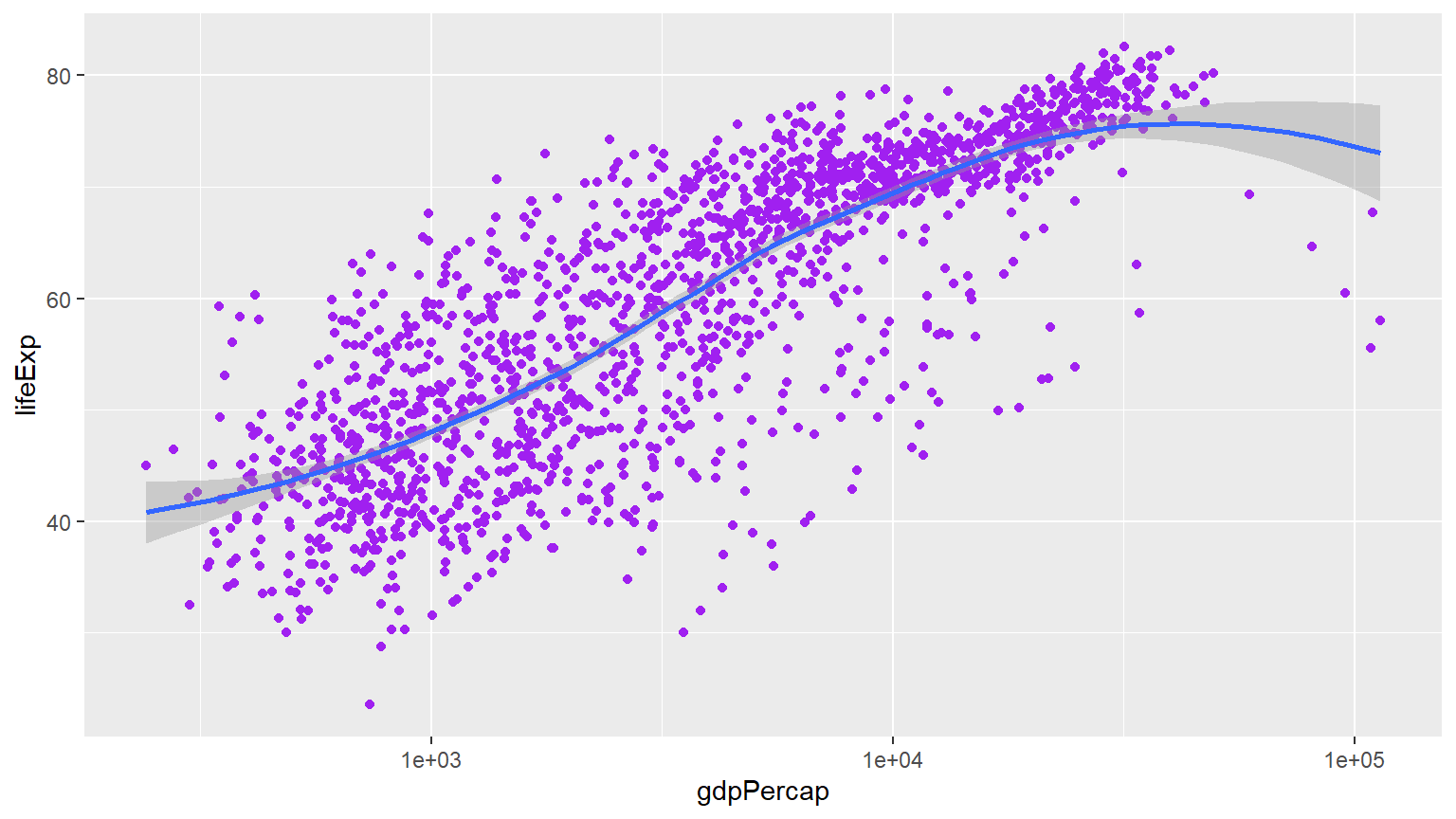
P<-ggplot(data=gapminder,mapping = aes(gdpPercap,y=lifeExp,color="purple"))
P+geom_point()+geom_smooth(method = "loess")+scale_x_log10()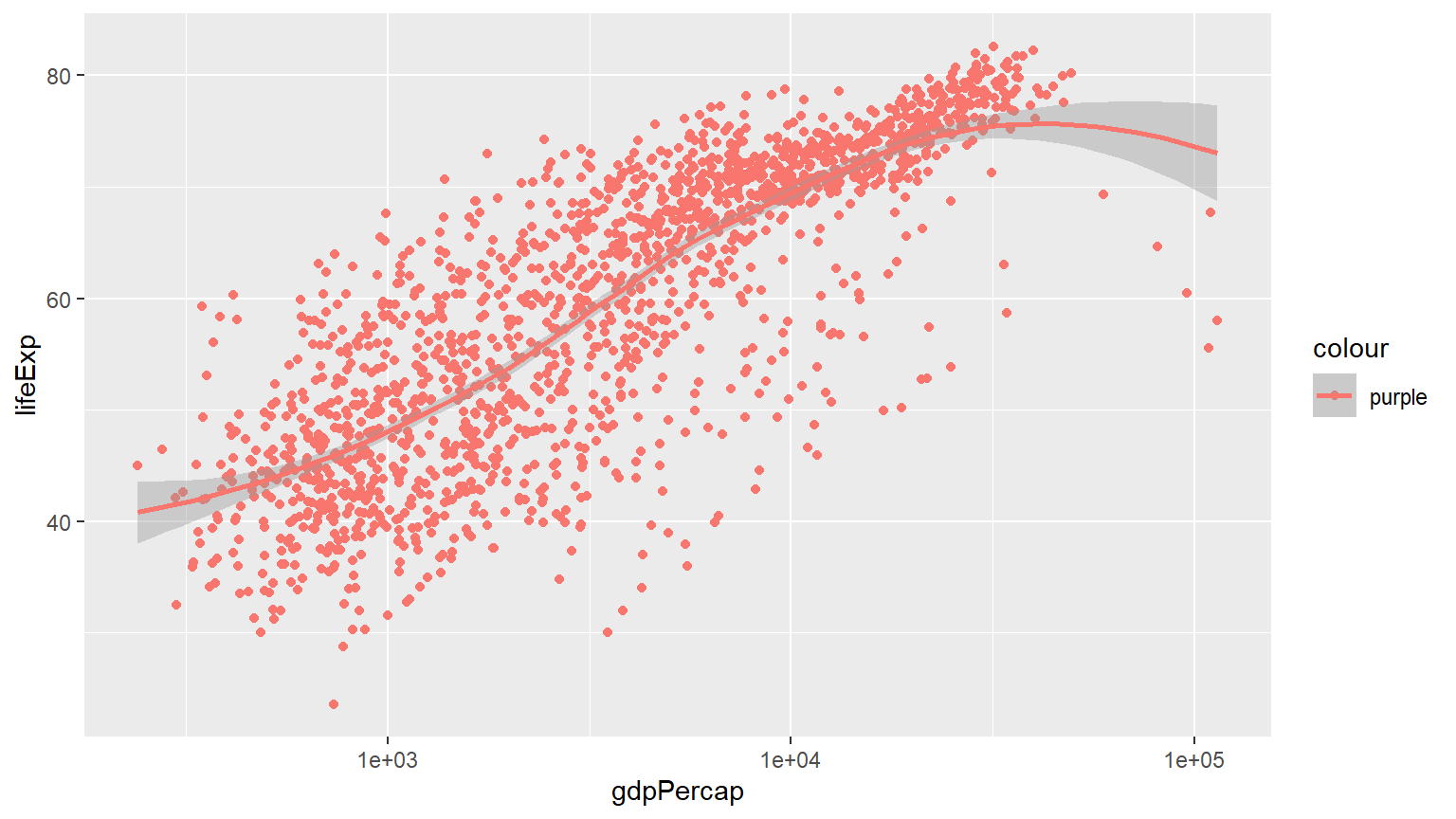
With proper title
P<-ggplot(data=gapminder,mapping = aes(gdpPercap,y=lifeExp))
P+geom_point(alpha=0.3)+
  geom_smooth(method = "gam")+
  scale_x_log10(labels=scales::dollar)+
  labs(x = "GDP Per Capita", y = "Life Expectancy in Years",
       title = "Economic Growth and Life Expectancy",
       subtitle = "Data points are country-years",
       caption = "Source: Gapminder.")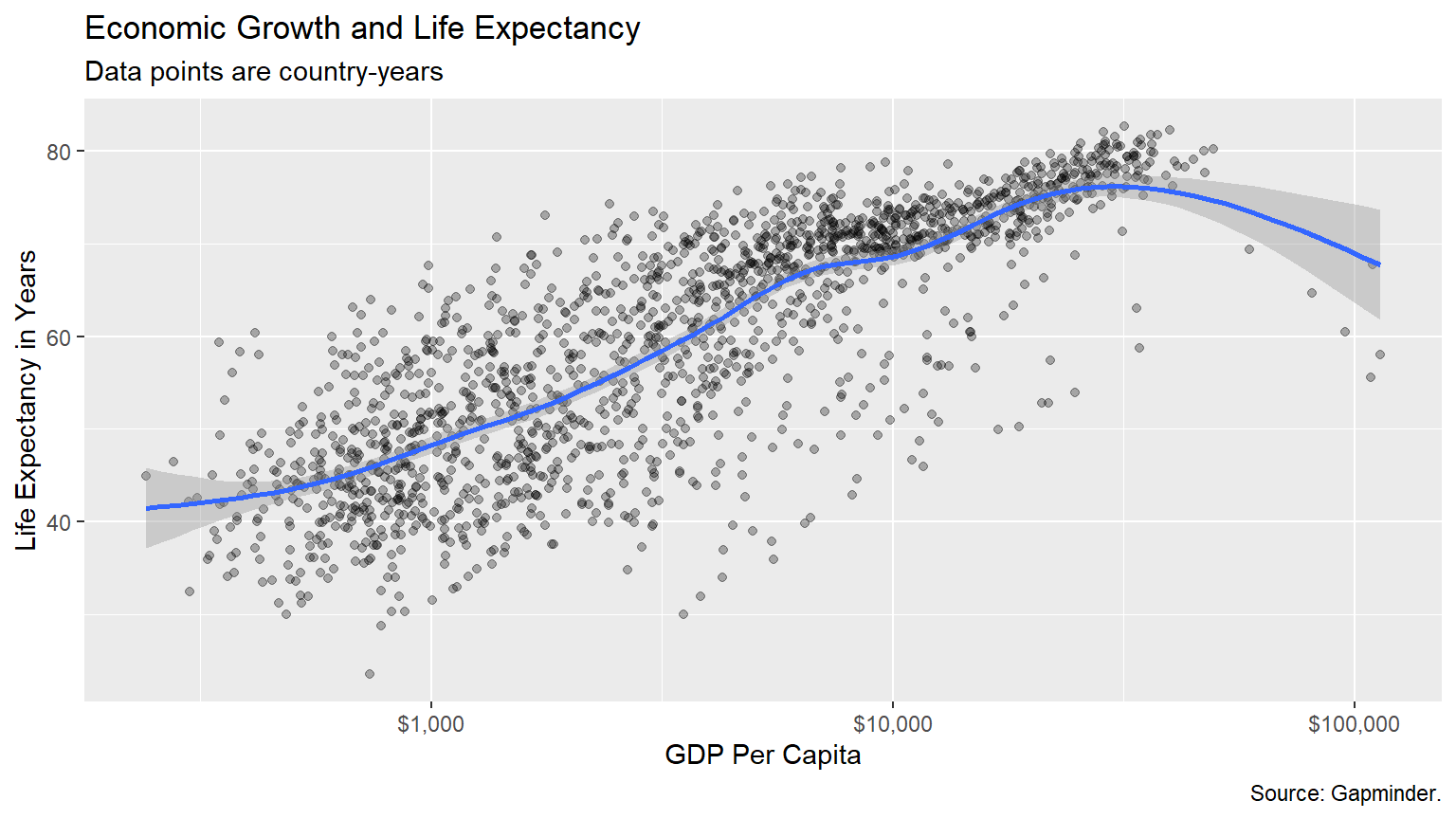
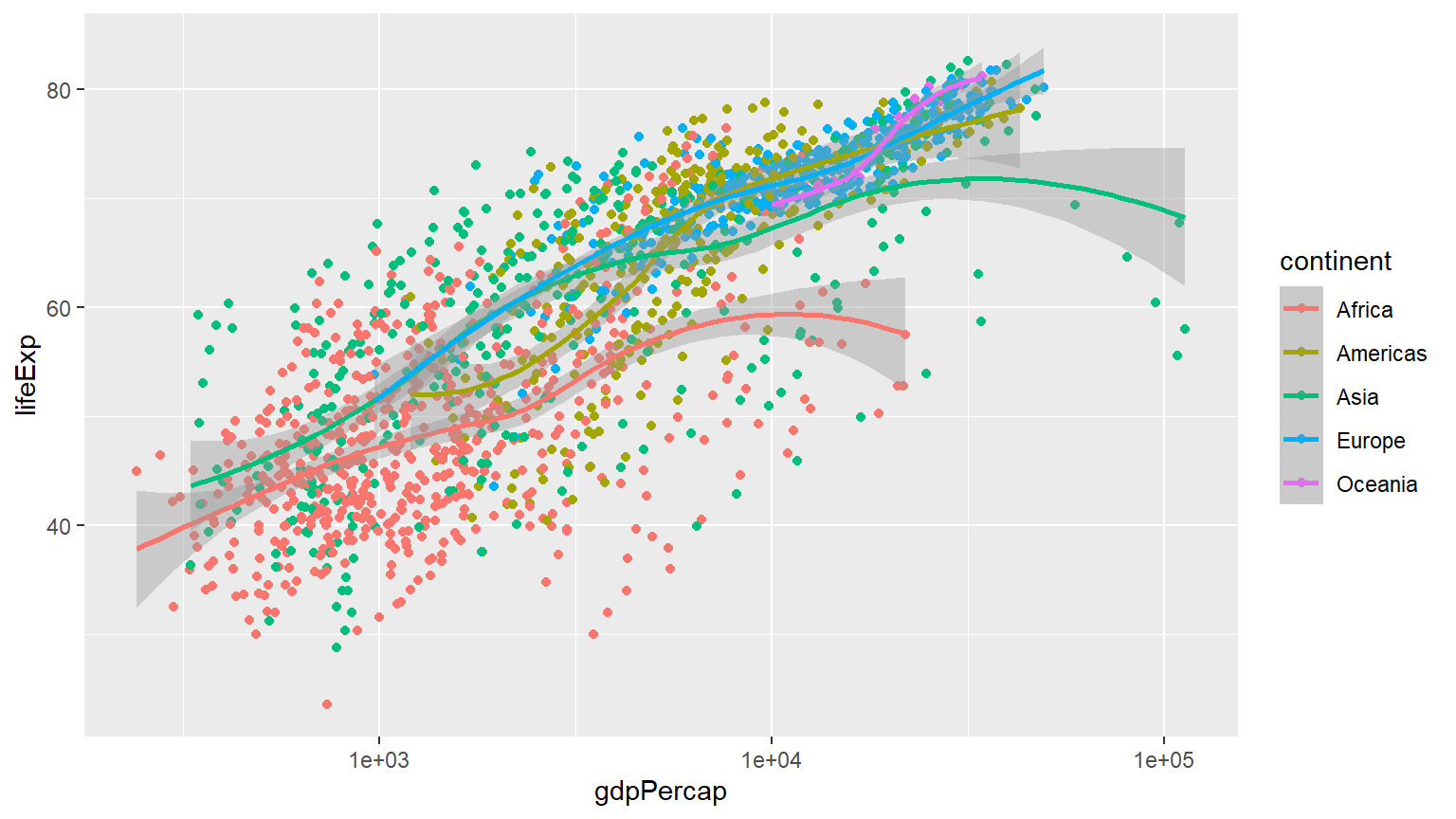
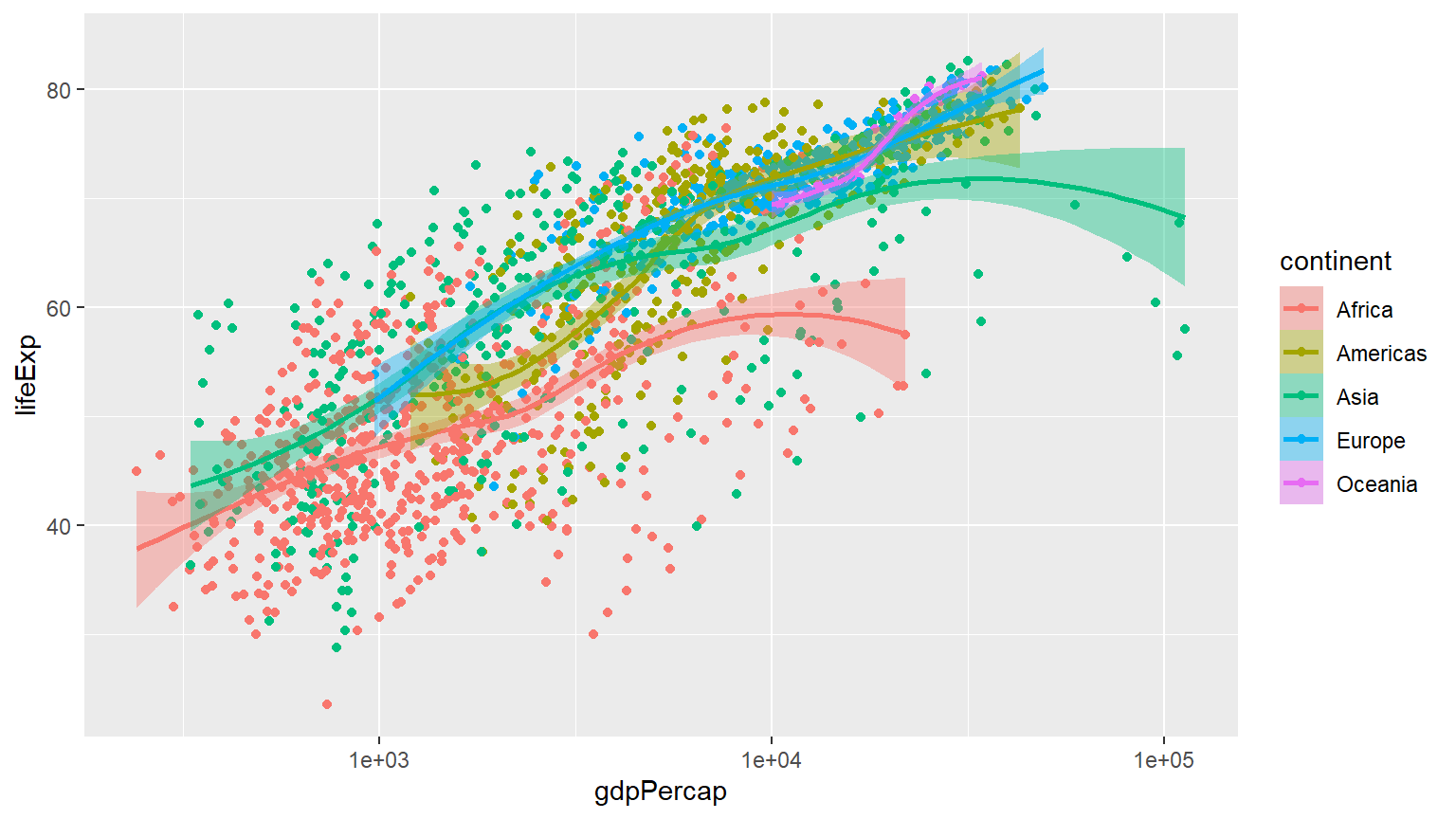
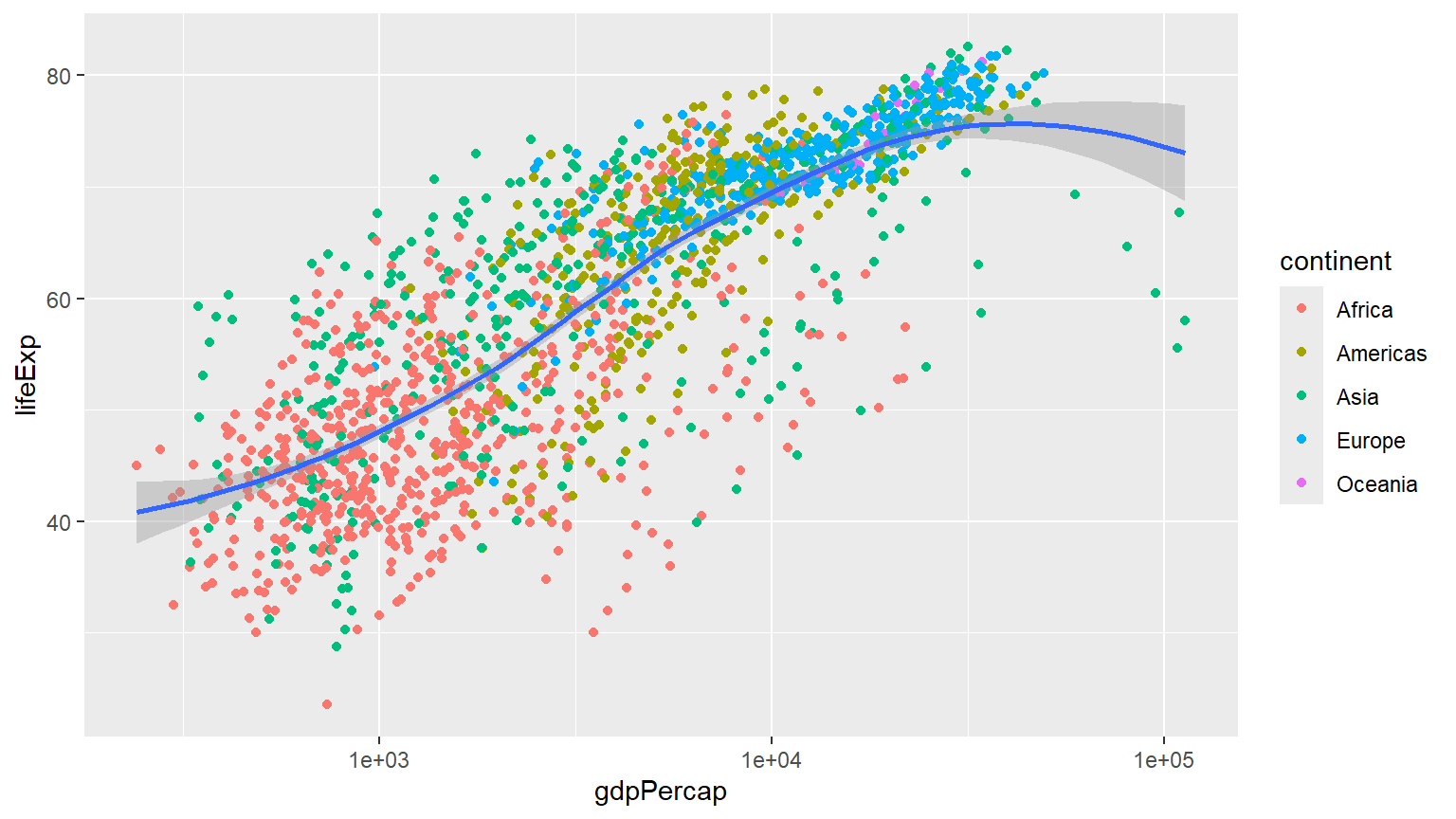
p + geom_point(mapping = aes(color = log(pop))) +
scale_x_log10() 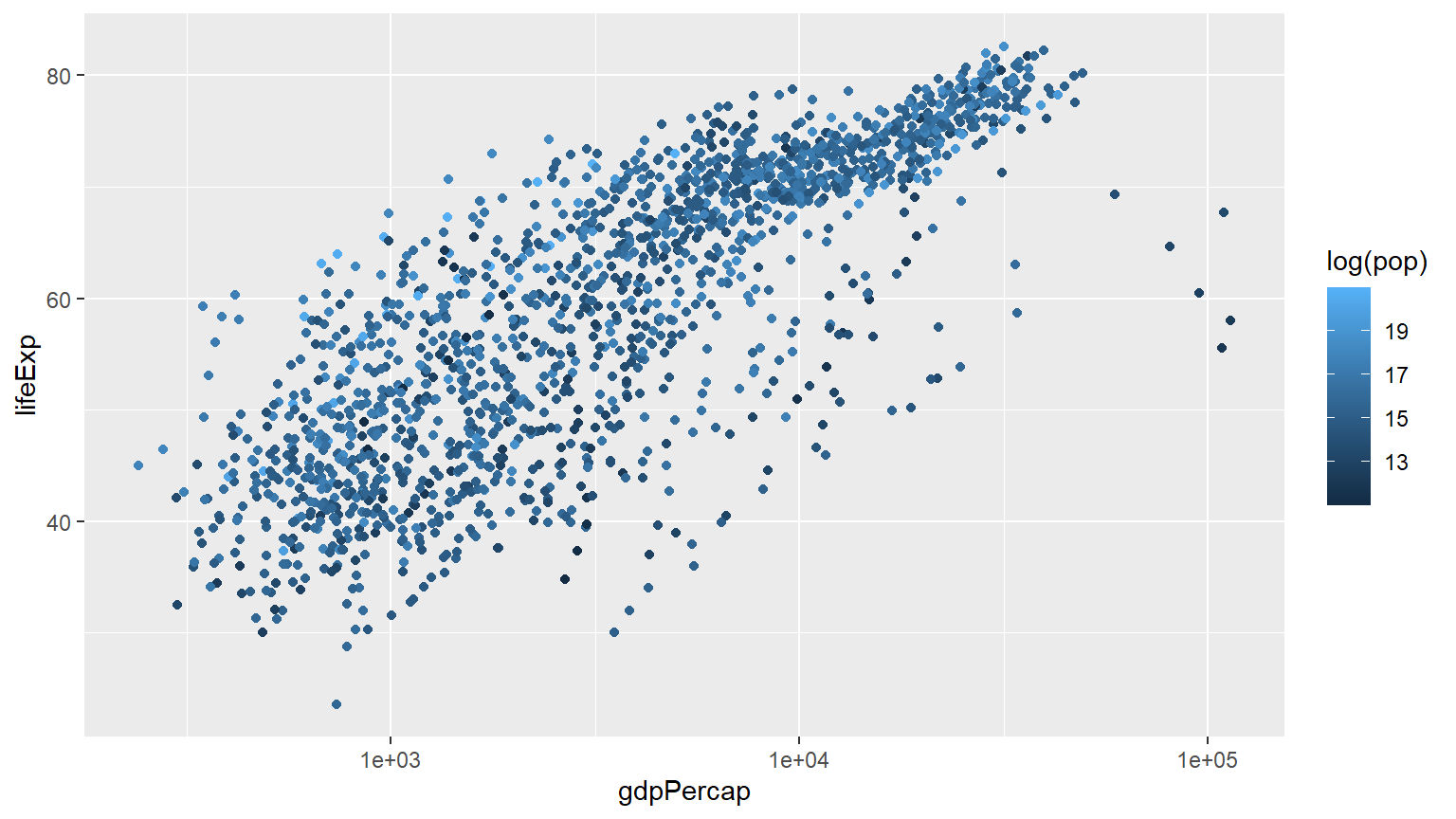
Comparison of 2007 vs 1952 continentwise
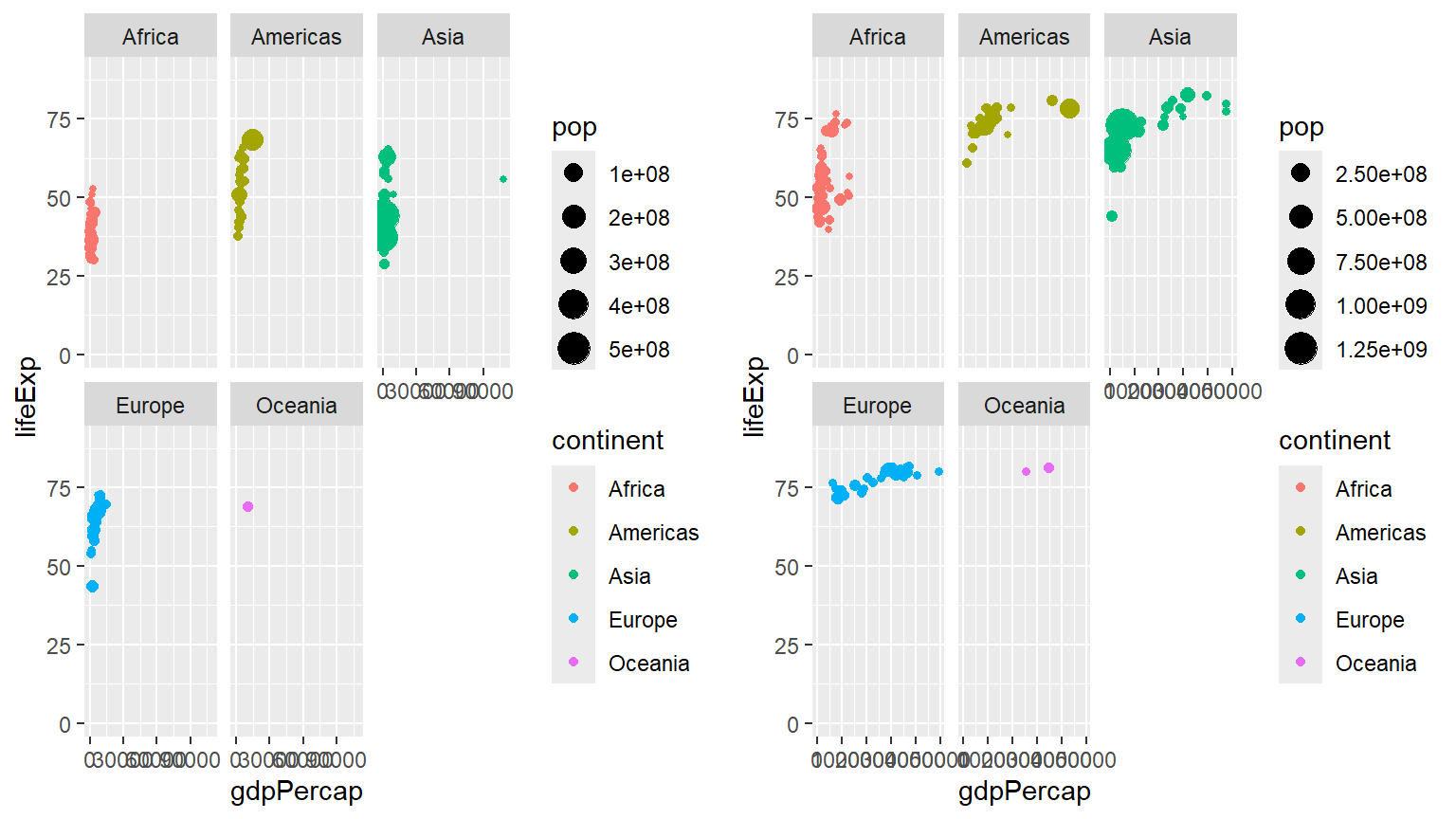
p1+labs(x = "GDP Per Capita", y = "Life Expectancy in Years",
       title = "Economic Growth and Life Expectancy",
       subtitle = "Data points are country-years",
       caption = "Source: Gapminder.")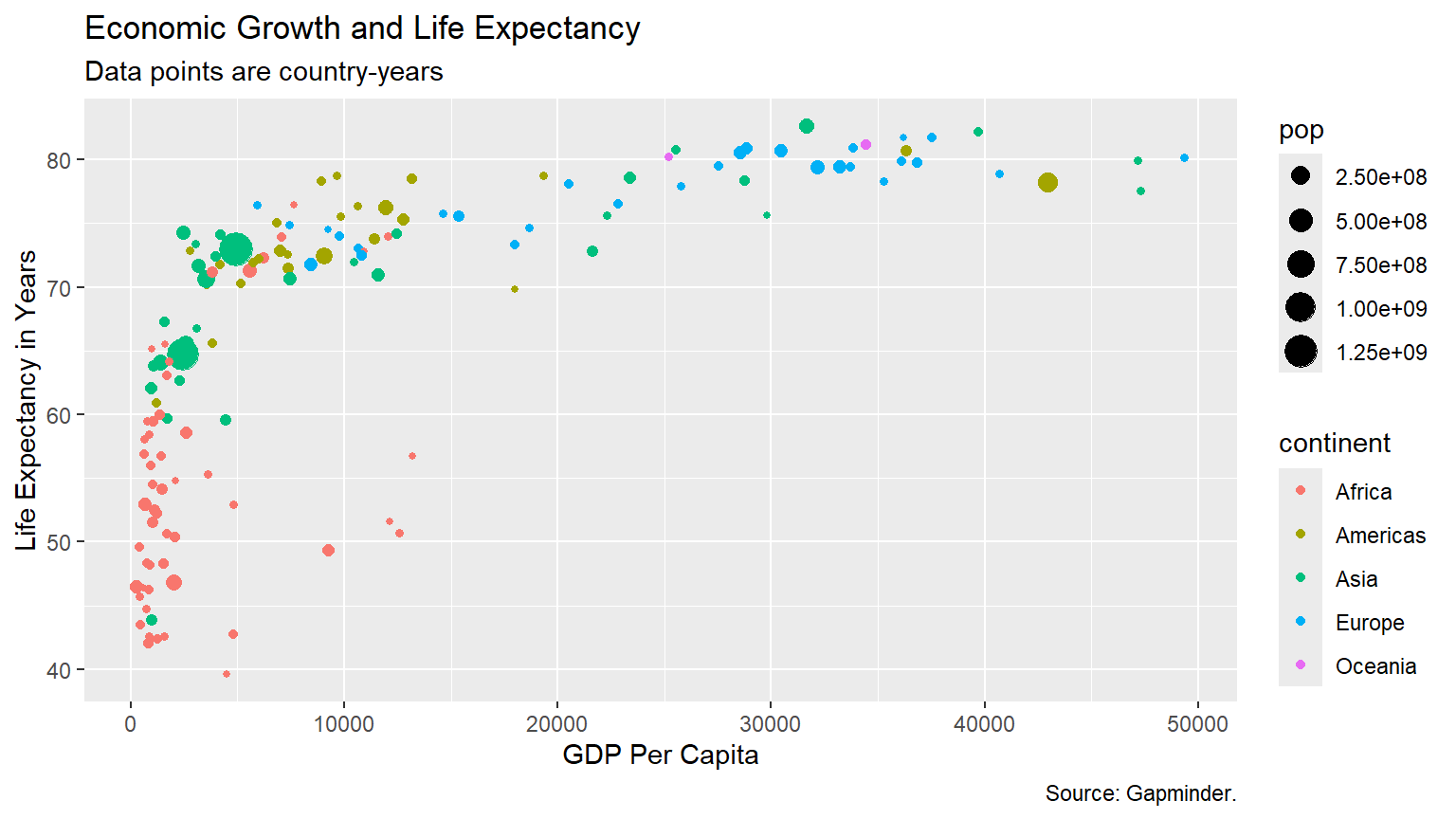
gapminder |>
  select(-pop, -gdpPercap) |>
  filter(year == 2007) |>
  group_by(continent) |>
  summarise(median_life_exp =
              median(lifeExp)) |>
  ggplot() +
  aes(x = continent) +
  aes(y = median_life_exp) +
  geom_point(color = "blue", size = 3,
             alpha = .4) +
  scale_y_continuous(limits = c(0,85)) +
  labs(title = "Median life expectency by continent in 2007") +
  labs(subtitle = "Data Source: Gapminder package in R") +
  labs(x = "") +
  labs(y = "Median life expectancy") +
  labs(caption = "Zahid Asghar for 'QM4SSH'") +
  theme_minimal()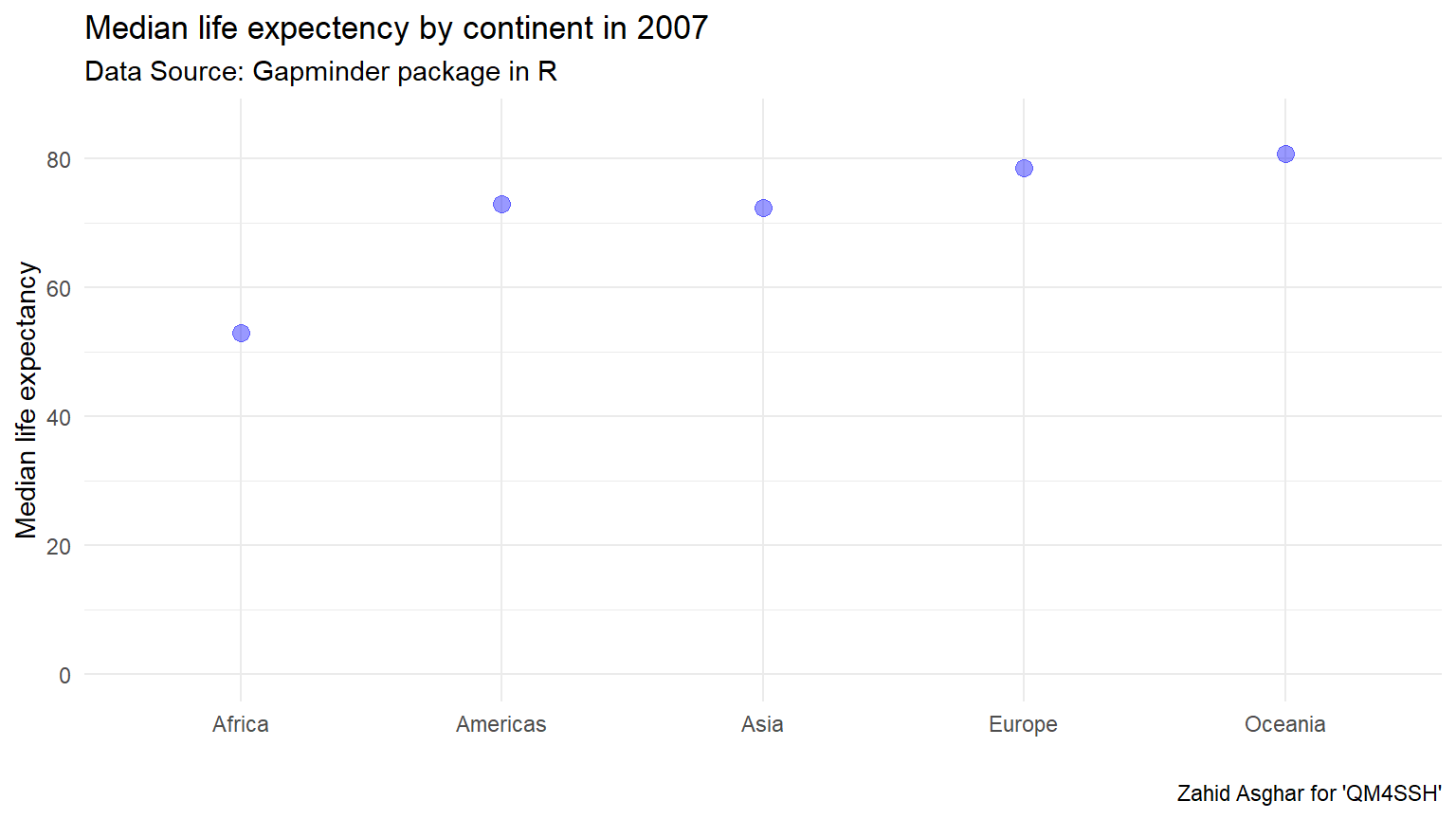
gapminder |>
  filter(year == 1997) |>
  select(country, continent, lifeExp) |>
  mutate(
    life_cats =
      case_when(lifeExp >= 70 ~ "70+",
                lifeExp < 70 ~ "<70")) |>
  ggplot() +
  aes(x = continent, y = life_cats) +
  geom_jitter(width = .25, height = .25)+
  aes(col = continent) +
  scale_color_discrete(guide = FALSE) +
  theme_dark() +
  labs(x = "", y = "") +
  labs(title = "Life expectency beyond 70 in 1997")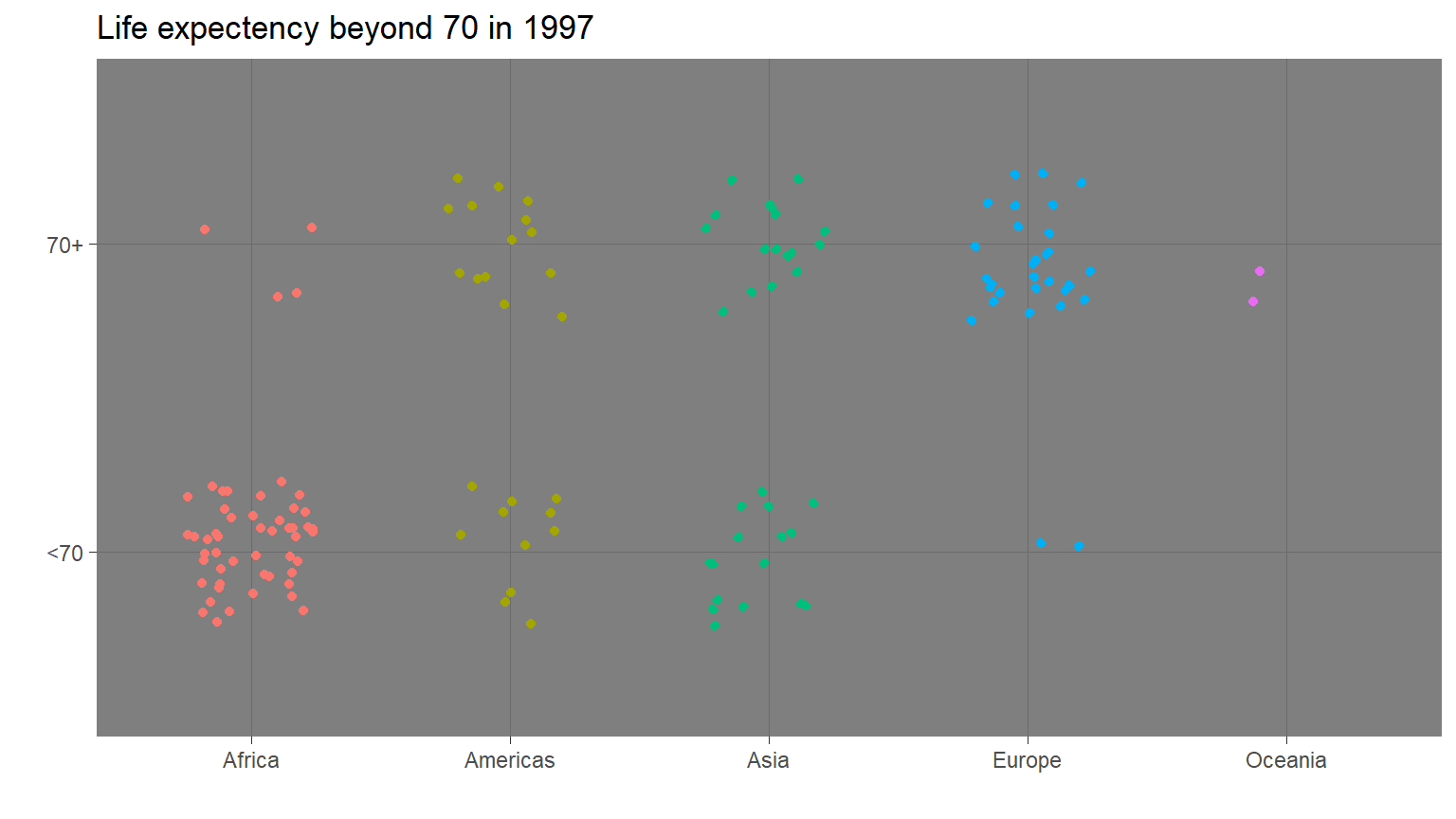
gapminder |>
  mutate(gdp_billions =
           gdpPercap *
           pop/1000000000) |>
  ggplot() +
  aes(x = year) +
  aes(y = gdp_billions) +
  geom_line() +
  aes(group = country) +
  scale_y_log10() +
  aes(col = continent) +
  facet_wrap( ~ continent) +
  scale_color_discrete(guide = F) +
  theme_minimal()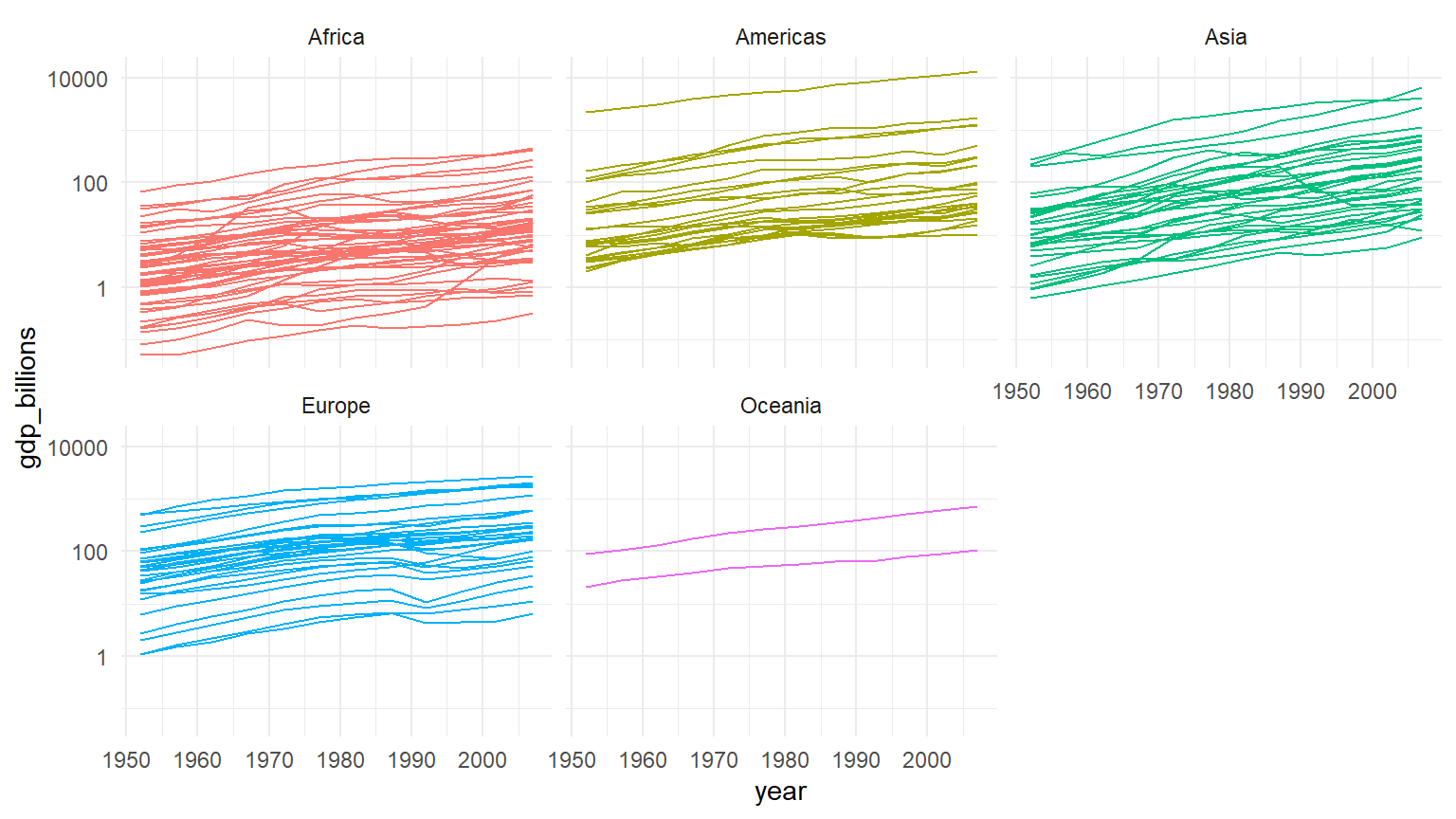
gapminder |>
  filter(year == 2007) |>
  ggplot() +
  aes(x = continent, y = lifeExp) +
  geom_boxplot() +
  geom_jitter(height = 0, width = .2) +
  stat_summary(fun.y = mean,
               geom = "point",
               col = "goldenrod3",
               size = 5)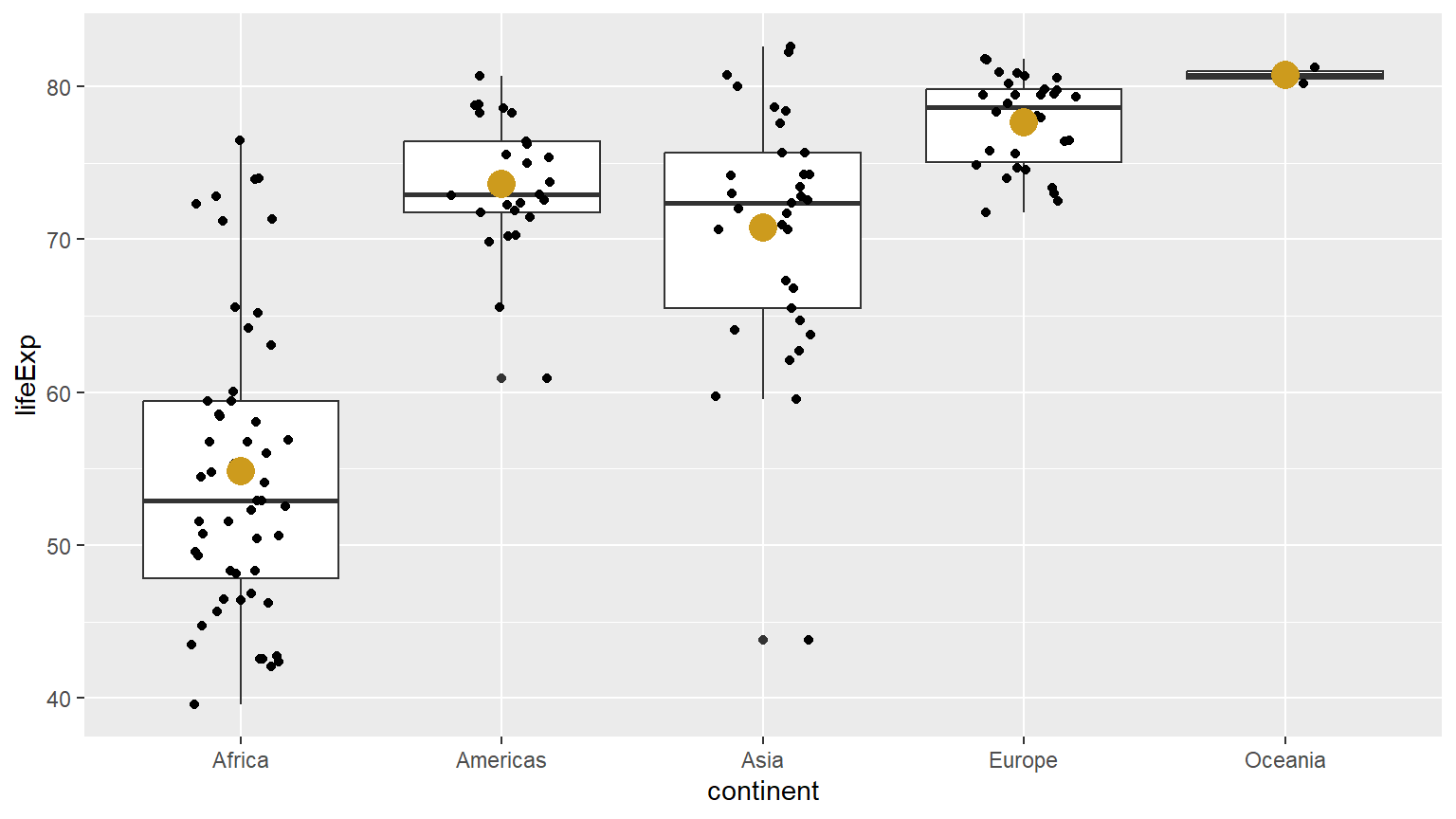
Pakistan
gapminder |>
  filter(country == "Pakistan") |>
  ggplot() +
  aes(x = year, y = lifeExp) +
  geom_point() +
  geom_line() +
  aes(alpha = year) +
  aes(col = year) +
  scale_color_viridis_c() +
  theme_classic()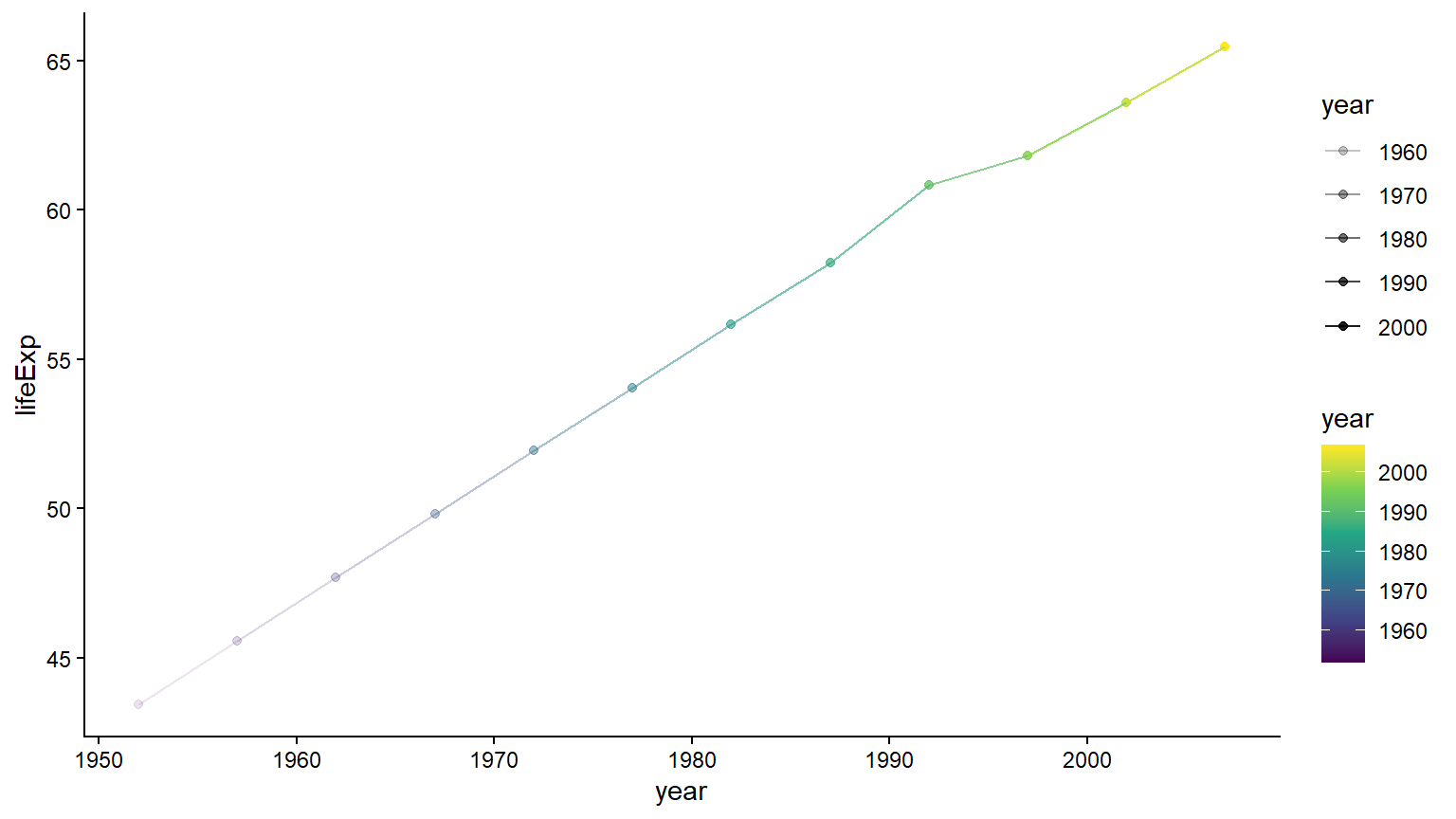
gapminder |>
  filter(year == 2007) |>
  ggplot() +
  aes(x = gdpPercap) +
  aes(y = lifeExp) +
  geom_point(alpha = .5) +
  geom_rug(size = 1) +
  aes(col = continent) +
  aes(col = lifeExp) +
  scale_x_log10() +
  aes(size = gdpPercap) +
  aes(size = pop) +
  geom_point(col = "darkgreen", size = 1) +
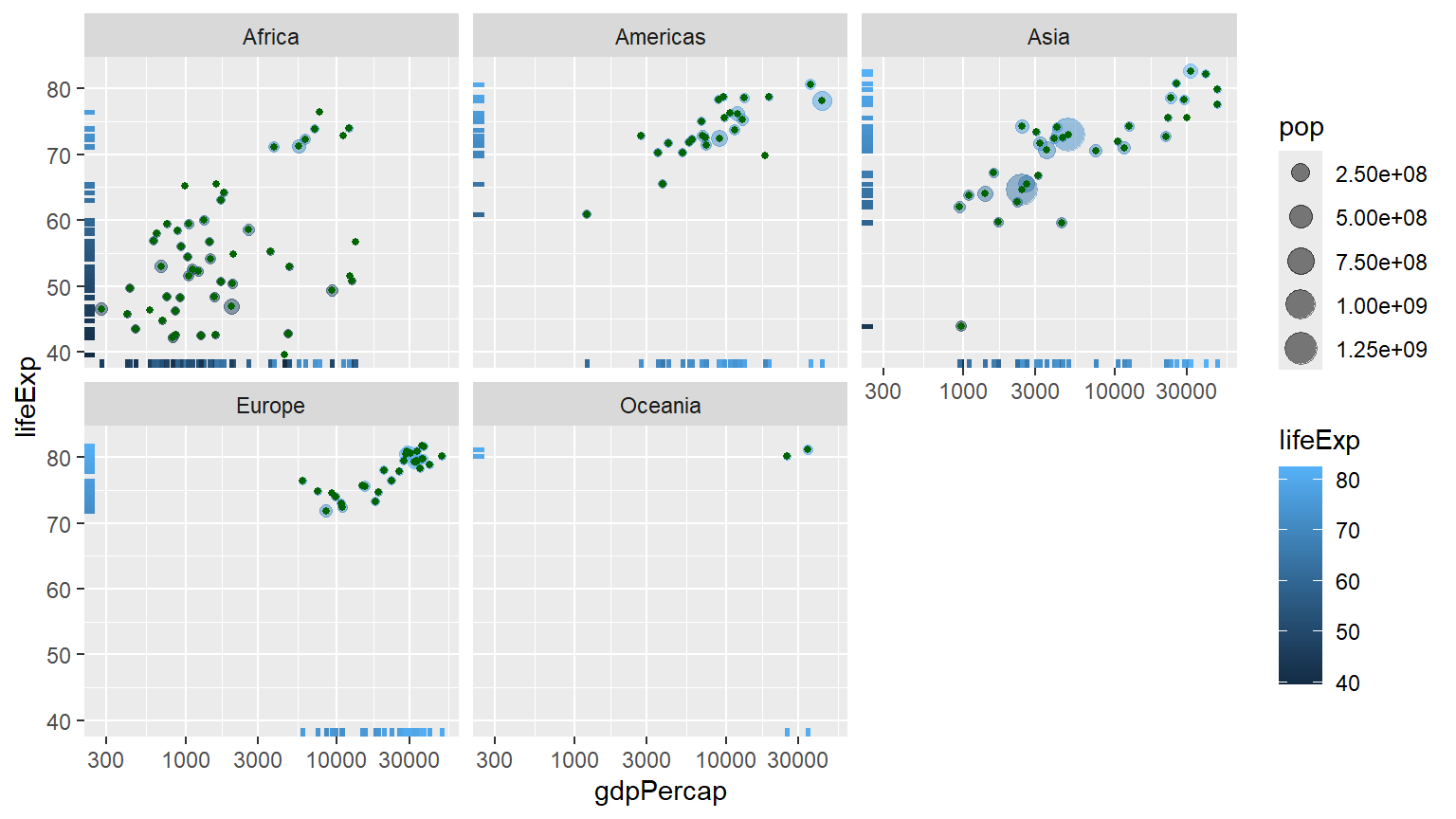
  facet_wrap(~ continent)