Stationary and Nonstationary Series

Macroeconomic Forecasting Lecture

Author
Published

September 12, 2026

1 Properties of Time Series

1.1 Outline

1.1.1 Part 1: Stationary Processes

  • Identification
  • Estimation & Model Selection
  • Putting it all together

1.1.2 Part 2: Nonstationary Processes

  • Characterization
  • Testing

1.2 Univariate Analysis

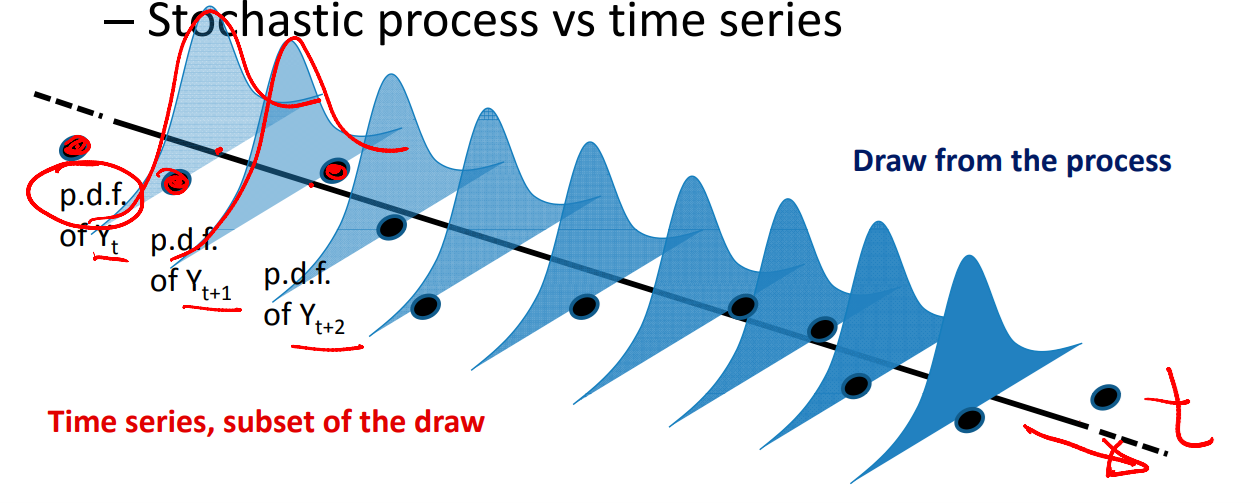
Each distribution is a draw from a random process.

1.3 Strong Stationarity

  • Strong stationarity vs weak stationarity (covariance stationarity)
    • Strong stationarity:
      • Same distribution over time
      • Same covariance structure over time
      • But it’s only a theoretical concept. In practice, we use covariance stationarity.
    • Covariance stationary:
      • Unconditional mean \(E(Y_t)=E(Y_{t+j})=\mu\)
      • Variance constant \(Var(Y_t)=Var(Y_{t+j})=\sigma^2_y\)
      • Covariance depends on time j that has elapsed between observations, not on reference period \(Cov(Y_t,Y_{t+j})=Cov(Y_s,Y_{s+j})=\gamma_j\)

2 Part 1: Stationary Process

Just to remind you… - Identification - Estimation & Model Selection - Putting it all together

The first step is visual inspection: graph and observe your data.

“You can observe a lot just by watching” — Yogi Berra

2.1 Plot Your Data

# Load necessary libraries
library(tidyverse)
library(forecast)
library(ggplot2)

# Set parameters
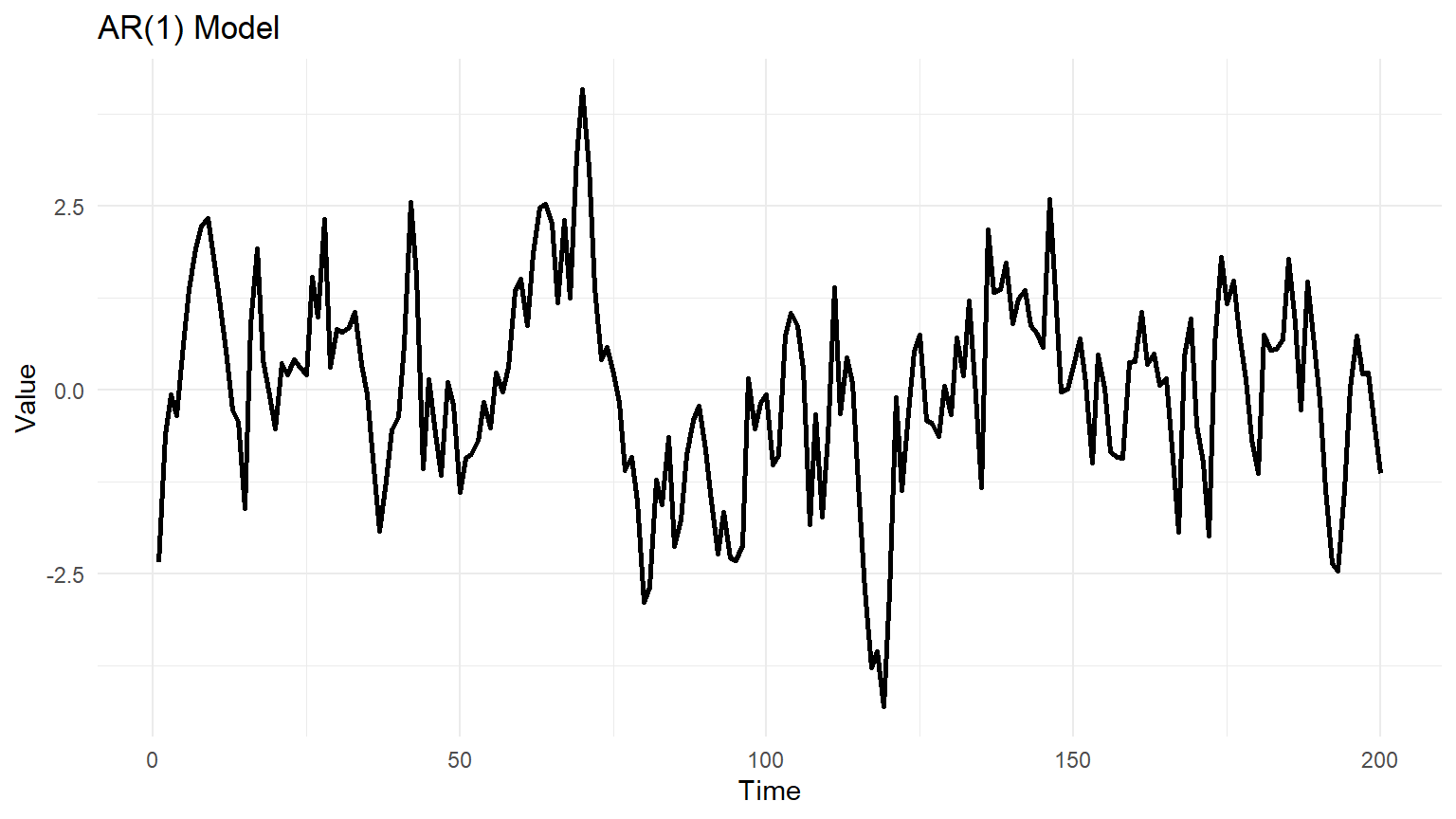
phi <- 0.8  
n <- 200    

# Simulate AR(1) data
set.seed(123)
ar1_data <- arima.sim(model = list(ar = phi), n = n)

# Create a time series plot
ggplot(data.frame(Time = 1:n, Value = ar1_data), aes(x = Time, y = Value)) +
  geom_line(linewidth=1) +
  labs(title = "AR(1) Model", x = "Time", y = "Value") +
  theme_minimal()


2.2 Differenced Model of a Trend Variable

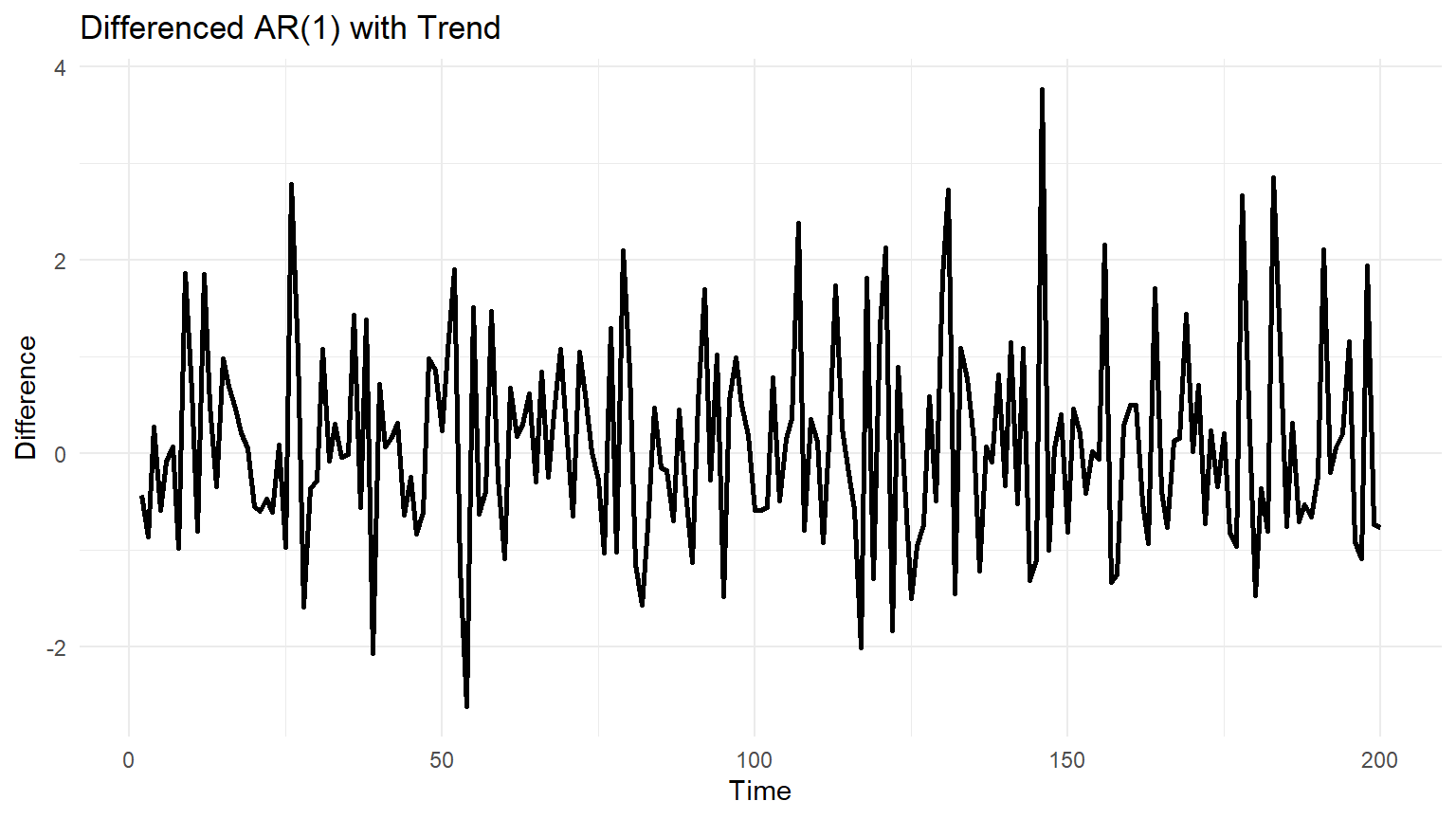
Differencing can remove a trend:

\[ y_t^{*} = y_t - y_{t-1} \]

# Simulate AR(1) data with trend
set.seed(123)
beta <- 0.1
n <- 200
ar1_trend_data <- arima.sim(model = list(order = c(1, 0, 0), ar = 0.7), n = n) + beta * (1:n)

# Compute first difference
differences <- diff(ar1_trend_data)

# Plot the differenced series
ggplot(data.frame(Time = 2:n, Difference = differences), aes(x = Time, y = Difference)) +
  geom_line(linewidth=1) +
  labs(title = "Differenced AR(1) with Trend", x = "Time", y = "Difference") +
  theme_minimal()


2.3 Identification

The three basic models of interest: - Autoregressive (AR): \(y_t = a + b_1 y_{t-1} + b_2 y_{t-2} + \dots + b_p y_{t-p} + \epsilon_t\) - Moving Average (MA): \(y_t = \mu + \phi_1 \epsilon_{t-1} + \dots + \phi_q \epsilon_{t-q} + \epsilon_t\) - ARMA (Autoregressive Moving Average): Combination of both.


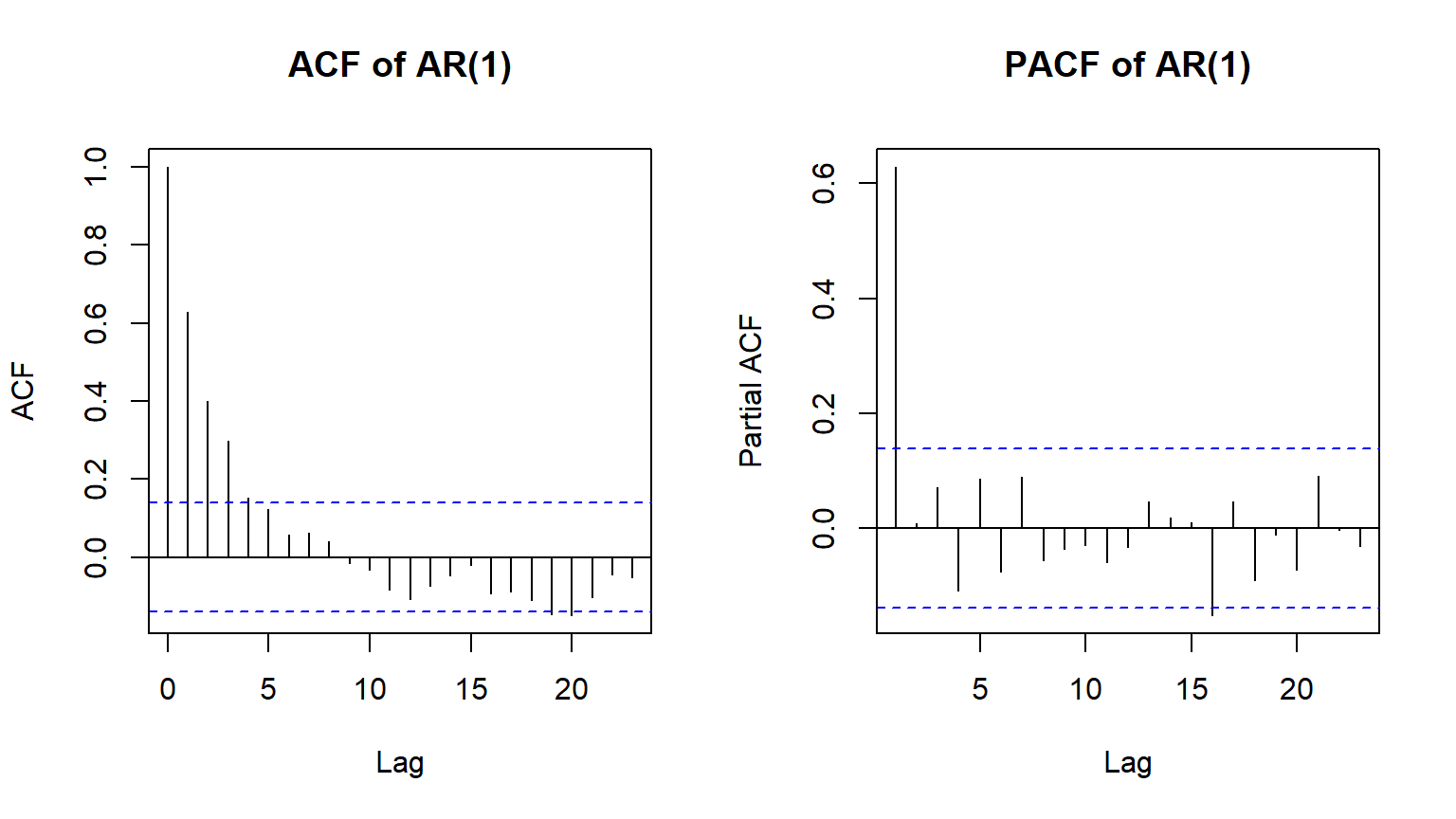
2.4 ACF and PACF for Identification

# Simulate AR(1) time series
set.seed(123)
ar1_data <- arima.sim(model = list(order = c(1, 0, 0), ar = 0.7), n = 200)

# Plot ACF and PACF
par(mfrow = c(1,2))
acf(ar1_data, main = "ACF of AR(1)")
pacf(ar1_data, main = "PACF of AR(1)")


3 Part 2: Nonstationary Series

3.1 What is Nonstationarity?

A nonstationary time series does not have: - A constant mean - A constant variance - Autocorrelations that decay over time

3.2 Simulating a Nonstationary Series

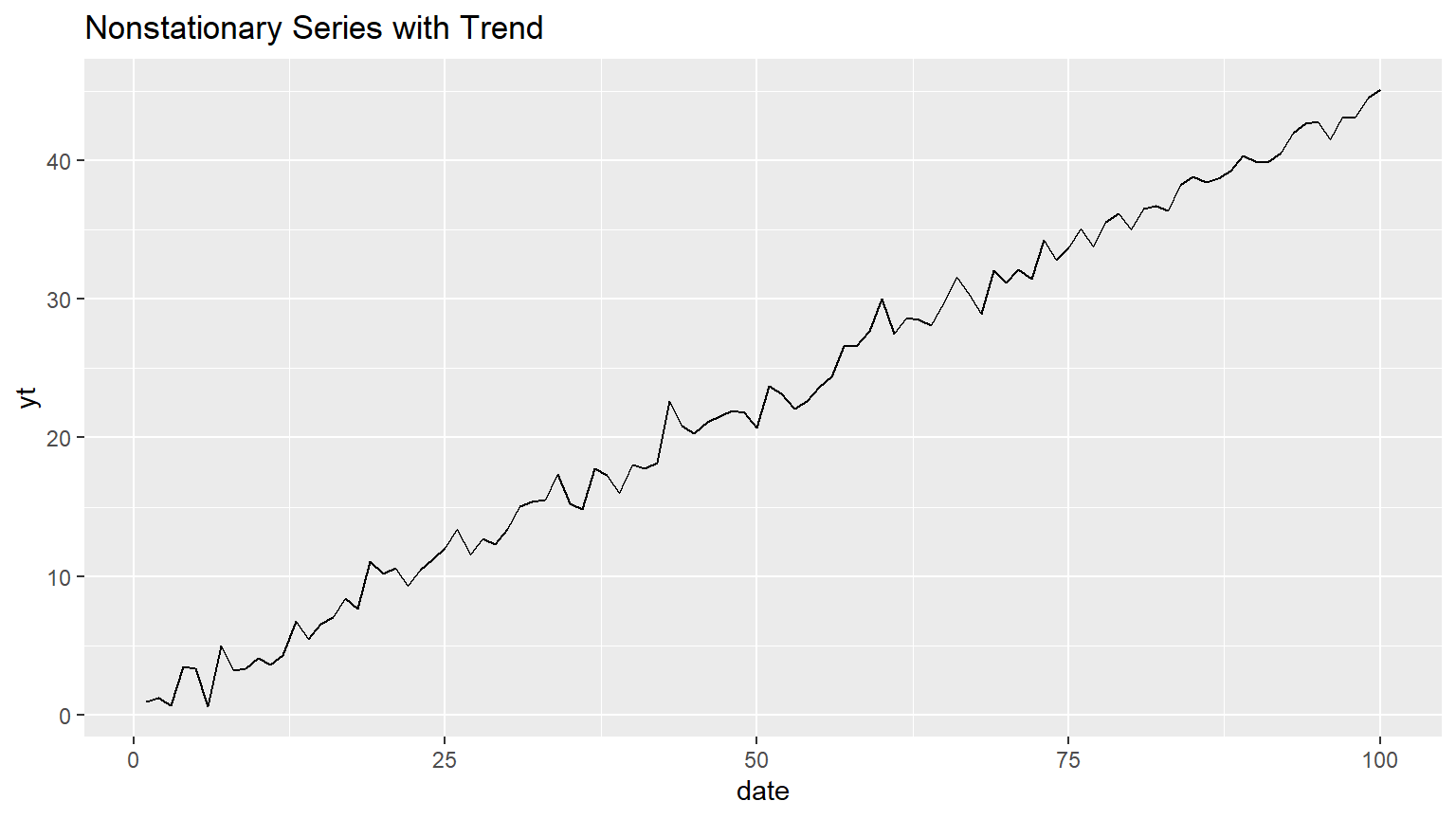
3.2.1 Deterministic Trend Model

set.seed(1269)
date <- ts(c(1:100))
trend <- 0.45 * (1:length(date))
noise <- rnorm(length(date), mean = 0, sd = 1)
yt <- trend + noise

df <- data.frame(date=date, yt=yt)
ggplot(df) + aes(x=date, y=yt) + geom_line() + labs(title = "Nonstationary Series with Trend")


3.3 Checking for Nonstationarity

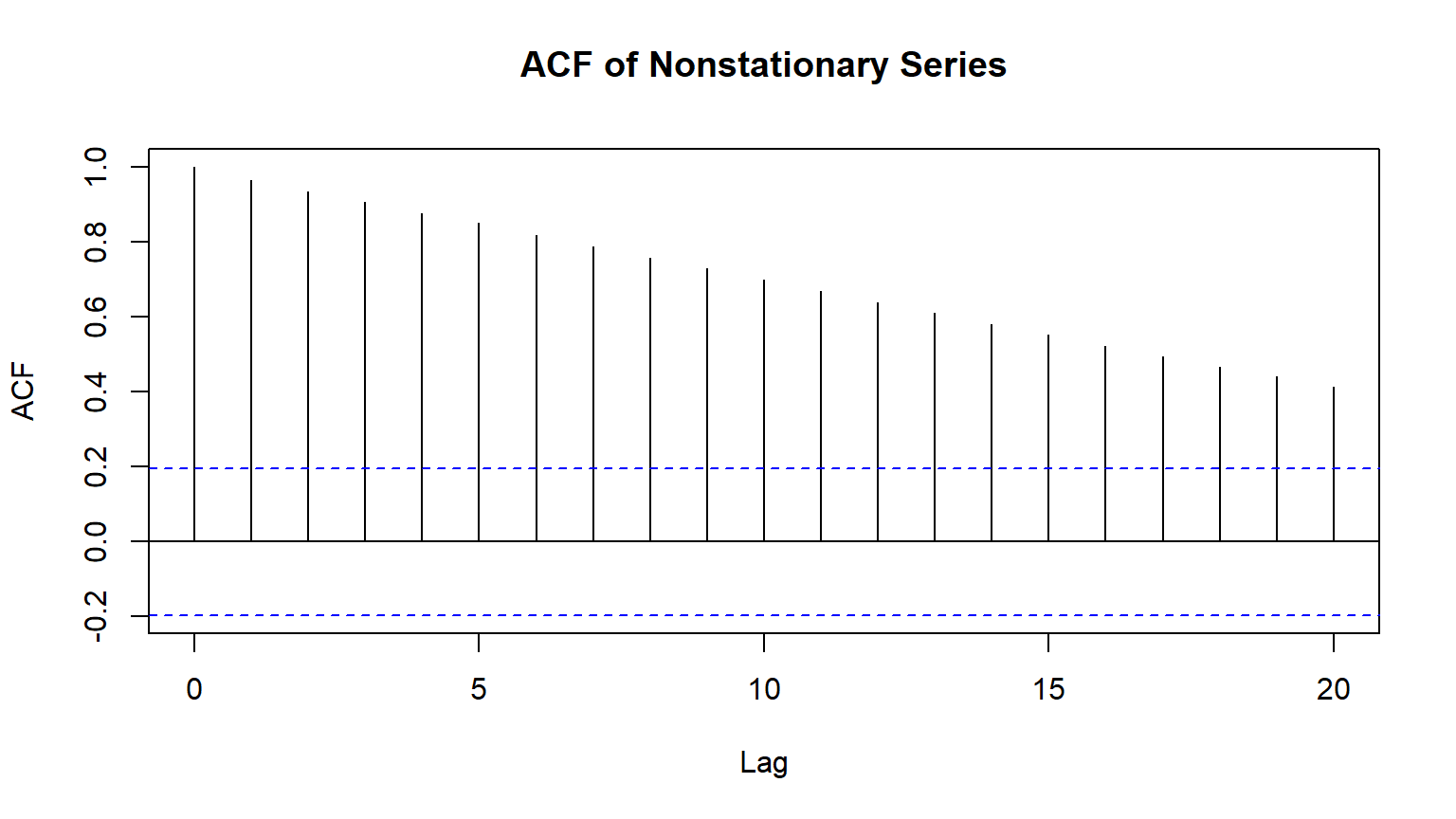
Use Autocorrelation Function (ACF) to check for nonstationarity.

acf(yt, main="ACF of Nonstationary Series")

A slow decay in ACF suggests nonstationarity.


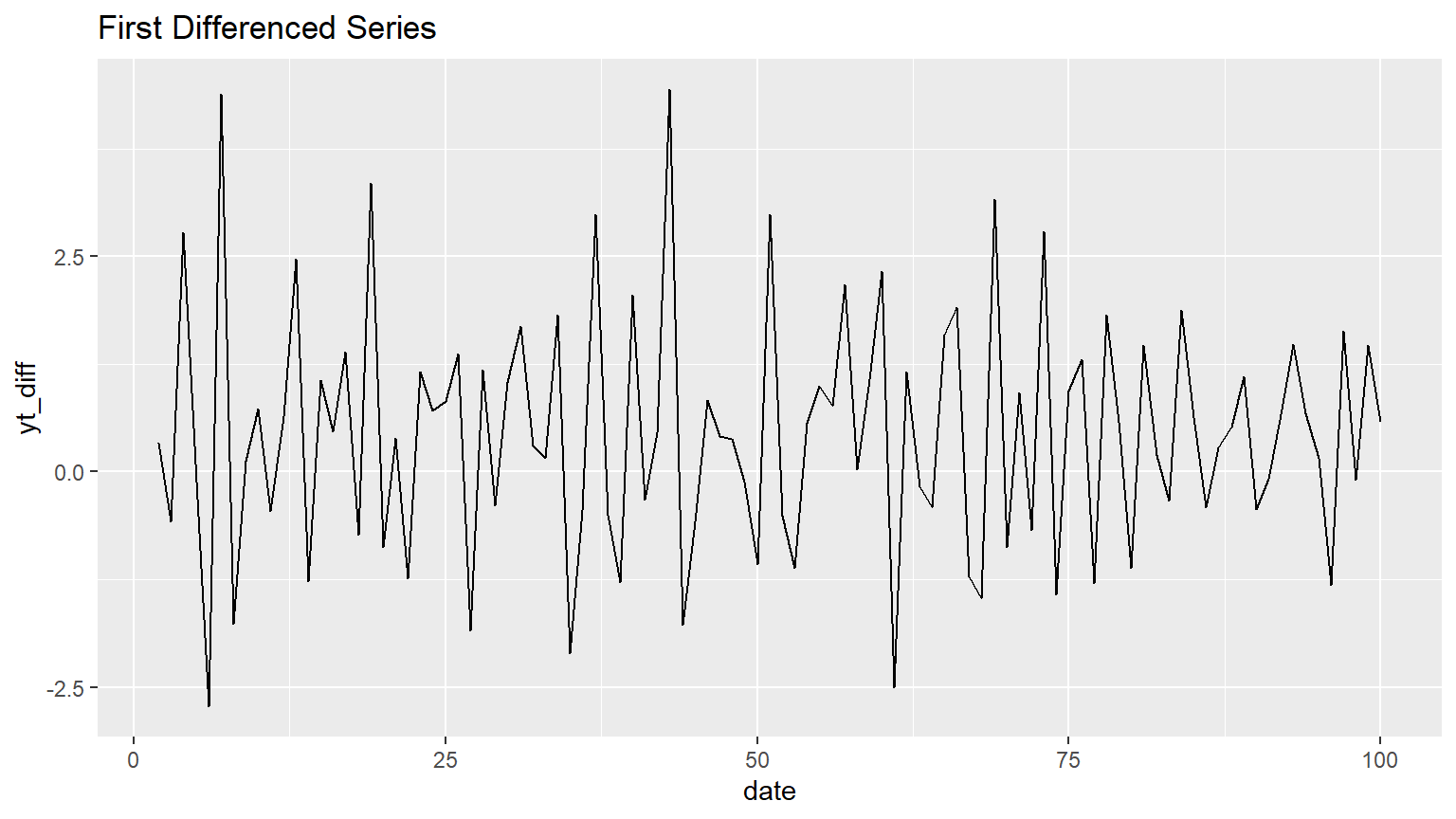
3.4 Differencing the Series

diff_yt <- diff(yt)
ggplot(data.frame(date=2:100, yt_diff=diff_yt)) + 
  aes(x=date, y=yt_diff) + 
  geom_line() + 
  labs(title="First Differenced Series")

Now the series appears stationary.


4 Real-World Example: U.S. Price Earnings Ratio (PE)

4.1 Load and Inspect Data

library(readr)
pe <- read_csv("data/pe.csv")
glimpse(pe)
Rows: 733
Columns: 8
$ dateid01 <date> 1954-02-01, 1954-03-01, 1954-04-01, 1954-05-01, 1954-06-01, …
$ dateid   <dttm> 1954-02-28 23:59:59, 1954-03-31 23:59:59, 1954-04-30 23:59:5…
$ date     <date> 1954-02-26, 1954-03-31, 1954-04-30, 1954-05-31, 1954-06-30, …
$ pe_aus   <dbl> NA, NA, NA, NA, NA, NA, NA, NA, NA, NA, NA, NA, NA, NA, NA, N…
$ pe_ind   <dbl> NA, NA, NA, NA, NA, NA, NA, NA, NA, NA, NA, NA, NA, NA, NA, N…
$ pe_ndo   <dbl> NA, NA, NA, NA, NA, NA, NA, NA, NA, NA, NA, NA, NA, NA, NA, N…
$ pe_saf   <dbl> NA, NA, NA, NA, NA, NA, NA, NA, NA, NA, NA, NA, NA, NA, NA, N…
$ pe_usa   <dbl> 9.9200, 10.1700, 10.5700, 11.0000, 11.0800, 12.1740, 11.7600,…
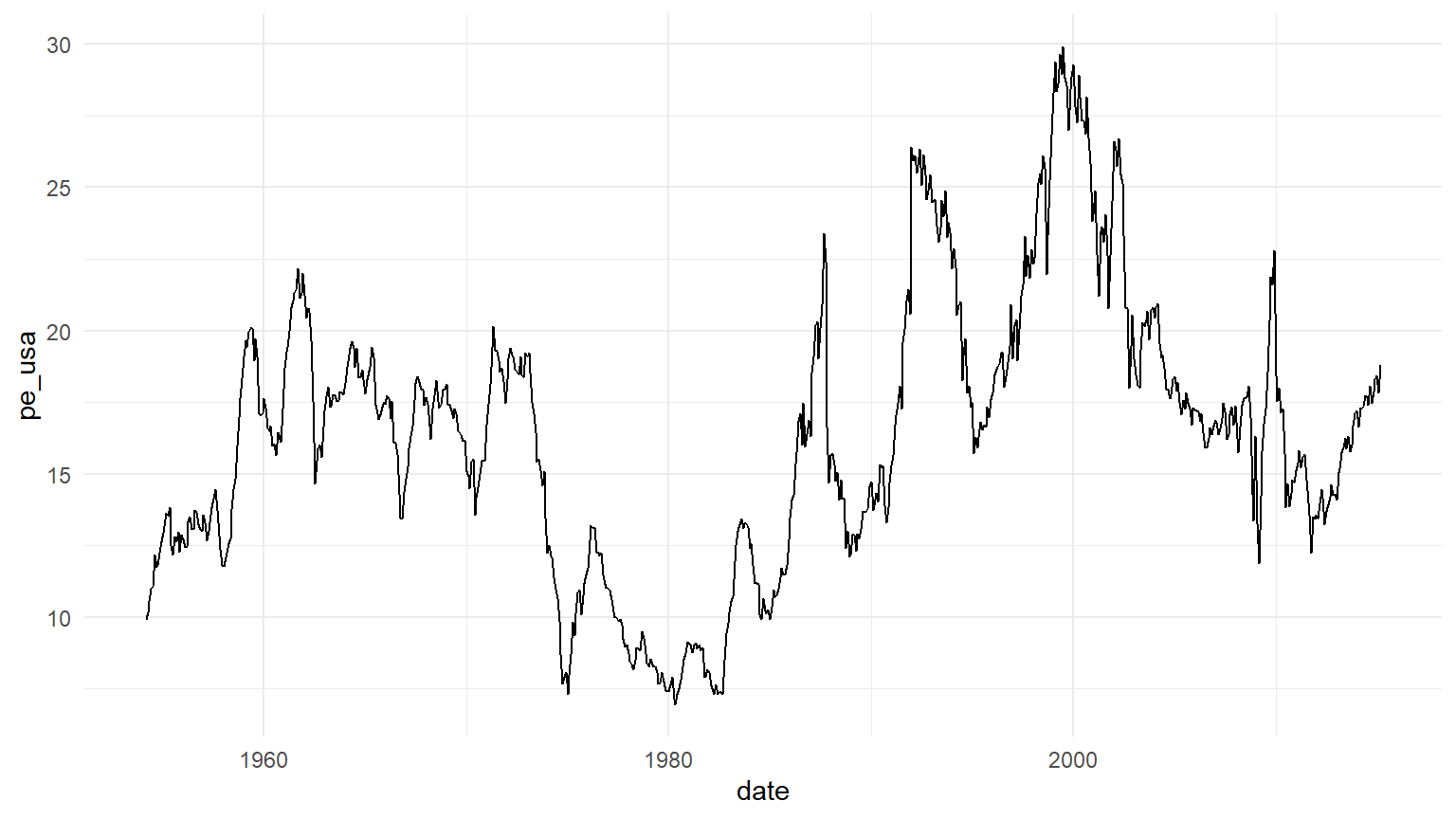
4.2 Plot the U.S. PE Ratio

pe_us <- pe |> select(date, pe_usa)
ggplot(pe_us, aes(x=date, y=pe_usa)) + geom_line() + theme_minimal()

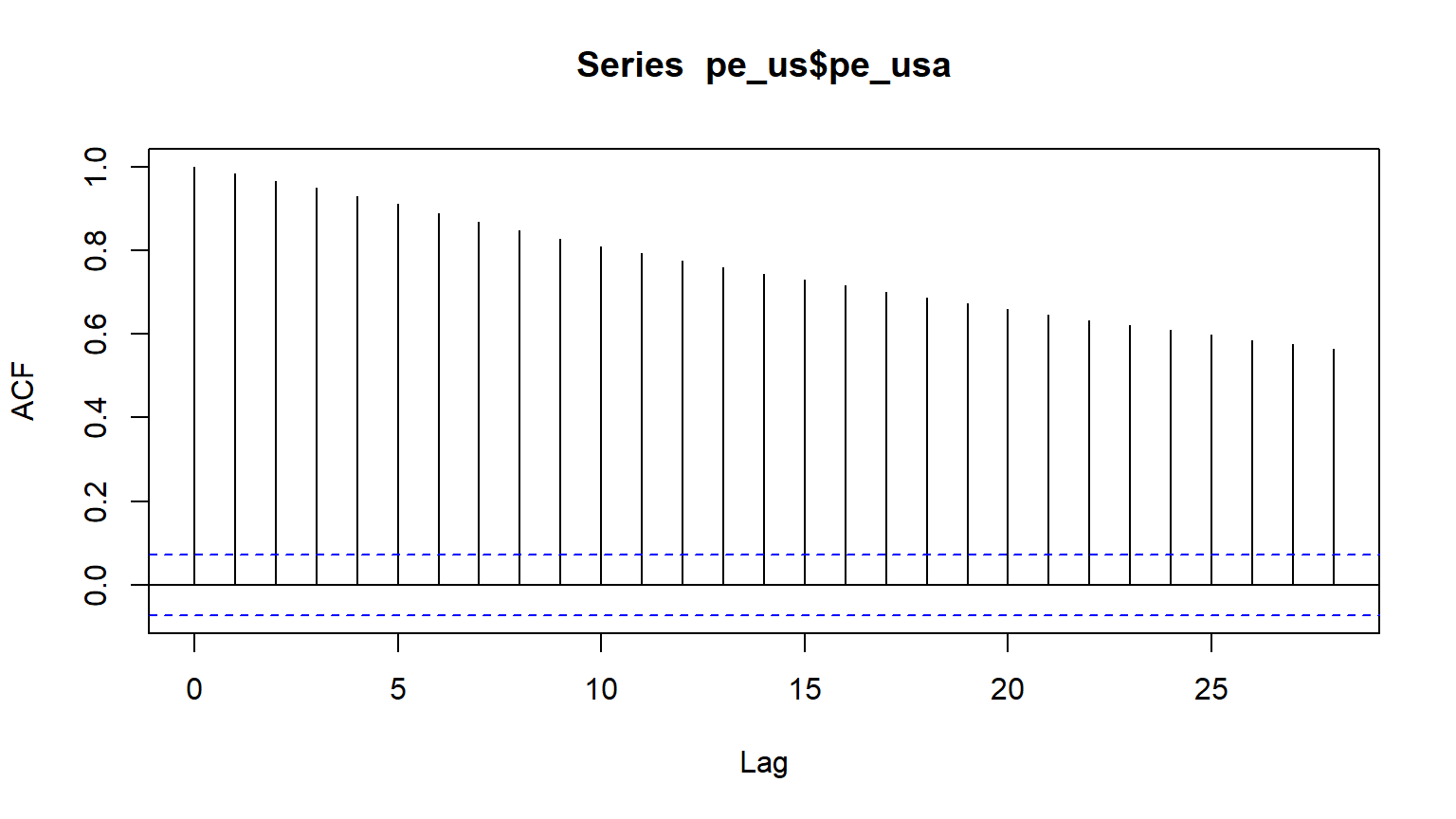
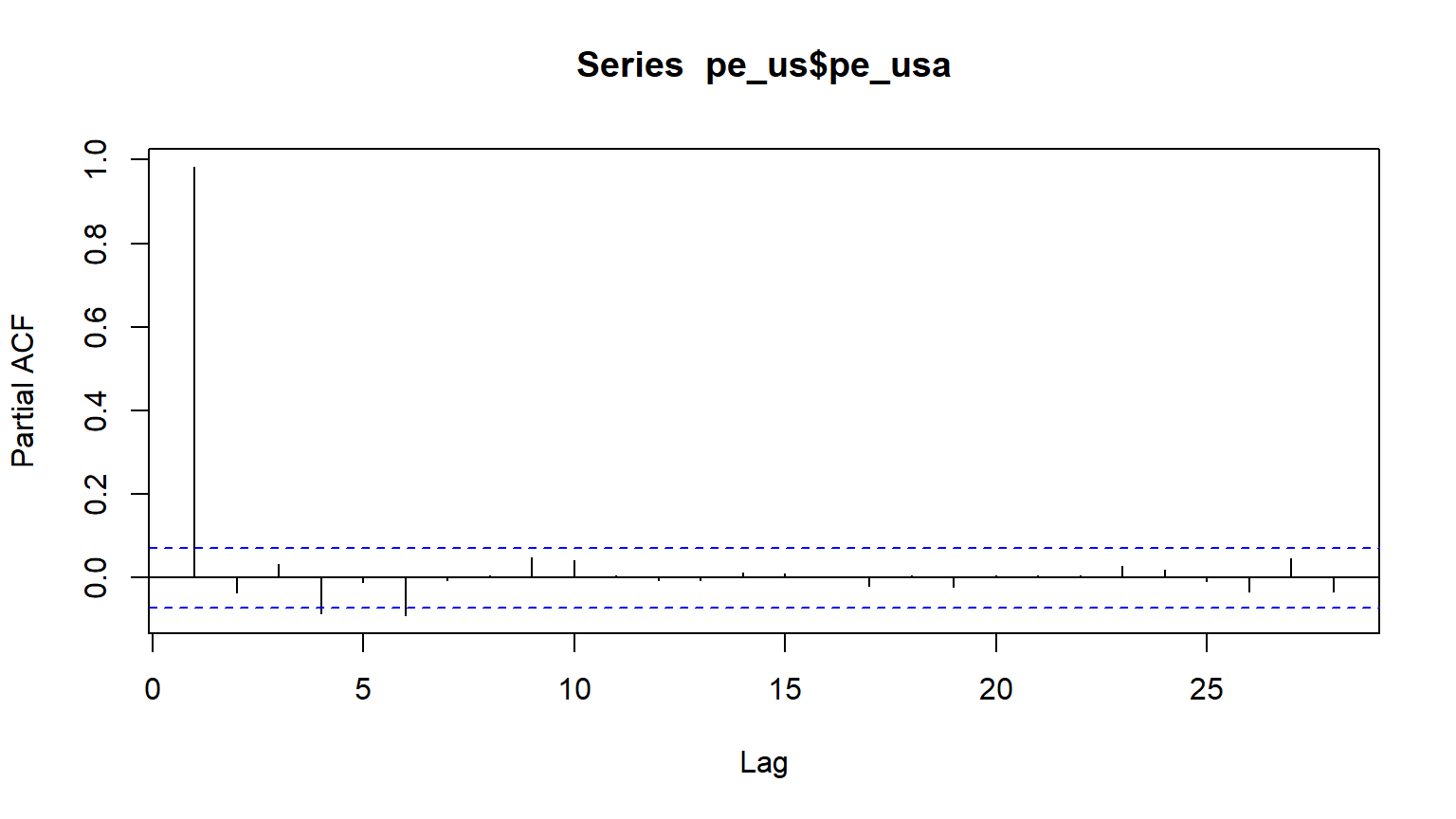
4.3 Identify the Model Using ACF & PACF

acf(pe_us$pe_usa)

pacf(pe_us$pe_usa)

4.4 Differencing the Series

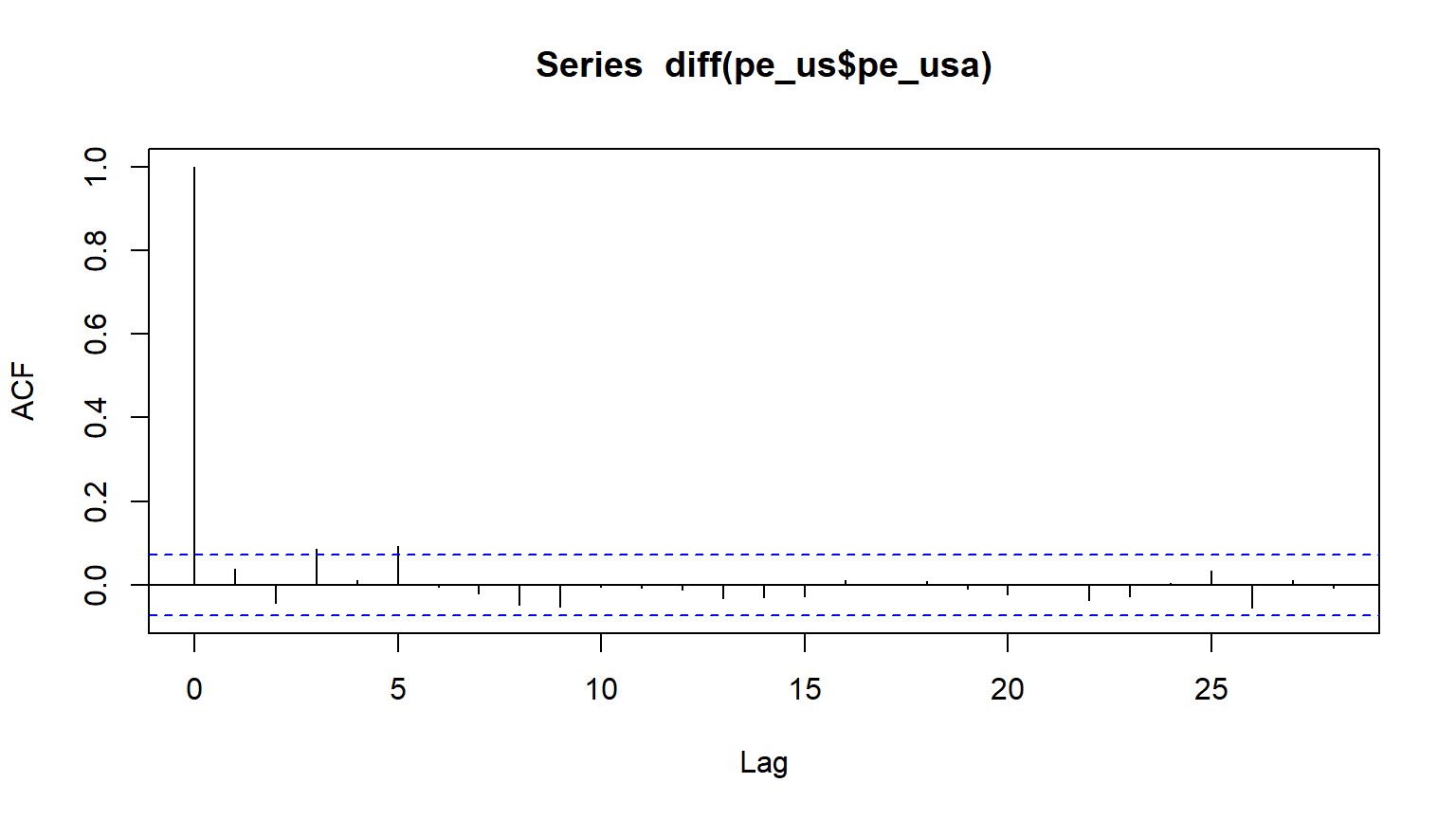
acf(diff(pe_us$pe_usa))

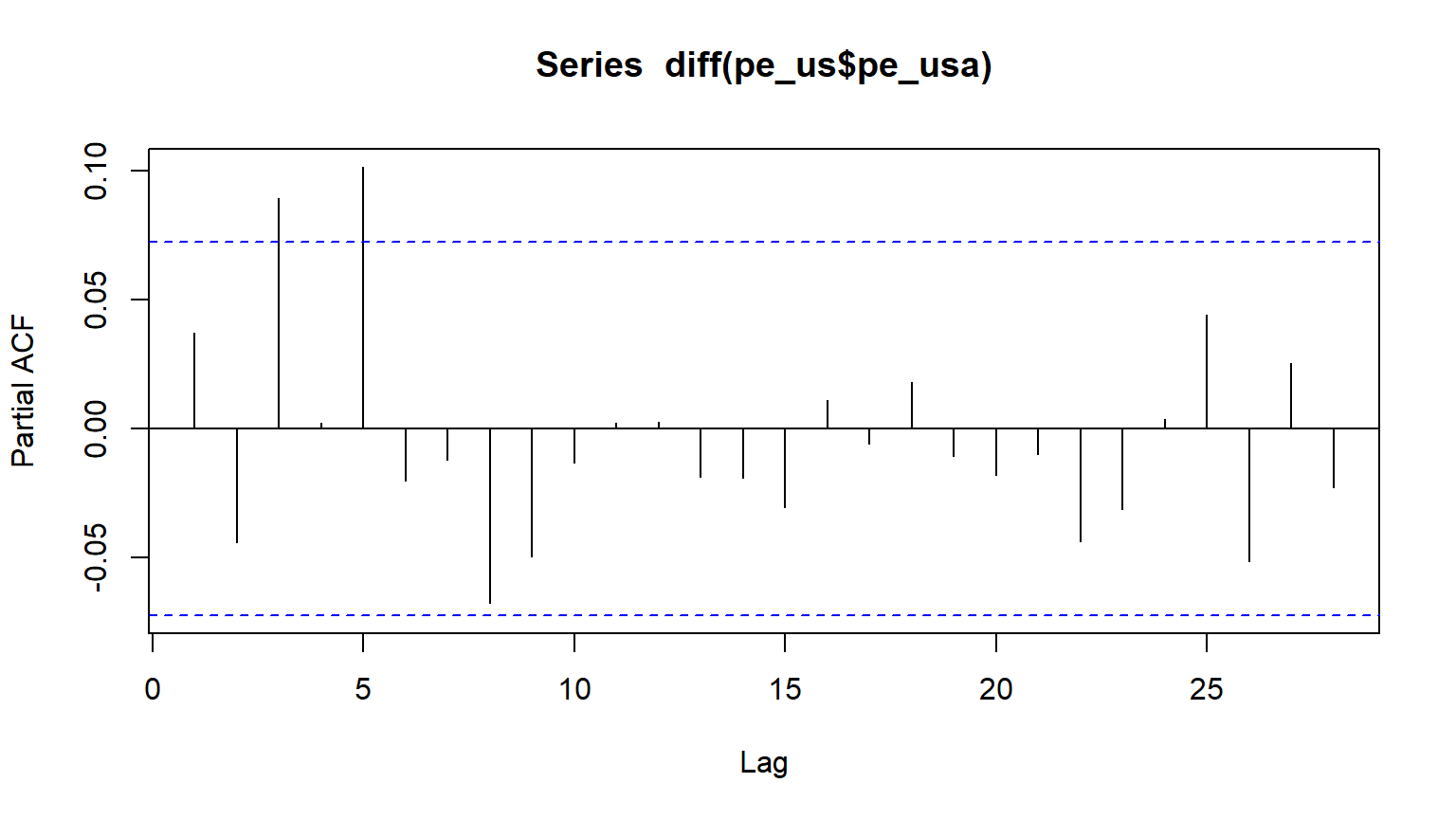
pacf(diff(pe_us$pe_usa))

The differenced series suggests an ARIMA(0,1,1) model.

4.5 Auto-ARIMA Selection

auto.arima(pe_us$pe_usa)
Series: pe_us$pe_usa 
ARIMA(1,1,1) 

Coefficients:
          ar1     ma1
      -0.7554  0.8268
s.e.   0.1106  0.0944

sigma^2 = 0.7151:  log likelihood = -914.95
AIC=1835.91   AICc=1835.94   BIC=1849.69

The automatic model selection suggests ARIMA(1,1,1).


5 Summary and Next Steps

  • Stationary series: Mean, variance, and autocorrelation structure remain constant over time.
  • Nonstationary series: These properties change over time.
  • ACF & PACF: Useful tools for identifying stationarity and model structure.
  • Differencing: Helps to remove trends and make a series stationary.
  • Model selection: Using AIC, BIC, and Auto-ARIMA.

Next steps: - Apply these methods to your own datasets. - Experiment with different ARMA models. - Compare forecast accuracy between models.

Happy coding! 🚀

Back to top