Trend, Season and Simple Forecasting

Moving averages, classical decomposition and exponential smoothing — from the spreadsheet to R

Prof. Dr. Zahid Asghar · School of Economics, QAU

2026-09-15

Why start here?

The methods everyone skips

Most forecasting courses jump straight to ARIMA and ETS. That is a mistake.

Before any model is estimated, three questions have to be answered from the data itself:

  1. Is there a trend, and is it straight?
  2. Is there a season, and is it fixed or growing with the level?
  3. What is left over, and does it look like noise?

Classical decomposition answers all three with arithmetic a student can do by hand — averages, ratios and one regression. Once you can see the components, every later model becomes a statement about them.

The deck follows your Excel workbook column by column. Every spreadsheet column — MA(4), CMA(4), St·It, St, deseasonalised, Tt, fitted, error — is reproduced in R, so students can put the two side by side.

Roadmap

Part Topic Data
1 Components and the two models quarterly car sales
2 Moving averages and the centred MA quarterly car sales
3 Ratio-to-moving-average seasonal indices quarterly car sales
4 Deseasonalise, fit trend, forecast quarterly car sales
5 Additive decomposition daily hits
6 Exponential smoothing: SES, Holt, Holt–Winters monthly series
7 Application: monthly car sales in Pakistan PAMA-style monthly data
8 Accuracy, diagnostics, pitfalls all

Part 1 · The components

What a series is made of

A seasonal series is usually written as four pieces:

\[ Y_t = T_t \times S_t \times C_t \times I_t \qquad \text{(multiplicative)} \]

\[ Y_t = T_t + S_t + C_t + I_t \qquad \text{(additive)} \]

  • \(T_t\) — trend: the slow movement of the level
  • \(S_t\) — season: a pattern that repeats every \(m\) periods (\(m = 4\) quarterly, \(12\) monthly)
  • \(C_t\) — cycle: longer swings with no fixed length; in practice we merge it into the trend and speak of a trend–cycle
  • \(I_t\) — irregular: what is left

Classical decomposition estimates \(T\) first, removes it, then estimates \(S\), then calls the residue \(I\).

Additive or multiplicative?

Look at the seasonal swings as the level rises.

  • Additive — the peaks and troughs stay the same distance from the trend. Seasonal effect measured in units. Indices sum to 0.
  • Multiplicative — the peaks and troughs stay the same proportion of the trend, so they widen as the series grows. Seasonal effect measured as a ratio. Indices sum to \(m\).

Rule of thumb: if the fan widens with the level, go multiplicative — or take logs and work additively, because \(\log(T_t S_t I_t) = \log T_t + \log S_t + \log I_t\).

Car sales, electricity demand and most Pakistani nominal series are multiplicative. Temperature is additive.

The data in your workbook

Sixteen quarters of car sales, in thousands of units.

cars <- tibble(
  t       = 1:16,
  year    = rep(1:4, each = 4),
  quarter = rep(1:4, times = 4),
  sales   = c(4.8, 4.1, 6.0, 6.5,
              5.8, 5.2, 6.8, 7.4,
              6.0, 5.6, 7.5, 7.8,
              6.3, 5.9, 8.0, 8.4)
)

head(cars, 8)
#> # A tibble: 8 × 4
#>       t  year quarter sales
#>   <int> <int>   <int> <dbl>
#> 1     1     1       1   4.8
#> 2     2     1       2   4.1
#> 3     3     1       3   6  
#> 4     4     1       4   6.5
#> 5     5     2       1   5.8
#> 6     6     2       2   5.2
#> 7     7     2       3   6.8
#> 8     8     2       4   7.4

Always plot first

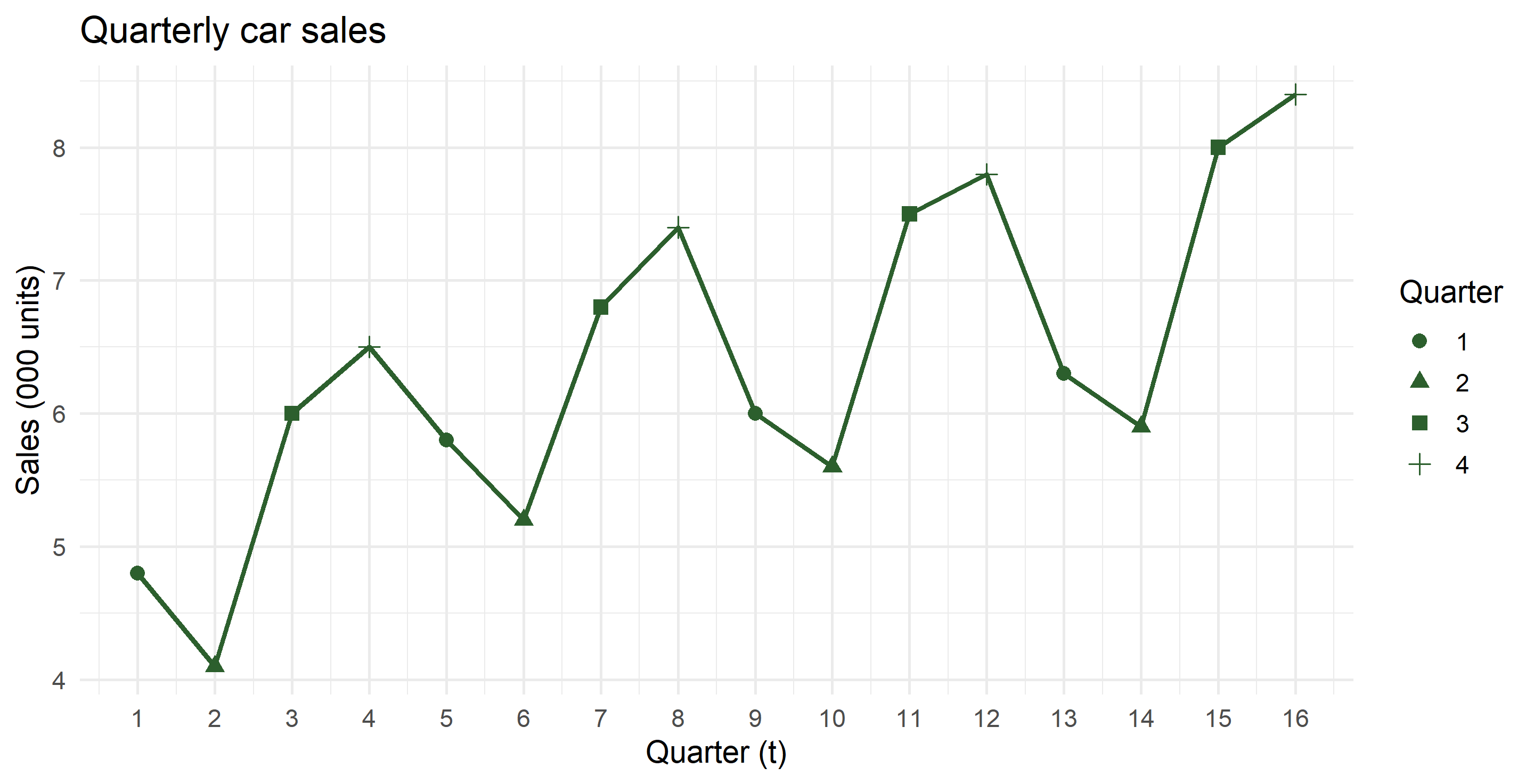
Two things are visible without any model: the level drifts up by roughly 0.15 per quarter, and Q2 is always the low point while Q4 is always the high point.

The seasonal plot

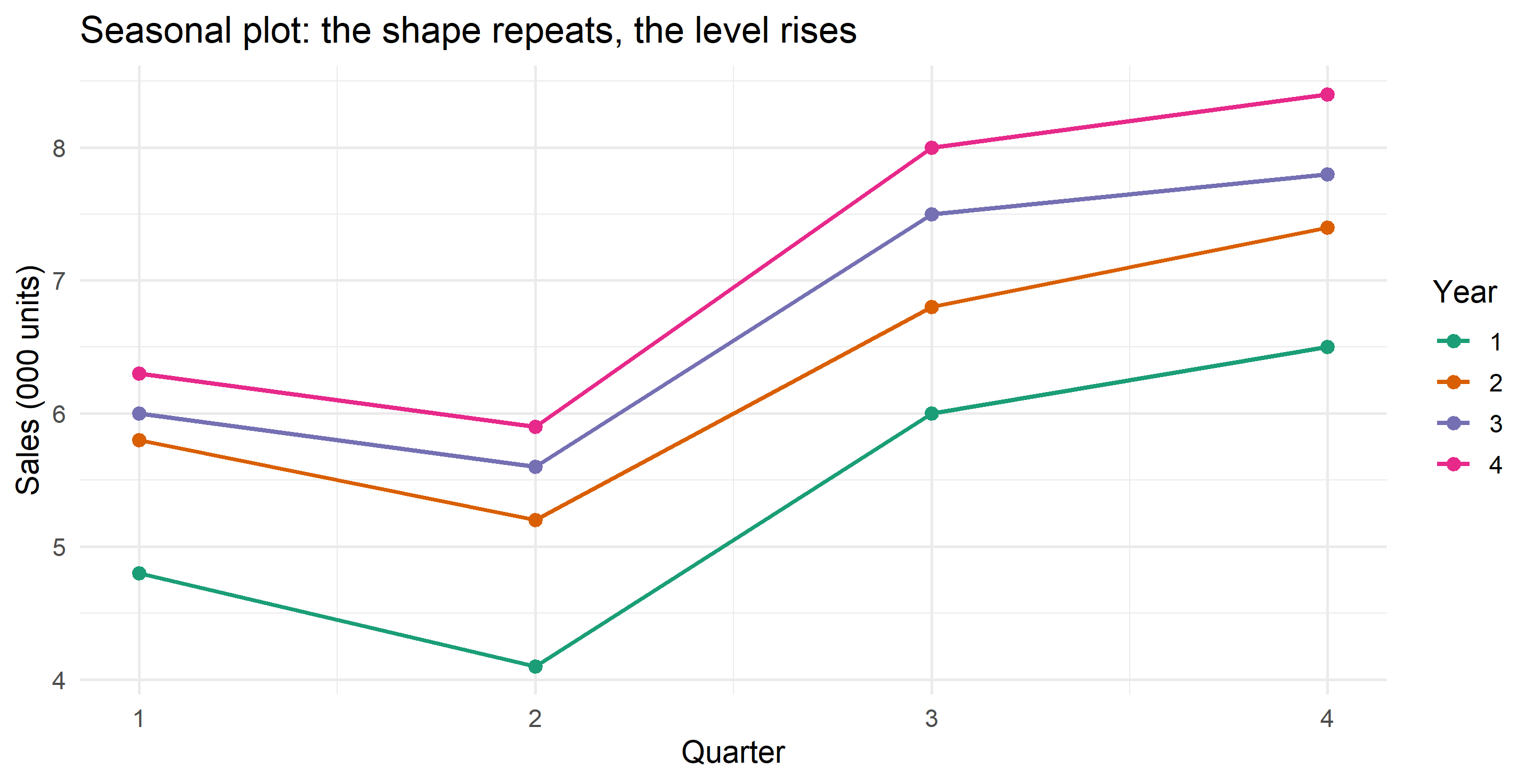
Overlaying years is the fastest seasonality check.

Parallel lines that shift upward mean a stable seasonal shape on a rising trend — exactly what decomposition assumes.

Part 2 · Moving averages

A moving average is a local mean

A \(k\)-term moving average replaces each observation by the average of its neighbours:

\[ \hat{T}_t = \frac{1}{k}\sum_{j=-h}^{h} y_{t+j}, \qquad k = 2h+1 \]

  • Odd \(k\) (3, 5, 7) is naturally centred on \(t\).
  • Larger \(k\) smooths more: it kills noise but also flattens genuine turning points and costs you \(h\) observations at each end.
  • With \(k = m\) (the seasonal period) the average covers one full year, so the seasonal effect cancels out. That is the whole trick.

The problem with even \(k\)

For quarterly data we need \(k = 4\) to sweep out the season. But a 4-term average of \(y_1,\dots,y_4\) sits at time 2.5, not at any observation.

The fix is to average two consecutive 4-term averages. This is the centred moving average, written \(2\times4\)-MA:

\[ \text{CMA}_t = \frac{\text{MA}_{t-0.5} + \text{MA}_{t+0.5}}{2} = \frac{\tfrac12 y_{t-2} + y_{t-1} + y_t + y_{t+1} + \tfrac12 y_{t+2}}{4} \]

The half-weights at the ends are what makes it land on \(t\). For monthly data the same logic gives the \(2\times12\)-MA with weights \(\tfrac{1}{24},\tfrac{1}{12},\dots,\tfrac{1}{12},\tfrac{1}{24}\).

Computing both columns

cars_ma <- cars |>
  mutate(
    # MA(4): average of t-2, t-1, t, t+1  → sits at t - 0.5
    ma4  = (lag(sales, 2) + lag(sales, 1) + sales + lead(sales, 1)) / 4,
    # CMA(4): average of the two neighbouring MA(4) values → sits at t
    cma4 = (ma4 + lead(ma4)) / 2
  )

cars_ma |> select(t, quarter, sales, ma4, cma4) |> head(8) |> show_tbl()
t quarter sales ma4 cma4
1 1 4.8 NA NA
2 2 4.1 NA NA
3 3 6.0 5.350 5.4750
4 4 6.5 5.600 5.7375
5 1 5.8 5.875 5.9750
6 2 5.2 6.075 6.1875
7 3 6.8 6.300 6.3250
8 4 7.4 6.350 6.4000

The first CMA appears at \(t = 3\) and the last at \(t = 14\): a \(2\times4\)-MA costs two observations at each end.

The one-line version

The weighted form gives the identical column without any lag bookkeeping:

cars_ma <- cars_ma |>
  mutate(cma_direct = as.numeric(
    stats::filter(sales, filter = c(0.5, 1, 1, 1, 0.5) / 4, sides = 2)
  ))

all.equal(cars_ma$cma4, cars_ma$cma_direct)
#> [1] TRUE

Use stats::filter() with the stats:: prefix — dplyr::filter() will otherwise mask it and give a confusing error.

Alignment: the classic spreadsheet bug

In a spreadsheet nothing stops you writing the CMA one row too high. The numbers still look plausible, and the seasonal indices come out wrong.

misaligned <- cars_ma |>
  mutate(cma_bad = lead(cma4)) |>         # trend shifted one quarter early
  summarise(
    correct    = mean(sales / cma4,    na.rm = TRUE),
    shifted    = mean(sales / cma_bad, na.rm = TRUE),
    .by = quarter
  ) |>
  mutate(across(c(correct, shifted), \(x) x * 4 / sum(x)))

show_tbl(misaligned)
quarter correct shifted
1 0.9307 0.9342
2 0.8364 0.8220
3 1.0915 1.0981
4 1.1414 1.1457

Q2’s index moves by more than a full percentage point of the level. Whenever you replicate a spreadsheet, check that the first CMA sits at \(t = m/2 + 1\) — here, quarter 3.

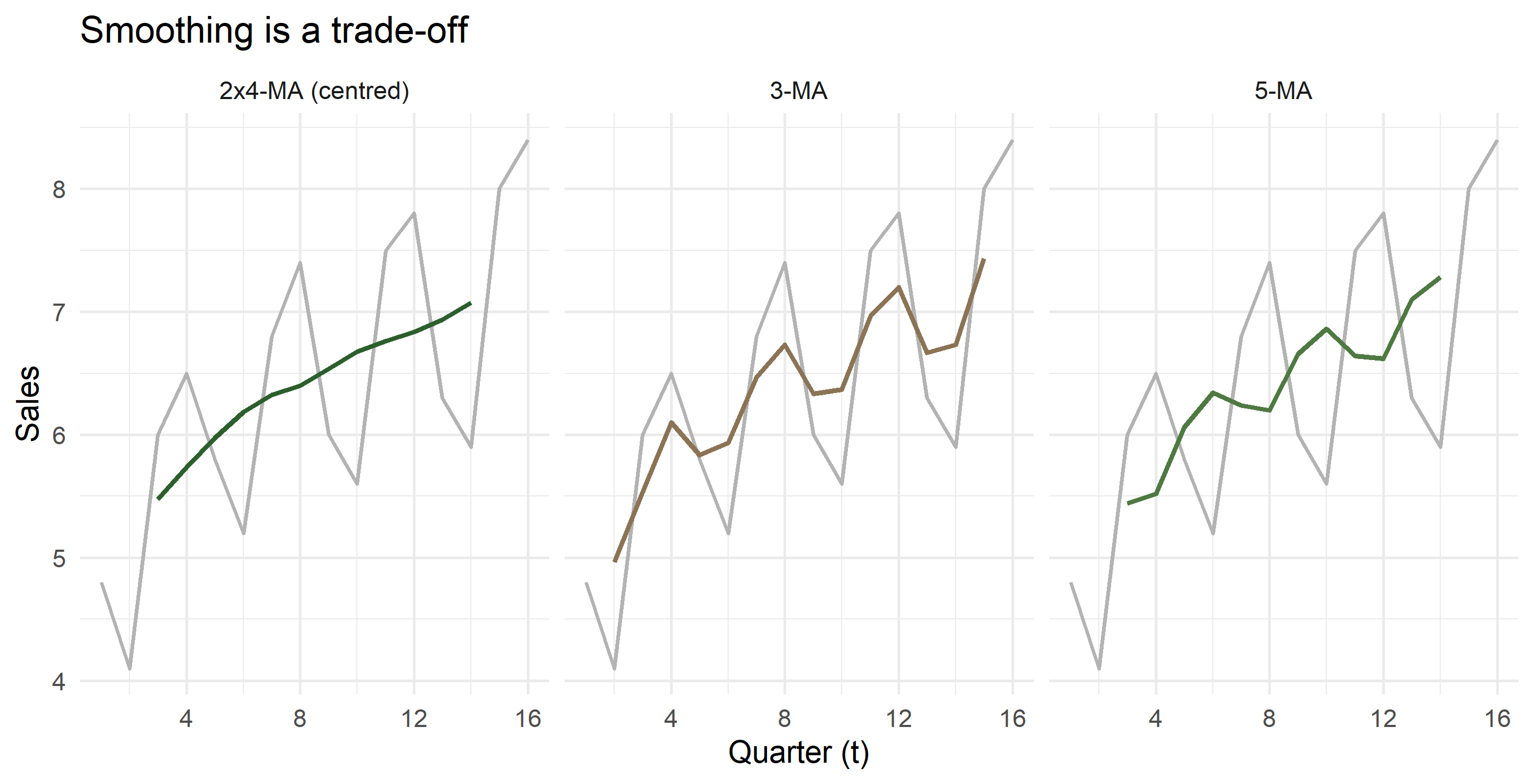
How much smoothing?

The 3-MA still wobbles with the season because it does not cover a full year. Only a span equal to the seasonal period removes the season cleanly.

Part 3 · Seasonal indices

Step 1 — detrend by division

If \(Y_t = T_t S_t I_t\) and the CMA estimates \(T_t\), then

\[ \frac{Y_t}{\text{CMA}_t} \approx S_t \times I_t \]

This is the ratio-to-moving-average, the St, It column of your sheet. For an additive series you subtract instead of divide.

cars_ratio <- cars_ma |>
  mutate(ratio = sales / cma4)

cars_ratio |> select(t, quarter, sales, cma4, ratio) |> slice(3:10) |> show_tbl()
t quarter sales cma4 ratio
3 3 6.0 5.4750 1.0959
4 4 6.5 5.7375 1.1329
5 1 5.8 5.9750 0.9707
6 2 5.2 6.1875 0.8404
7 3 6.8 6.3250 1.0751
8 4 7.4 6.4000 1.1563
9 1 6.0 6.5375 0.9178
10 2 5.6 6.6750 0.8390

Step 2 — average out the irregular

Each quarter now has three or four ratios. Averaging them cancels \(I_t\) and leaves \(S_t\).

seasonal_tbl <- cars_ratio |>
  summarise(index_raw = mean(ratio, na.rm = TRUE), .by = quarter) |>
  mutate(index = index_raw * 4 / sum(index_raw))   # normalise: indices must sum to m

show_tbl(seasonal_tbl)
quarter index_raw index
1 0.9322 0.9307
2 0.8378 0.8364
3 1.0933 1.0915
4 1.1433 1.1414
sum(seasonal_tbl$index_raw); sum(seasonal_tbl$index)
#> [1] 4.006614
#> [1] 4

Why normalise?

The raw averages will not sum to exactly 4 — here they miss by a fraction of a percent. If you skip the rescaling, the seasonal factors quietly add or subtract level from every forecast you make.

Rescale by \(m / \sum \hat S_j\) for multiplicative, and subtract the mean for additive:

# multiplicative
index <- index_raw * m / sum(index_raw)

# additive
index <- index_raw - mean(index_raw)

Some textbook spreadsheets leave this step out. If the two sheets in your workbook give slightly different indices for the same recipe, normalisation and CMA alignment are the first places to look.

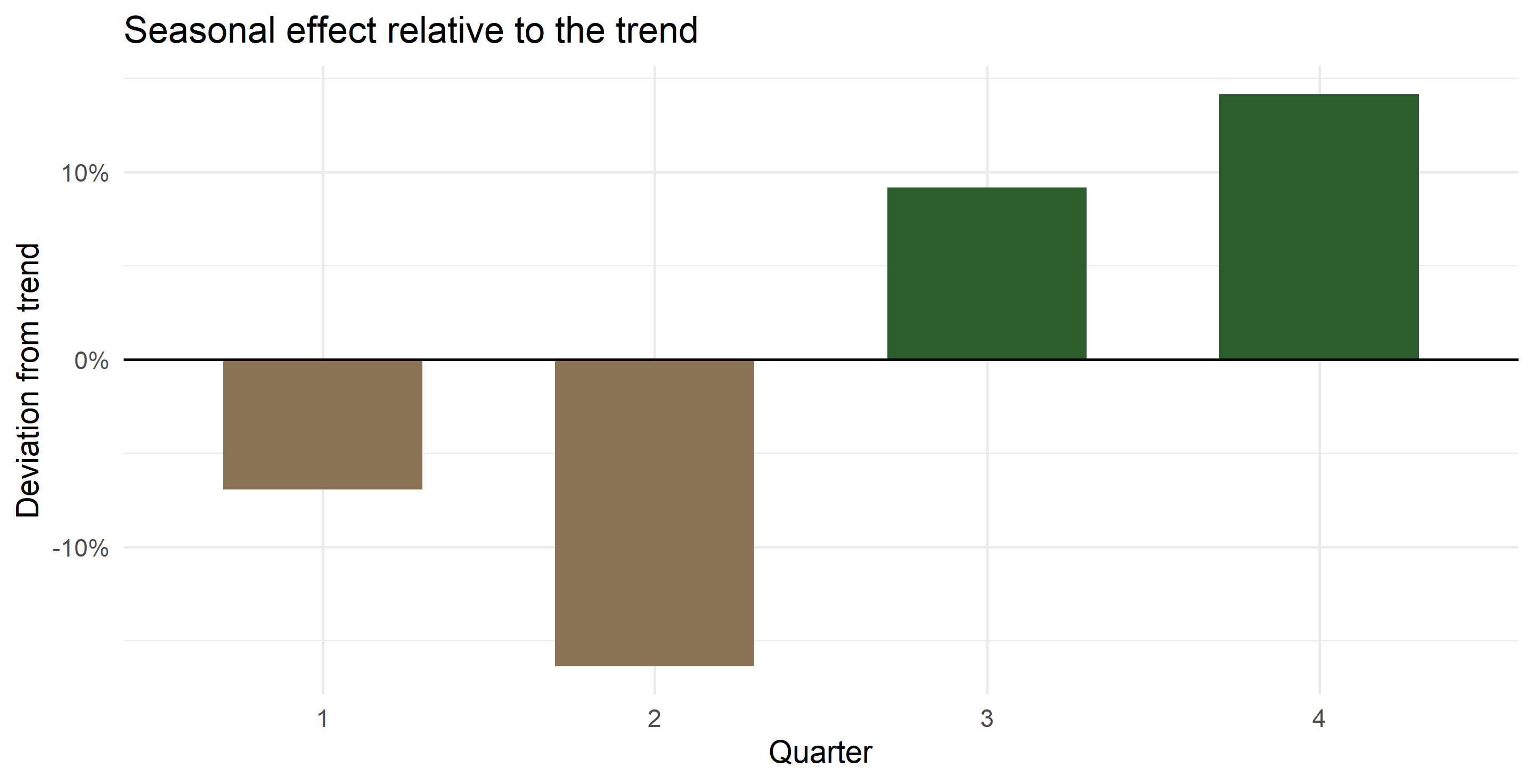
Reading the indices

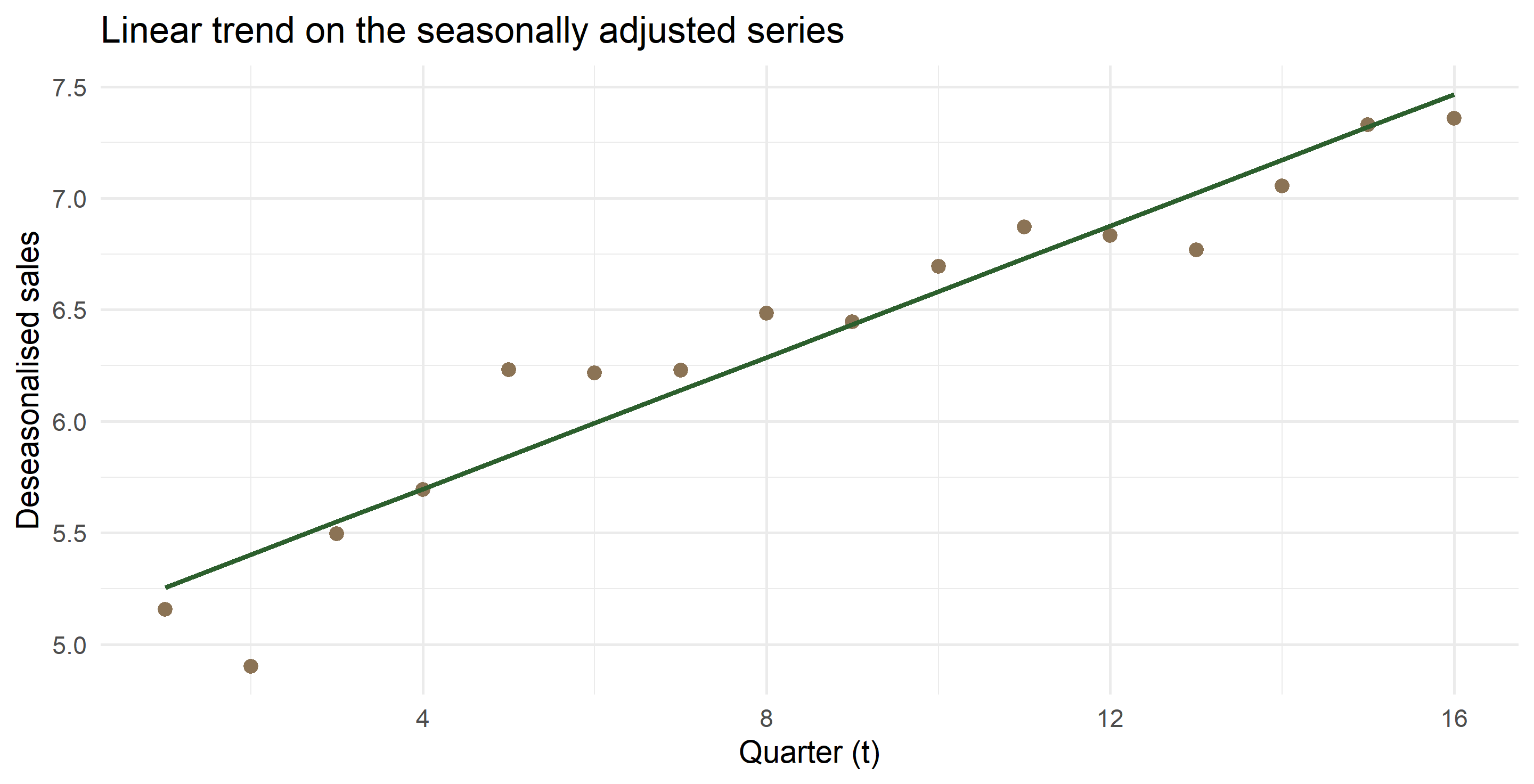
Q4 runs about 14% above trend, Q2 about 16% below. A dealer reading a 16% drop from Q1 to Q2 as a collapse in demand is reading the calendar, not the market.

Step 3 — the components

cars_dec <- cars_ratio |>
  left_join(seasonal_tbl, by = join_by(quarter)) |>
  mutate(
    deseason  = sales / index,          # seasonally adjusted series
    irregular = sales / (cma4 * index)  # what the model cannot explain
  )

cars_dec |> select(t, sales, cma4, index, deseason, irregular) |> slice(3:10) |> show_tbl()
t sales cma4 index deseason irregular
3 6.0 5.4750 1.0915 5.4968 1.0040
4 6.5 5.7375 1.1414 5.6947 0.9925
5 5.8 5.9750 0.9307 6.2321 1.0430
6 5.2 6.1875 0.8364 6.2173 1.0048
7 6.8 6.3250 1.0915 6.2297 0.9849
8 7.4 6.4000 1.1414 6.4832 1.0130
9 6.0 6.5375 0.9307 6.4470 0.9862
10 5.6 6.6750 0.8364 6.6956 1.0031

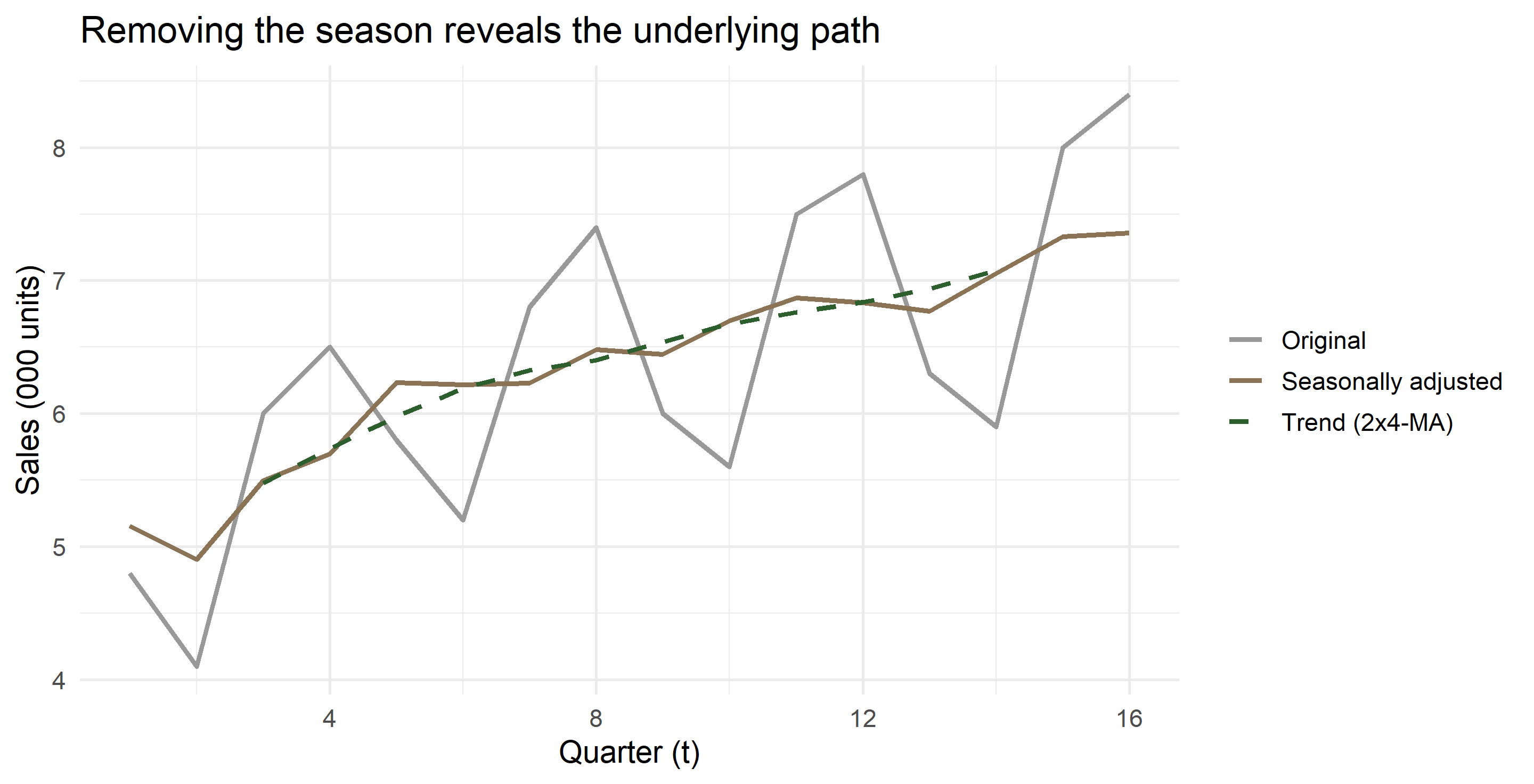
Seasonally adjusted vs raw

This is precisely what PBS, SBP and every statistical agency publish as “seasonally adjusted” — nothing more mysterious than dividing by an index.

Cross-check with decompose()

cars_ts <- ts(cars$sales, start = c(1, 1), frequency = 4)
dc <- decompose(cars_ts, type = "multiplicative")

tibble(
  quarter   = 1:4,
  by_hand   = seasonal_tbl$index,
  decompose = as.numeric(dc$figure)
) |> show_tbl()
quarter by_hand decompose
1 0.9307 0.9307
2 0.8364 0.8364
3 1.0915 1.0915
4 1.1414 1.1414

Identical to the last decimal. decompose() is the same recipe: centred MA, ratio, average by cycle position, normalise.

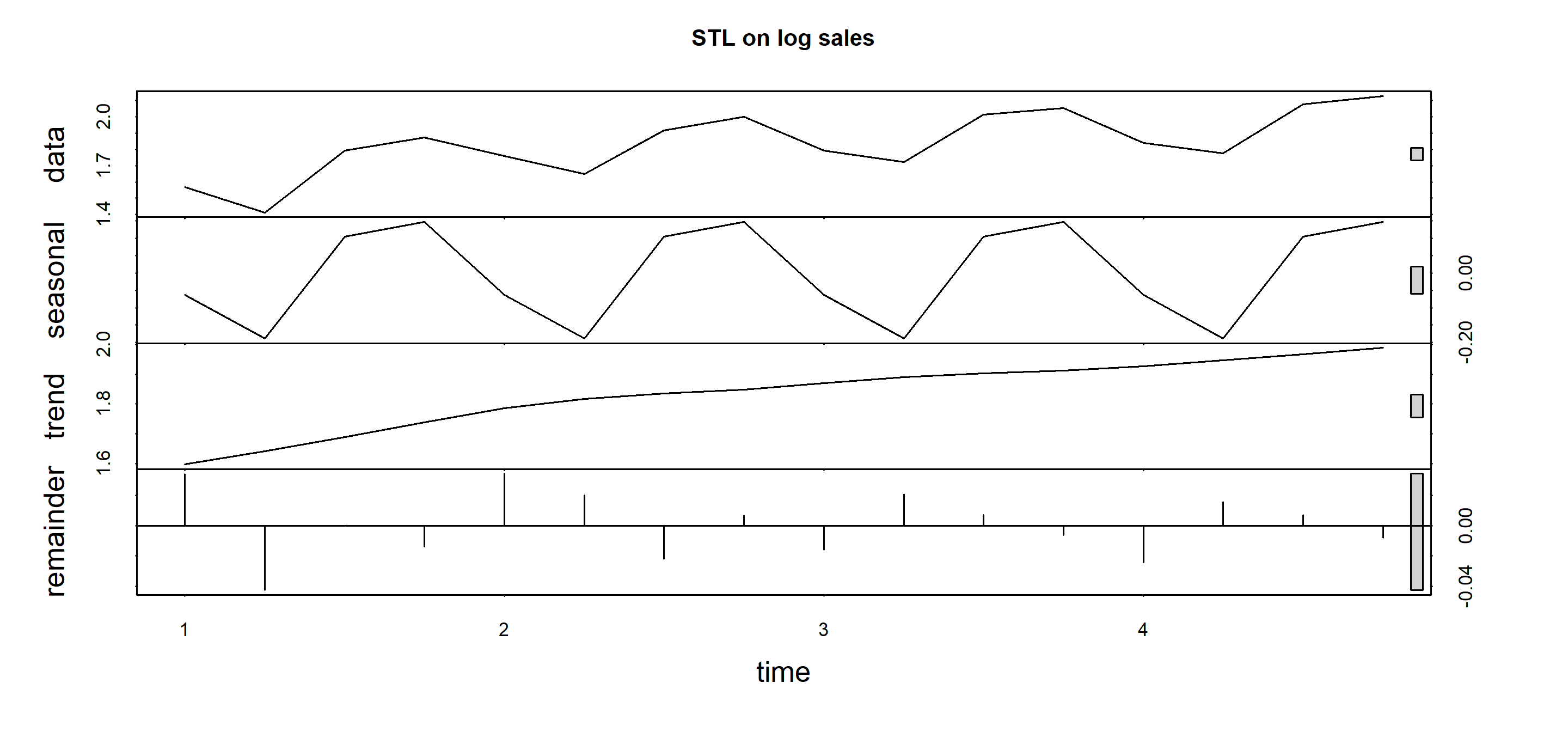
And with stl()

stl_fit <- stl(log(cars_ts), s.window = "periodic")
plot(stl_fit, main = "STL on log sales")

stl() is the modern workhorse: loess instead of simple averages, robust to outliers, and it allows the seasonal shape to evolve (s.window = 7 rather than "periodic"). Classical decomposition assumes the shape never changes.

Part 4 · Forecasting from the decomposition

The logic

You cannot extrapolate a moving average — it stops two periods from the end. So:

  1. Deseasonalise the series: \(D_t = Y_t / S_t\)
  2. Fit a trend to \(D_t\) — a straight line is usually enough
  3. Extrapolate the trend to \(t + h\)
  4. Re-seasonalise: \(\hat Y_{t+h} = \hat T_{t+h} \times S_{t+h}\)

Step 2 is where the regression enters, and it must be run on the deseasonalised series, not on raw sales.

Fitting the trend

trend_fit <- lm(deseason ~ t, data = cars_dec)
coef(trend_fit)
#> (Intercept)           t 
#>    5.108042    0.147382

Fitted values and errors

cars_fit <- cars_dec |>
  mutate(
    trend_hat = fitted(trend_fit),
    fitted    = trend_hat * index,
    error     = sales - fitted
  )

cars_fit |> select(t, quarter, sales, trend_hat, index, fitted, error) |> head(8) |> show_tbl()
t quarter sales trend_hat index fitted error
1 1 4.8 5.2554 0.9307 4.8910 -0.0910
2 2 4.1 5.4028 0.8364 4.5188 -0.4188
3 3 6.0 5.5502 1.0915 6.0583 -0.0583
4 4 6.5 5.6976 1.1414 6.5033 -0.0033
5 1 5.8 5.8450 0.9307 5.4397 0.3603
6 2 5.2 5.9923 0.8364 5.0118 0.1882
7 3 6.8 6.1397 1.0915 6.7018 0.0982
8 4 7.4 6.2871 1.1414 7.1762 0.2238

How good is the fit?

accuracy_tbl <- function(actual, fitted, label = "model") {
  e <- actual - fitted
  tibble(
    model = label,
    ME    = mean(e, na.rm = TRUE),
    MAE   = mean(abs(e), na.rm = TRUE),
    RMSE  = sqrt(mean(e^2, na.rm = TRUE)),
    MAPE  = 100 * mean(abs(e / actual), na.rm = TRUE)
  )
}

accuracy_tbl(cars_fit$sales, cars_fit$fitted, "decomposition + linear trend") |> show_tbl()
model ME MAE RMSE MAPE
decomposition + linear trend 0.0041 0.1388 0.1817 2.4395

MAPE under 3% on a series with a 30% seasonal swing: the two components have done nearly all the work.

A common shortcut — and what it costs

A tempting shortcut is to regress raw sales on \(t\) and then multiply by the seasonal index. The slope looks fine, but the intercept has already absorbed the average seasonal level, so multiplying by \(S_t\) counts the season one and a half times.

shortcut <- lm(sales ~ t, data = cars_fit)

bind_rows(
  accuracy_tbl(cars_fit$sales, cars_fit$fitted, "trend on deseasonalised (correct)"),
  accuracy_tbl(cars_fit$sales, fitted(shortcut) * cars_fit$index, "trend on raw sales (shortcut)")
) |> show_tbl()
model ME MAE RMSE MAPE
trend on deseasonalised (correct) 0.0041 0.1388 0.1817 2.4395
trend on raw sales (shortcut) -0.0200 0.2057 0.2425 3.3096

The fit is a third worse, and the gap grows with the forecast horizon.

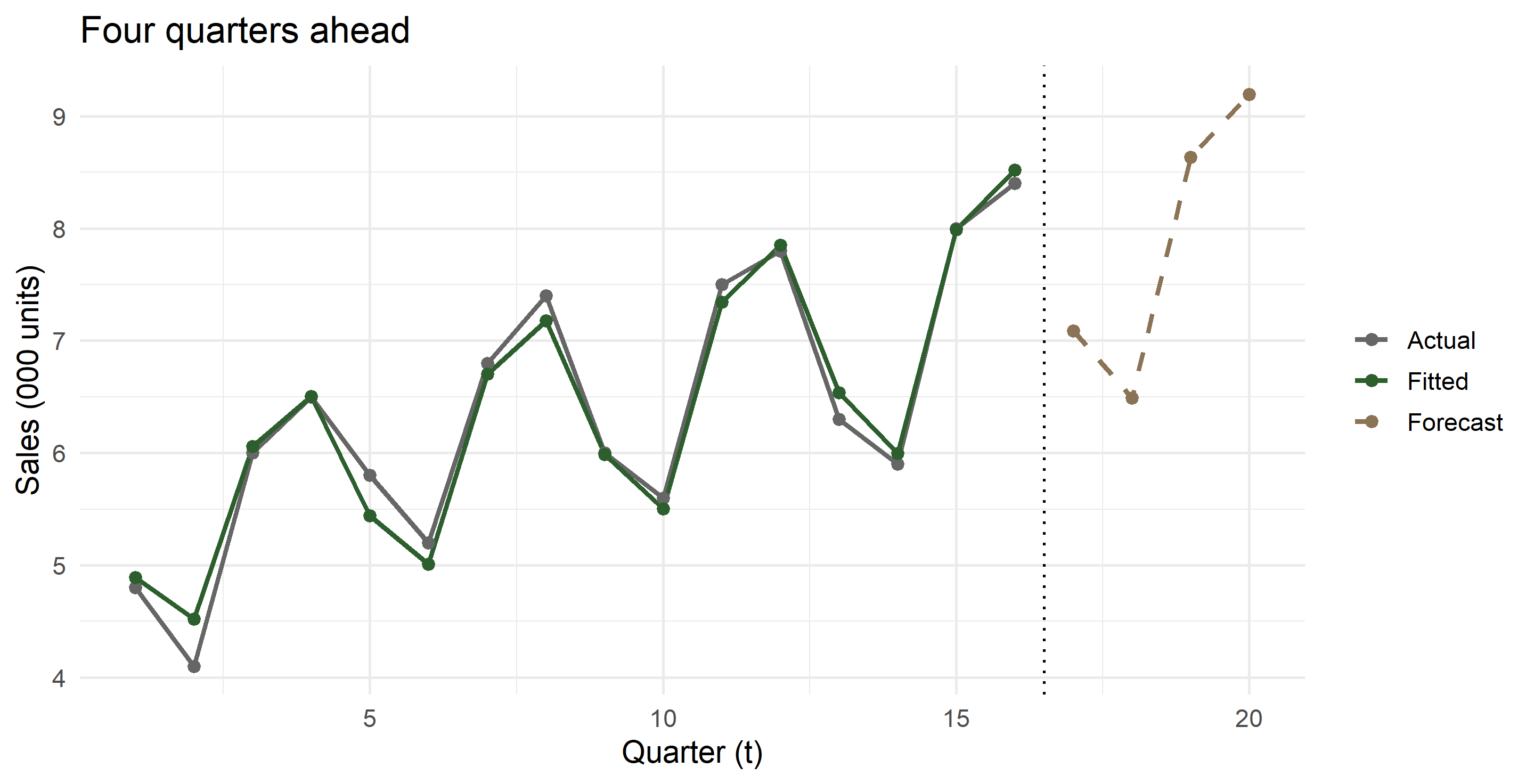
Forecasting year 5

future <- tibble(t = 17:20, quarter = 1:4) |>
  left_join(seasonal_tbl, by = join_by(quarter)) |>
  mutate(
    trend_hat = predict(trend_fit, newdata = pick(t)),
    forecast  = trend_hat * index
  )

future |> select(t, quarter, trend_hat, index, forecast) |> show_tbl(digits = 3)
t quarter trend_hat index forecast
17 1 7.614 0.931 7.086
18 2 7.761 0.836 6.491
19 3 7.908 1.092 8.632
20 4 8.056 1.141 9.195

The forecast in context

What this forecast assumes

Worth saying out loud to students, because the arithmetic hides it:

  • the trend stays linear — no saturation, no policy shock
  • the seasonal shape is fixed for all time
  • the irregular component has no memory
  • there is no uncertainty band, because we never modelled the errors

Every one of these is relaxed later by ETS and ARIMA. But the point estimate of a good decomposition is often within a few percent of theirs, and you can explain it to a secretary in a ministry.

Part 5 · The additive case

When the swings do not grow

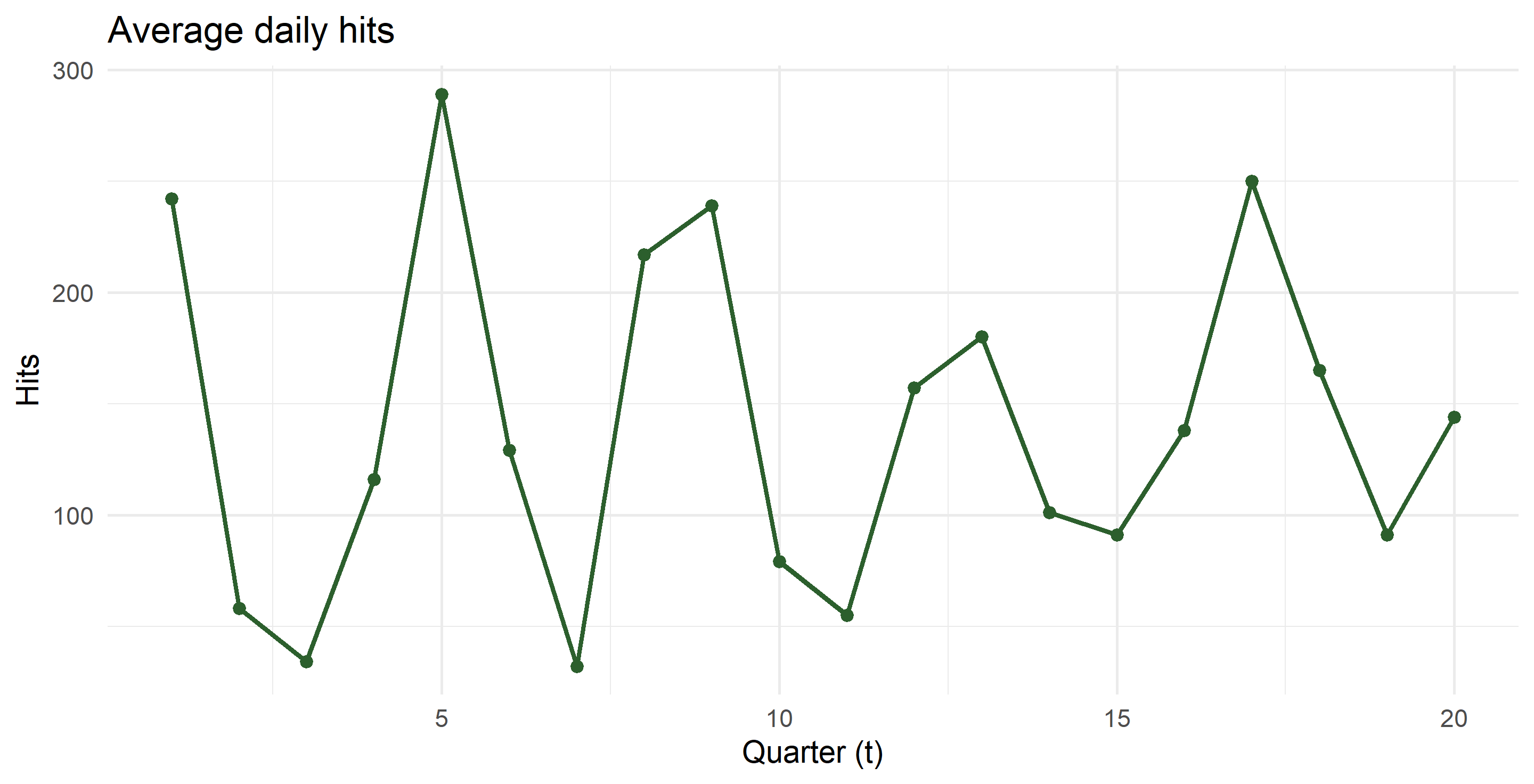
Average daily hits on a website, five years of quarterly data — the Sheet1 (2) example from your workbook.

hits <- tibble(
  t       = 1:20,
  year    = rep(2001:2005, each = 4),
  quarter = rep(1:4, times = 5),
  hits    = c(242,  58,  34, 116,
              289, 129,  32, 217,
              239,  79,  55, 157,
              180, 101,  91, 138,
              250, 165,  91, 144)
)

The quick method — and when it is legitimate

With no visible trend, the seasonal effect is simply each quarter’s mean minus the grand mean.

grand <- mean(hits$hits)

hits_idx <- hits |>
  summarise(q_mean = mean(hits), .by = quarter) |>
  mutate(index_add = q_mean - grand)

show_tbl(hits_idx, digits = 2)
quarter q_mean index_add
1 240.0 99.65
2 106.4 -33.95
3 60.6 -79.75
4 154.4 14.05
grand
#> [1] 140.35

Seasonally adjusted series: \(Y_t - S_j\).

hits_sa <- hits |>
  left_join(hits_idx, by = join_by(quarter)) |>
  mutate(seas_adj = hits - index_add)

hits_sa |> select(t, quarter, hits, index_add, seas_adj) |> head(8) |> show_tbl(digits = 2)
t quarter hits index_add seas_adj
1 1 242 99.65 142.35
2 2 58 -33.95 91.95
3 3 34 -79.75 113.75
4 4 116 14.05 101.95
5 1 289 99.65 189.35
6 2 129 -33.95 162.95
7 3 32 -79.75 111.75
8 4 217 14.05 202.95

The proper method, for comparison

If there is a trend, the quick method confuses trend with season and you must detrend first — by subtraction, since the model is additive.

hits_proper <- hits |>
  mutate(
    cma4 = (0.5 * lag(hits, 2) + lag(hits) + hits + lead(hits) + 0.5 * lead(hits, 2)) / 4,
    diff = hits - cma4
  ) |>
  summarise(raw = mean(diff, na.rm = TRUE), .by = quarter) |>
  mutate(index_add = raw - mean(raw))

hits_idx |> select(quarter, quick = index_add) |>
  left_join(hits_proper |> select(quarter, detrended = index_add), by = join_by(quarter)) |>
  show_tbl(digits = 2)
quarter quick detrended
1 99.65 94.70
2 -33.95 -28.95
3 -79.75 -83.08
4 14.05 17.33

Close, because the trend here is weak. On a trending series the two diverge sharply — which is why the detrended route is the default.

Additive vs multiplicative, side by side

Additive Multiplicative
Model \(Y = T + S + I\) \(Y = T \times S \times I\)
Detrend \(Y_t - \text{CMA}_t\) \(Y_t / \text{CMA}_t\)
Indices sum to 0 \(m\)
Adjust \(Y_t - S_j\) \(Y_t / S_j\)
Use when swings constant in units swings constant in percent
Trick — take logs, then use additive

Part 6 · Exponential smoothing

The idea

A moving average gives equal weight to the last \(k\) observations and none to the rest. That is an odd belief. Simple exponential smoothing instead lets weights fade geometrically:

\[ F_{t+1} = \alpha Y_t + (1-\alpha) F_t = \alpha \sum_{j\ge 0}(1-\alpha)^j\, Y_{t-j} \]

  • \(\alpha\) near 1 → the forecast chases the last observation
  • \(\alpha\) near 0 → the forecast is a long memory, almost a constant
  • No trend, no season: every future period gets the same forecast

The SES sheet, reproduced

Twenty-four monthly observations, \(\alpha = 0.4\), starting level \(F_2 = Y_1\).

ses_data <- tibble(
  date  = seq(ymd("2010-01-01"), by = "month", length.out = 24),
  y     = c(97.6, 95.1, 90.3, 92.5, 89.8, 92.7, 94.4, 96.2,
            88.9, 90.2, 88.2, 91.0, 89.3, 88.5, 93.7, 92.7,
            94.7, 95.3, 94.7, 95.3, 94.7, 96.5, 99.2, 96.9)
)

ses <- function(y, alpha) {
  # returns forecasts for t = 2 ... n+1, with F_2 = y_1
  accumulate(y[-length(y)], \(f, obs) alpha * obs + (1 - alpha) * f, .init = y[1])
}

The smoothing table

alpha <- 0.4

ses_tbl <- ses_data |>
  mutate(
    forecast = c(NA, ses(y, alpha)[-24]),   # F_t aligned to period t
    error    = y - forecast,
    abs_err  = abs(error),
    pct_err  = abs(error / y),
    sq_err   = error^2
  )

ses_tbl |> slice(1:8) |> show_tbl(digits = 3)
date y forecast error abs_err pct_err sq_err
2010-01-01 97.6 NA NA NA NA NA
2010-02-01 95.1 97.600 -2.500 2.500 0.026 6.250
2010-03-01 90.3 97.600 -7.300 7.300 0.081 53.290
2010-04-01 92.5 96.600 -4.100 4.100 0.044 16.810
2010-05-01 89.8 94.080 -4.280 4.280 0.048 18.318
2010-06-01 92.7 93.448 -0.748 0.748 0.008 0.560
2010-07-01 94.4 91.989 2.411 2.411 0.026 5.814
2010-08-01 96.2 92.273 3.927 3.927 0.041 15.419

Accuracy, and choosing \(\alpha\)

ses_tbl |>
  summarise(
    ME   = mean(error,   na.rm = TRUE),
    MAE  = mean(abs_err, na.rm = TRUE),
    MAPE = 100 * mean(pct_err, na.rm = TRUE),
    SSE  = sum(sq_err,   na.rm = TRUE)
  ) |> show_tbl(digits = 3)
ME MAE MAPE SSE
-0.104 2.89 3.117 253.64

Small differences from the spreadsheet come from Excel rounding each smoothed value to one decimal. R carries full precision.

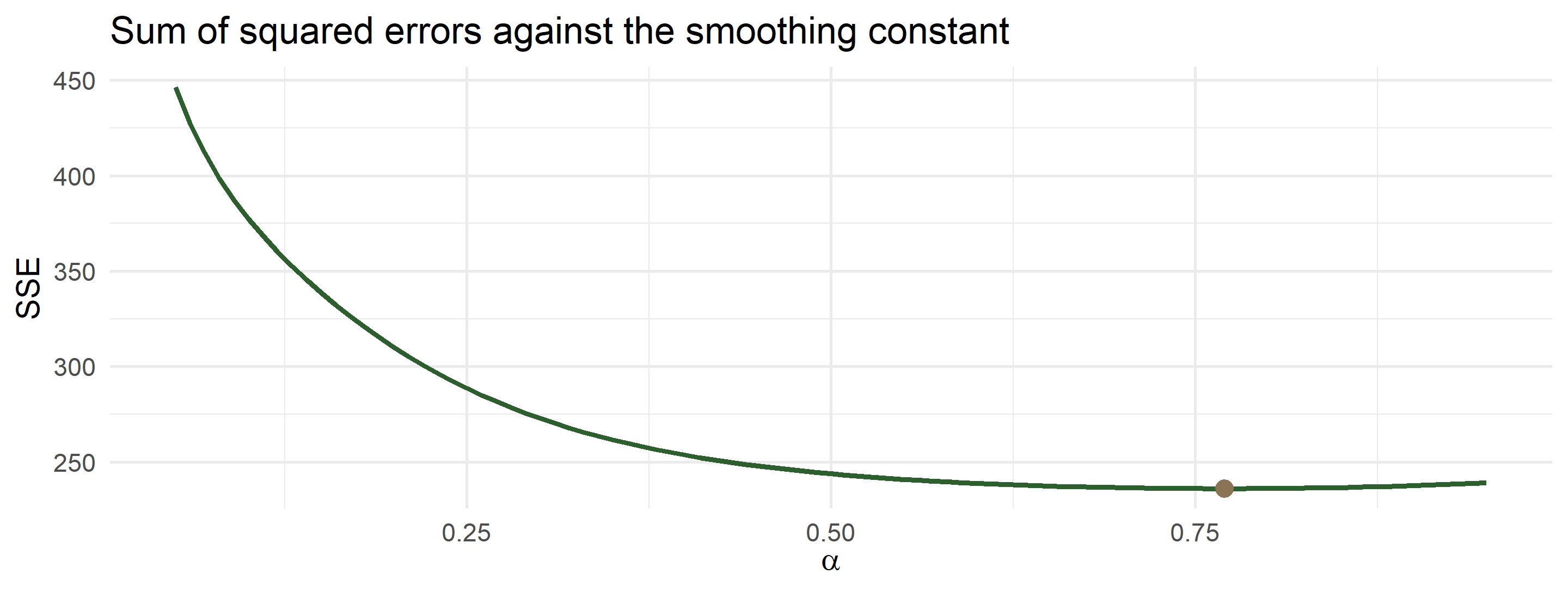
Let the data pick \(\alpha\)

sse_for <- function(a) {
  f <- c(NA, ses(ses_data$y, a)[-24])
  sum((ses_data$y - f)^2, na.rm = TRUE)
}

grid <- tibble(alpha = seq(0.05, 0.95, by = 0.01)) |>
  mutate(sse = map_dbl(alpha, sse_for))

best <- grid |> slice_min(sse)
show_tbl(best, digits = 4)
alpha sse
0.77 236.1215

The same thing, in one line

ses_ts  <- ts(ses_data$y, start = c(2010, 1), frequency = 12)
ses_opt <- HoltWinters(ses_ts, beta = FALSE, gamma = FALSE)

ses_opt$alpha
#> [1] 0.698175
ses_opt$SSE
#> [1] 160.5603

HoltWinters() with beta = FALSE, gamma = FALSE is simple exponential smoothing, with \(\alpha\) chosen by minimising the same SSE you just plotted by hand.

Holt: adding a trend

SES has no trend, so its forecast is flat — useless for a growing series. Holt adds a second recursion for the slope:

\[ \begin{aligned} \ell_t &= \alpha Y_t + (1-\alpha)(\ell_{t-1} + b_{t-1}) \\ b_t &= \beta(\ell_t - \ell_{t-1}) + (1-\beta) b_{t-1} \\ \hat Y_{t+h} &= \ell_t + h\, b_t \end{aligned} \]

The level is smoothed, then the change in level is itself smoothed. Unlike OLS, the slope is local: recent quarters count more than the first one.

Holt on the car sales

deseason_ts <- ts(cars_dec$deseason, start = c(1, 1), frequency = 4)
holt_fit    <- HoltWinters(deseason_ts, gamma = FALSE)

c(alpha = holt_fit$alpha, beta = holt_fit$beta)
#> alpha.alpha   beta.beta 
#>   1.0000000   0.3760964
holt_fc <- tibble(
  t         = 17:20,
  quarter   = 1:4,
  trend_hat = as.numeric(predict(holt_fit, n.ahead = 4))
) |>
  left_join(seasonal_tbl, by = join_by(quarter)) |>
  mutate(forecast_holt = trend_hat * index)

holt_fc |> select(t, quarter, trend_hat, forecast_holt) |> show_tbl(digits = 3)
t quarter trend_hat forecast_holt
17 1 7.484 6.965
18 2 7.608 6.363
19 3 7.733 8.441
20 4 7.857 8.969

Global trend vs local trend

future |>
  select(t, quarter, ols_trend = forecast) |>
  left_join(holt_fc |> select(t, holt = forecast_holt), by = join_by(t)) |>
  mutate(difference = holt - ols_trend) |>
  show_tbl(digits = 3)
t quarter ols_trend holt difference
17 1 7.086 6.965 -0.121
18 2 6.491 6.363 -0.128
19 3 8.632 8.441 -0.191
20 4 9.195 8.969 -0.226

On a short, well-behaved series the two nearly agree. They diverge when the trend bends — and then the local method is usually the one you want.

Holt–Winters: trend and season together

Add a third recursion for the seasonal factors and you have the full method:

\[ \begin{aligned} \ell_t &= \alpha \frac{Y_t}{s_{t-m}} + (1-\alpha)(\ell_{t-1}+b_{t-1}) \\ b_t &= \beta(\ell_t-\ell_{t-1}) + (1-\beta) b_{t-1} \\ s_t &= \gamma \frac{Y_t}{\ell_t} + (1-\gamma) s_{t-m} \\ \hat Y_{t+h} &= (\ell_t + h b_t)\, s_{t+h-m} \end{aligned} \]

The key advantage over classical decomposition: \(\gamma > 0\) lets the seasonal shape evolve. In Pakistan, where tax and tariff changes reshape the calendar of demand, that matters.

Part 7 · Application: monthly car sales in Pakistan

The data

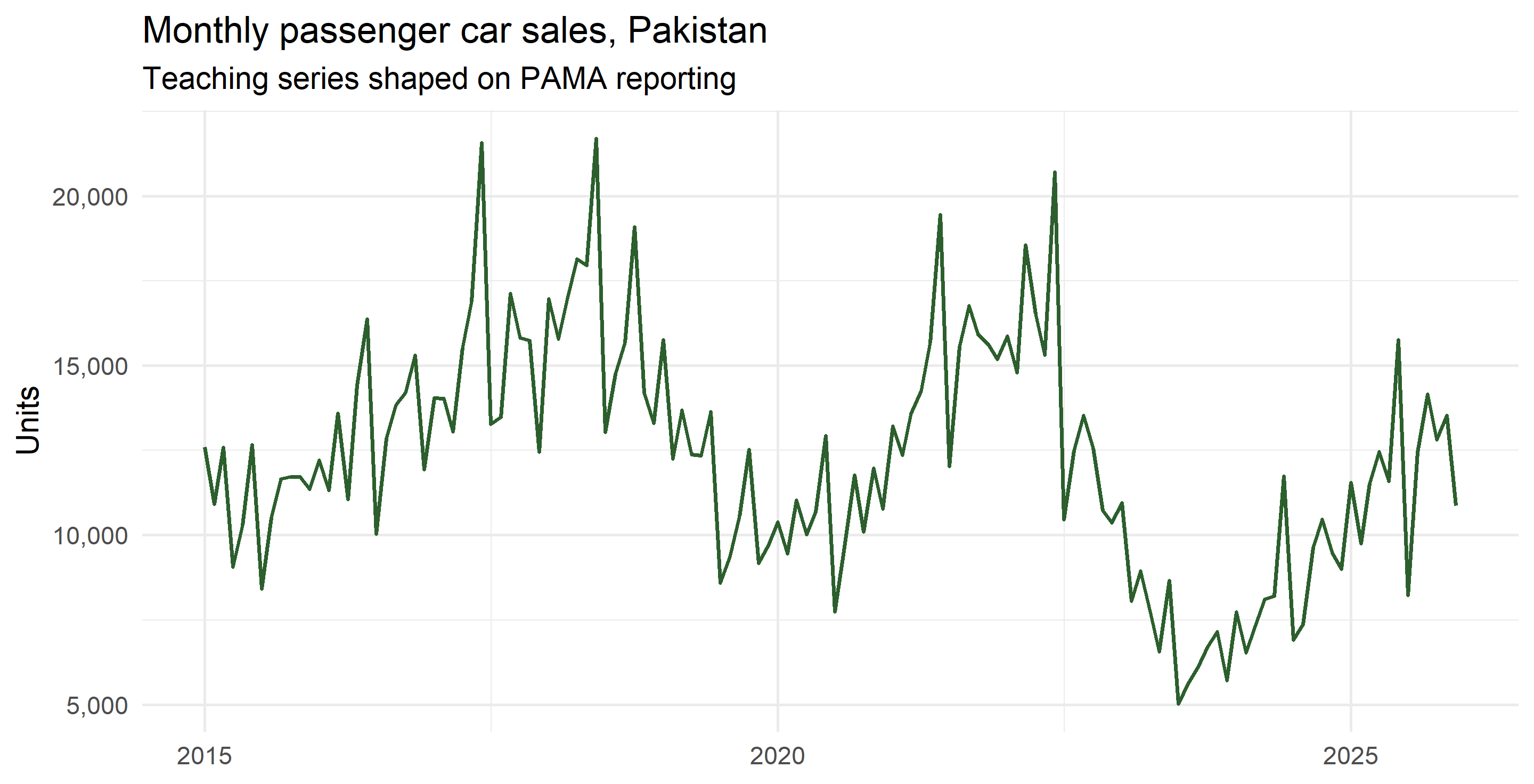
PAMA publishes monthly production and sales by category. The series below is a teaching series shaped like PAMA passenger-car sales: the June push before the new fiscal year, the July collapse after price and duty revisions, the 2020 lockdown, the 2022–23 import-compression crash, and the 2024–25 recovery as policy rates fell.

set.seed(614)

anchor_level <- c(`2015` = 11000, `2016` = 13500, `2017` = 15500, `2018` = 17500,
                  `2019` = 11000, `2020` =  9500, `2021` = 16500, `2022` = 15000,
                  `2023` =  6000, `2024` =  8000, `2025` = 12500, `2026` = 13000)

seas_true <- c(1.05, 0.92, 1.06, 1.00, 1.02, 1.30,
               0.78, 0.92, 1.02, 1.05, 0.98, 0.90)  # Jan ... Dec, sums to 12

pak <- tibble(date = seq(ymd("2015-01-01"), ymd("2025-12-01"), by = "month")) |>
  mutate(
    level = approx(x    = as.numeric(ymd(paste0(names(anchor_level), "-06-15"))),
                   y    = anchor_level,
                   xout = as.numeric(date), rule = 2)$y,
    sales = round(level * seas_true[month(date)] * exp(rnorm(n(), 0, 0.07)))
  ) |>
  select(date, sales)
To use the real data: download the monthly PDFs or the historic month-wise file from pama.org.pk, save as data/pama_cars_monthly.csv with columns month, sales, and replace the block above with pak <- read_csv("data/pama_cars_monthly.csv") |> mutate(date = ym(month)). Everything downstream runs unchanged.

The series

Three structural episodes in eleven years. Classical decomposition will handle the season well and the breaks badly — which is itself the lesson.

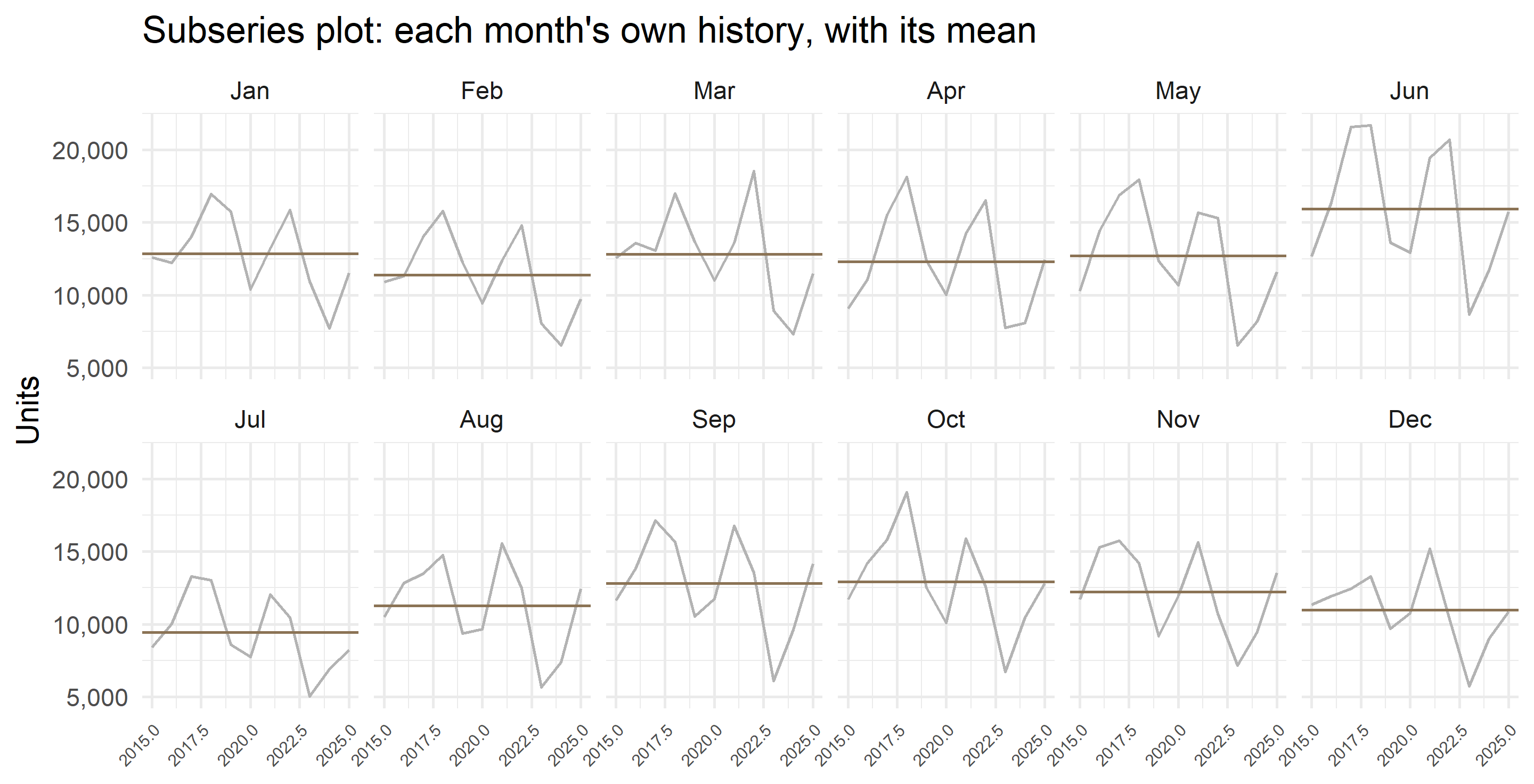
Seasonal subseries plot

The 2×12 centred moving average

pak_dec <- pak |>
  mutate(
    trend = as.numeric(stats::filter(sales,
              filter = c(0.5, rep(1, 11), 0.5) / 12, sides = 2)),
    ratio = sales / trend,
    mon   = month(date)
  )

pak_index <- pak_dec |>
  summarise(index_raw = mean(ratio, na.rm = TRUE), .by = mon) |>
  arrange(mon) |>
  mutate(index = index_raw * 12 / sum(index_raw))

pak_index |>
  transmute(month = month.abb[mon], index = round(index, 3)) |>
  pivot_wider(names_from = month, values_from = index) |>
  show_tbl(digits = 3)
Jan Feb Mar Apr May Jun Jul Aug Sep Oct Nov Dec
1.05 0.923 1.036 1.016 1.036 1.305 0.773 0.902 1.027 1.051 0.987 0.894

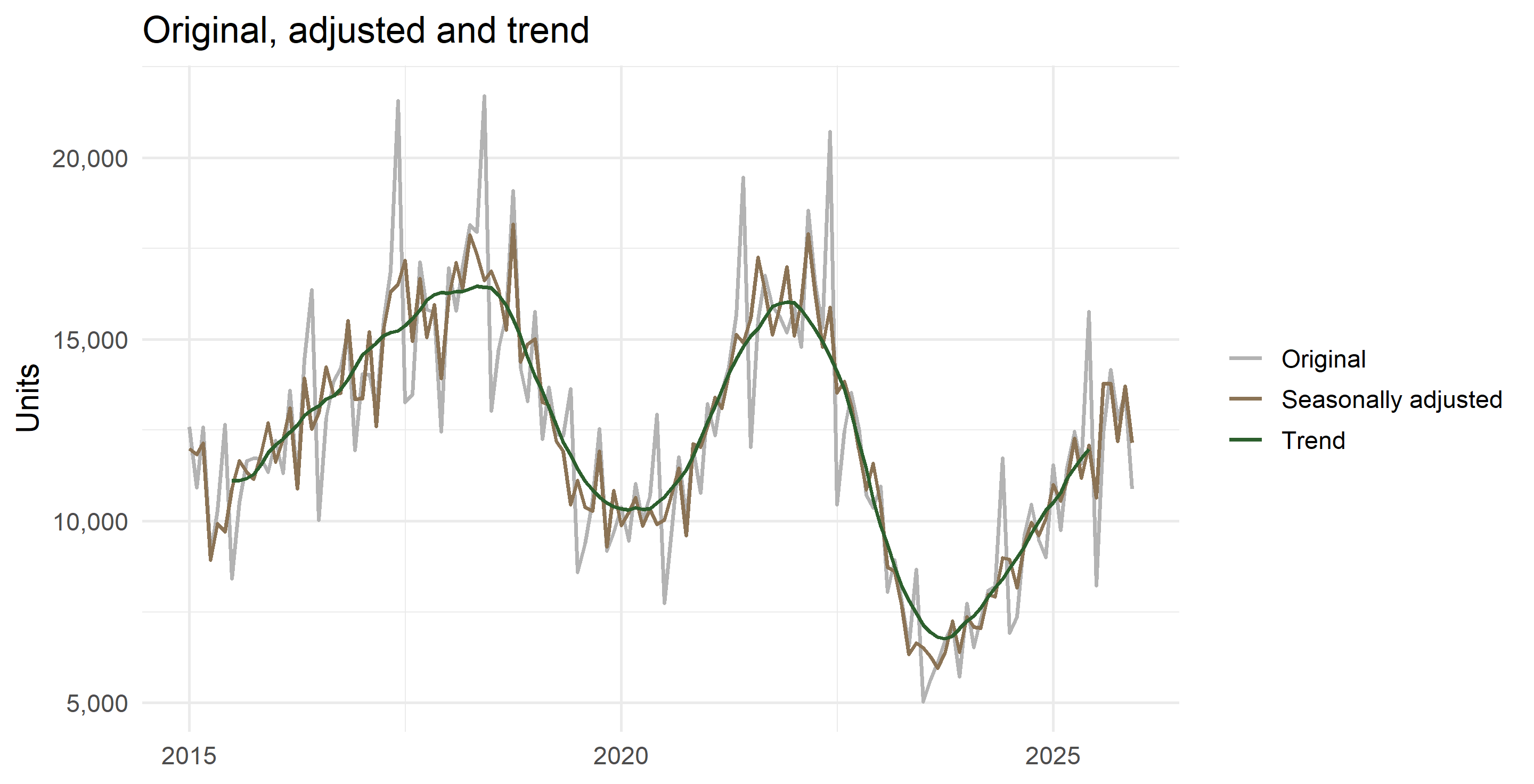
Trend and seasonally adjusted series

Notice the June spike disappears from the adjusted line. What remains is genuine news: the 2020 dip, the 2023 collapse, the recovery.

A proper forecasting test

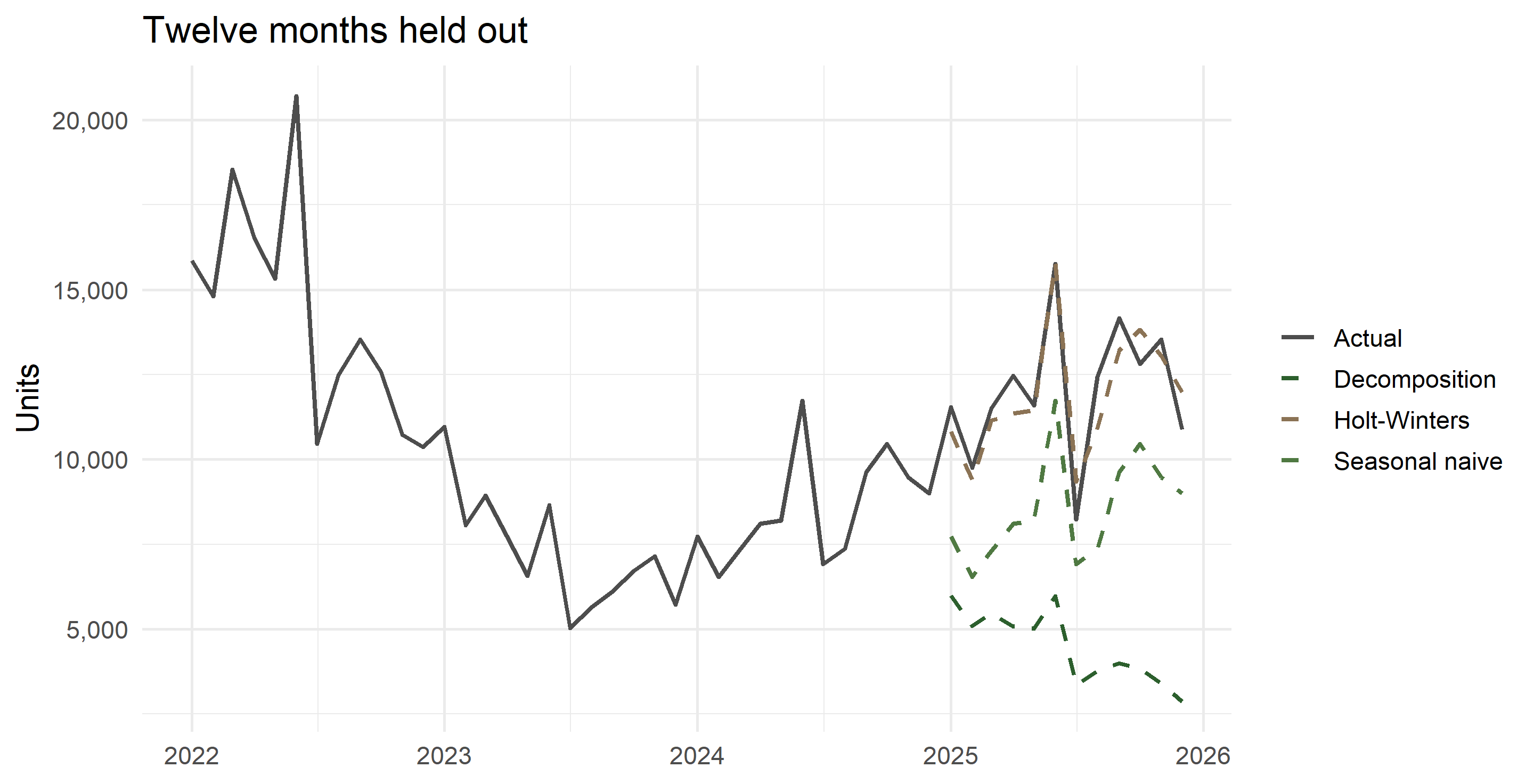
Hold out the last twelve months. Estimate on the rest. Compare three rules.

train <- pak |> filter(date <  ymd("2025-01-01"))
test  <- pak |> filter(date >= ymd("2025-01-01"))

nrow(train); nrow(test)
#> [1] 120
#> [1] 12

Rule 1 — seasonal naive. The forecast for next March is last March. Crude, hard to beat, and the benchmark every model must clear.

Rule 2 — decomposition plus trend, with the trend fitted only to the last three years, because of the 2023 break.

Rule 3 — Holt–Winters multiplicative, which updates both level and season as it goes.

Rule 1: seasonal naive

snaive_fc <- test |>
  mutate(forecast = train |> slice_tail(n = 12) |> pull(sales))

accuracy_tbl(snaive_fc$sales, snaive_fc$forecast, "seasonal naive") |> show_tbl(digits = 2)
model ME MAE RMSE MAPE
seasonal naive 3517.08 3517.08 3681.85 28.89

Rule 2: decomposition plus linear trend

tr_dec <- train |>
  mutate(
    trend = as.numeric(stats::filter(sales, c(0.5, rep(1, 11), 0.5) / 12, sides = 2)),
    ratio = sales / trend,
    mon   = month(date)
  )

tr_index <- tr_dec |>
  summarise(index_raw = mean(ratio, na.rm = TRUE), .by = mon) |>
  mutate(index = index_raw * 12 / sum(index_raw))

tr_model <- tr_dec |>
  left_join(tr_index, by = join_by(mon)) |>
  mutate(t = row_number(), deseason = sales / index) |>
  filter(t > n() - 36)                      # last three years only

lm_fit <- lm(deseason ~ t, data = tr_model)

dec_fc <- test |>
  mutate(t = 121:132, mon = month(date)) |>
  left_join(tr_index, by = join_by(mon)) |>
  mutate(forecast = predict(lm_fit, newdata = pick(t)) * index)

accuracy_tbl(dec_fc$sales, dec_fc$forecast, "decomposition + trend") |> show_tbl(digits = 2)
model ME MAE RMSE MAPE
decomposition + trend 7569.47 7569.47 7812.5 62.15

Rule 3: Holt–Winters

train_ts <- ts(train$sales, start = c(2015, 1), frequency = 12)
hw_fit   <- HoltWinters(train_ts, seasonal = "multiplicative")

c(alpha = hw_fit$alpha, beta = hw_fit$beta, gamma = hw_fit$gamma)
#> alpha.alpha   beta.beta gamma.gamma 
#>   0.4049314   0.3295493   0.4886703
hw_fc <- test |>
  mutate(forecast = as.numeric(predict(hw_fit, n.ahead = 12)))

accuracy_tbl(hw_fc$sales, hw_fc$forecast, "Holt-Winters multiplicative") |> show_tbl(digits = 2)
model ME MAE RMSE MAPE
Holt-Winters multiplicative 196.97 740.68 860.65 6.44

The scoreboard

bind_rows(
  accuracy_tbl(snaive_fc$sales, snaive_fc$forecast, "Seasonal naive"),
  accuracy_tbl(dec_fc$sales,    dec_fc$forecast,    "Decomposition + trend"),
  accuracy_tbl(hw_fc$sales,     hw_fc$forecast,     "Holt-Winters")
) |> arrange(MAPE) |> show_tbl(digits = 2)
model ME MAE RMSE MAPE
Holt-Winters 196.97 740.68 860.65 6.44
Seasonal naive 3517.08 3517.08 3681.85 28.89
Decomposition + trend 7569.47 7569.47 7812.50 62.15

Report MAPE to a policy audience and RMSE to a technical one. Always show the naive benchmark: a model that cannot beat “same month last year” has earned nothing.

The forecasts, plotted

Part 8 · Diagnostics and pitfalls

Check what is left over

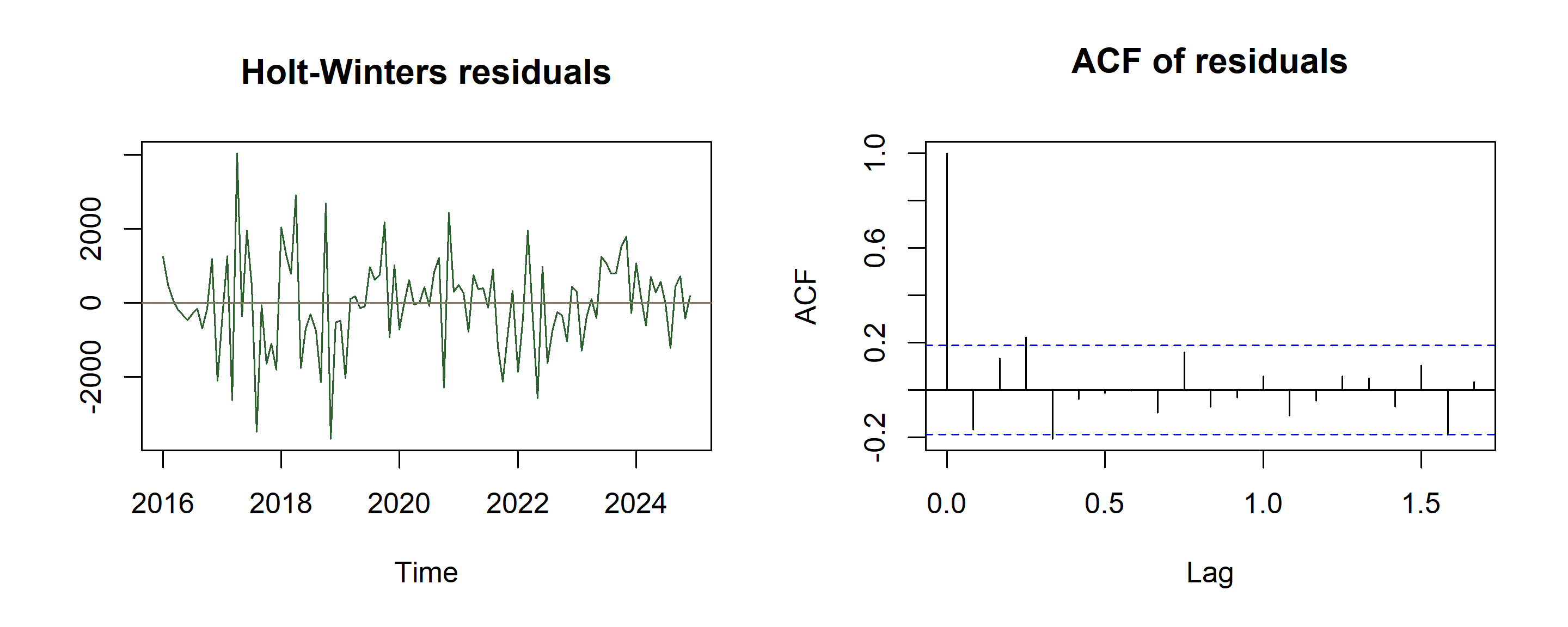
resid_hw <- residuals(hw_fit)

par(mfrow = c(1, 2))
plot(resid_hw, main = "Holt-Winters residuals", ylab = "", col = qau_green)
abline(h = 0, col = qau_brown)
acf(resid_hw, main = "ACF of residuals")
Box.test(resid_hw, lag = 24, type = "Ljung-Box")
#> 
#>  Box-Ljung test
#> 
#> data:  resid_hw
#> X-squared = 44.72, df = 24, p-value = 0.006285

If the ACF still shows spikes at lags 12 and 24, seasonality is left in the residuals and the seasonal component is mis-specified.

Four residual questions

  1. Mean zero? If not, the forecasts are biased — subtract the mean.
  2. No autocorrelation? Spikes in the ACF mean information was left on the table.
  3. Constant variance? Widening residuals call for logs.
  4. Roughly normal? Only needed for prediction intervals, not for the point forecast.

Failing (1) or (2) is serious. Failing (3) or (4) affects the intervals, not the centre.

Pitfalls specific to Pakistani data

  • Fiscal year vs calendar year. PAMA, FBR and PBS report July–June. A “year-on-year” figure from a fiscal-year table is not comparable with a calendar-year one. Decide your \(m\) origin and label it.

  • Moving holidays. Eid shifts about eleven days each year, so Ramadan demand migrates across months. A fixed monthly index cannot capture it — it shows up as a large irregular in two months each year. Remedies: a Ramadan-days regressor, or working in Hijri-adjusted months.

  • Trading-day effects. Months differ in working days; a 31-day month with five Fridays is not a 28-day February. Divide by working days before decomposing.

  • Structural breaks. Import compression in 2022–23 broke both level and seasonal shape. Fitting one global trend across a break gives a confident, wrong forecast. Fit after the break, or allow a break dummy.

  • Revisions. PBS and PAMA figures are revised. A forecast evaluated against revised data flatters itself; keep the vintage you actually had.

When classical decomposition is the wrong tool

  • The first and last \(m/2\) observations get no trend estimate — awkward when the recent end is what you care about. STL and X-13 fill the ends.
  • It assumes the seasonal shape never changes. Over ten years of Pakistani energy or auto data, that is rarely true.
  • It is not robust to outliers: one lockdown month contaminates that month’s index for every year.
  • There is no uncertainty. No standard errors, no intervals.

Use it to see the structure and to teach. Use STL, X-13ARIMA-SEATS, ETS or SARIMA to publish.

What we covered

Step Operation R tool
1 Plot: time, seasonal, subseries ggplot2
2 Trend by centred moving average (2xm-MA) stats::filter()
3 Detrend: ratio (multiplicative) or difference (additive) mutate()
4 Seasonal index: average by cycle position, then normalise summarise(.by =)
5 Deseasonalise, fit a trend, extrapolate, re-seasonalise lm() or HoltWinters()
6 Evaluate out of sample against a naive benchmark hold-out sample

Exercises

  1. The second sheet of the workbook holds another quarterly series: 72, 110, 117, 172, 76, 112, 130, 194, 78, 119, 128, 201, 81, 134, 141, 216. Run the full decomposition. Your Q4 index should land near 1.48. Compare with the spreadsheet and account for any gap — check the CMA alignment first.

  2. Re-run Part 4 in logs. Does the additive decomposition of \(\log Y\) give the same seasonal pattern as the multiplicative decomposition of \(Y\)?

  3. For the Pakistan series, drop everything before 2023 and refit. Does a shorter, break-free sample beat the long sample out of sample?

  4. Build a fiscal-year version of the Pakistan series (July as period 1). Do the seasonal indices change? Should they?

  5. Take monthly PBS data of your choice — CPI, large-scale manufacturing, exports — and decide additive or multiplicative before running a single line of code. Then test your decision by comparing MAPE on logs and levels.

Sources and further reading

  • Data: Pakistan Automotive Manufacturers Association, monthly production and sales (pama.org.pk); Pakistan Bureau of Statistics monthly bulletins.
  • Hyndman, R. J. & Athanasopoulos, G. — Forecasting: Principles and Practice, 3rd ed., chapters 3 and 8. Free at otexts.com/fpp3.
  • Makridakis, Wheelwright & Hyndman — Forecasting: Methods and Applications, chapters 3–4 for the hand-worked decomposition tables.
  • Ladiray & Quenneville — Seasonal Adjustment with the X-11 Method for what statistical agencies actually run.

Appendix · The same work in fpp3

For students who go on to the tidy forecasting stack:

library(fpp3)

pak_tsbl <- pak |> mutate(month = yearmonth(date)) |> as_tsibble(index = month)

pak_tsbl |> model(classical_decomposition(sales, type = "multiplicative")) |>
  components() |> autoplot()

pak_tsbl |> model(STL(log(sales) ~ season(window = "periodic"))) |>
  components() |> autoplot()

fit <- pak_tsbl |>
  filter(month < yearmonth("2025 Jan")) |>
  model(snaive  = SNAIVE(sales),
        hw      = ETS(sales ~ error("M") + trend("A") + season("M")),
        arima   = ARIMA(log(sales)))

fit |> forecast(h = 12) |> accuracy(pak_tsbl)

Same concepts, less bookkeeping. Learn the bookkeeping first.