Chapter 2

Exercise 8

import numpy as np 

import pandas as pd
import matplotlib.pyplot as plt
from ISLP import load_data
from matplotlib.pyplot import subplots
---------------------------------------------------------------------------

ModuleNotFoundError                       Traceback (most recent call last)

Cell In[4], line 5

      3 import pandas as pd

      4 import matplotlib.pyplot as plt

----> 5 from ISLP import load_data

      6 from matplotlib.pyplot import subplots


ModuleNotFoundError: No module named 'ISLP'

(a)

college=pd.read_csv('College.csv')
---------------------------------------------------------------------------

FileNotFoundError                         Traceback (most recent call last)

Cell In[5], line 1

----> 1 college=pd.read_csv('College.csv')


File ~\AppData\Roaming\Python\Python313\site-packages\pandas\io\parsers\readers.py:1026, in read_csv(filepath_or_buffer, sep, delimiter, header, names, index_col, usecols, dtype, engine, converters, true_values, false_values, skipinitialspace, skiprows, skipfooter, nrows, na_values, keep_default_na, na_filter, verbose, skip_blank_lines, parse_dates, infer_datetime_format, keep_date_col, date_parser, date_format, dayfirst, cache_dates, iterator, chunksize, compression, thousands, decimal, lineterminator, quotechar, quoting, doublequote, escapechar, comment, encoding, encoding_errors, dialect, on_bad_lines, delim_whitespace, low_memory, memory_map, float_precision, storage_options, dtype_backend)

   1013 kwds_defaults = _refine_defaults_read(

   1014     dialect,

   1015     delimiter,

   (...)

   1022     dtype_backend=dtype_backend,

   1023 )

   1024 kwds.update(kwds_defaults)

-> 1026 return _read(filepath_or_buffer, kwds)


File ~\AppData\Roaming\Python\Python313\site-packages\pandas\io\parsers\readers.py:620, in _read(filepath_or_buffer, kwds)

    617 _validate_names(kwds.get("names", None))

    619 # Create the parser.

--> 620 parser = TextFileReader(filepath_or_buffer, **kwds)

    622 if chunksize or iterator:

    623     return parser


File ~\AppData\Roaming\Python\Python313\site-packages\pandas\io\parsers\readers.py:1620, in TextFileReader.__init__(self, f, engine, **kwds)

   1617     self.options["has_index_names"] = kwds["has_index_names"]

   1619 self.handles: IOHandles | None = None

-> 1620 self._engine = self._make_engine(f, self.engine)


File ~\AppData\Roaming\Python\Python313\site-packages\pandas\io\parsers\readers.py:1880, in TextFileReader._make_engine(self, f, engine)

   1878     if "b" not in mode:

   1879         mode += "b"

-> 1880 self.handles = get_handle(

   1881     f,

   1882     mode,

   1883     encoding=self.options.get("encoding", None),

   1884     compression=self.options.get("compression", None),

   1885     memory_map=self.options.get("memory_map", False),

   1886     is_text=is_text,

   1887     errors=self.options.get("encoding_errors", "strict"),

   1888     storage_options=self.options.get("storage_options", None),

   1889 )

   1890 assert self.handles is not None

   1891 f = self.handles.handle


File ~\AppData\Roaming\Python\Python313\site-packages\pandas\io\common.py:873, in get_handle(path_or_buf, mode, encoding, compression, memory_map, is_text, errors, storage_options)

    868 elif isinstance(handle, str):

    869     # Check whether the filename is to be opened in binary mode.

    870     # Binary mode does not support 'encoding' and 'newline'.

    871     if ioargs.encoding and "b" not in ioargs.mode:

    872         # Encoding

--> 873         handle = open(

    874             handle,

    875             ioargs.mode,

    876             encoding=ioargs.encoding,

    877             errors=errors,

    878             newline="",

    879         )

    880     else:

    881         # Binary mode

    882         handle = open(handle, ioargs.mode)


FileNotFoundError: [Errno 2] No such file or directory: 'College.csv'
(b)

college.head()
Unnamed: 0 Private Apps Accept Enroll Top10perc Top25perc F.Undergrad P.Undergrad Outstate Room.Board Books Personal PhD Terminal S.F.Ratio perc.alumni Expend Grad.Rate
0 Abilene Christian University Yes 1660 1232 721 23 52 2885 537 7440 3300 450 2200 70 78 18.1 12 7041 60
1 Adelphi University Yes 2186 1924 512 16 29 2683 1227 12280 6450 750 1500 29 30 12.2 16 10527 56
2 Adrian College Yes 1428 1097 336 22 50 1036 99 11250 3750 400 1165 53 66 12.9 30 8735 54
3 Agnes Scott College Yes 417 349 137 60 89 510 63 12960 5450 450 875 92 97 7.7 37 19016 59
4 Alaska Pacific University Yes 193 146 55 16 44 249 869 7560 4120 800 1500 76 72 11.9 2 10922 15
college2 = pd.read_csv('College.csv', index_col =0)
college3 = college.rename({'Unnamed: 0': 'College'},axis=1)
college3 = college3.set_index('College')
college=college3
college.head()
Private Apps Accept Enroll Top10perc Top25perc F.Undergrad P.Undergrad Outstate Room.Board Books Personal PhD Terminal S.F.Ratio perc.alumni Expend Grad.Rate
College
Abilene Christian University Yes 1660 1232 721 23 52 2885 537 7440 3300 450 2200 70 78 18.1 12 7041 60
Adelphi University Yes 2186 1924 512 16 29 2683 1227 12280 6450 750 1500 29 30 12.2 16 10527 56
Adrian College Yes 1428 1097 336 22 50 1036 99 11250 3750 400 1165 53 66 12.9 30 8735 54
Agnes Scott College Yes 417 349 137 60 89 510 63 12960 5450 450 875 92 97 7.7 37 19016 59
Alaska Pacific University Yes 193 146 55 16 44 249 869 7560 4120 800 1500 76 72 11.9 2 10922 15

(c)

college.describe()
Apps Accept Enroll Top10perc Top25perc F.Undergrad P.Undergrad Outstate Room.Board Books Personal PhD Terminal S.F.Ratio perc.alumni Expend Grad.Rate
count 777.000000 777.000000 777.000000 777.000000 777.000000 777.000000 777.000000 777.000000 777.000000 777.000000 777.000000 777.000000 777.000000 777.000000 777.000000 777.000000 777.00000
mean 3001.638353 2018.804376 779.972973 27.558559 55.796654 3699.907336 855.298584 10440.669241 4357.526384 549.380952 1340.642214 72.660232 79.702703 14.089704 22.743887 9660.171171 65.46332
std 3870.201484 2451.113971 929.176190 17.640364 19.804778 4850.420531 1522.431887 4023.016484 1096.696416 165.105360 677.071454 16.328155 14.722359 3.958349 12.391801 5221.768440 17.17771
min 81.000000 72.000000 35.000000 1.000000 9.000000 139.000000 1.000000 2340.000000 1780.000000 96.000000 250.000000 8.000000 24.000000 2.500000 0.000000 3186.000000 10.00000
25% 776.000000 604.000000 242.000000 15.000000 41.000000 992.000000 95.000000 7320.000000 3597.000000 470.000000 850.000000 62.000000 71.000000 11.500000 13.000000 6751.000000 53.00000
50% 1558.000000 1110.000000 434.000000 23.000000 54.000000 1707.000000 353.000000 9990.000000 4200.000000 500.000000 1200.000000 75.000000 82.000000 13.600000 21.000000 8377.000000 65.00000
75% 3624.000000 2424.000000 902.000000 35.000000 69.000000 4005.000000 967.000000 12925.000000 5050.000000 600.000000 1700.000000 85.000000 92.000000 16.500000 31.000000 10830.000000 78.00000
max 48094.000000 26330.000000 6392.000000 96.000000 100.000000 31643.000000 21836.000000 21700.000000 8124.000000 2340.000000 6800.000000 103.000000 100.000000 39.800000 64.000000 56233.000000 118.00000

(d)

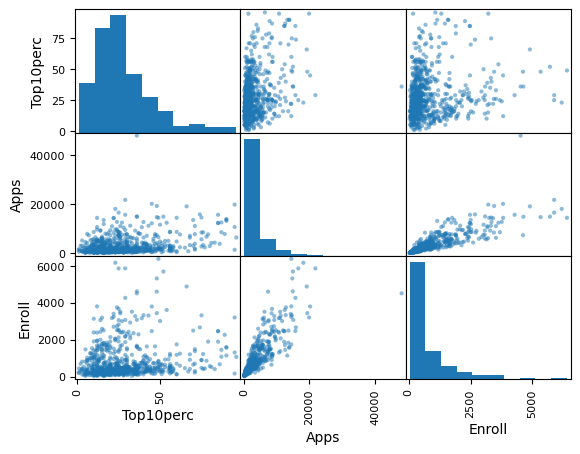
pd.plotting.scatter_matrix(college[['Top10perc','Apps','Enroll']]);

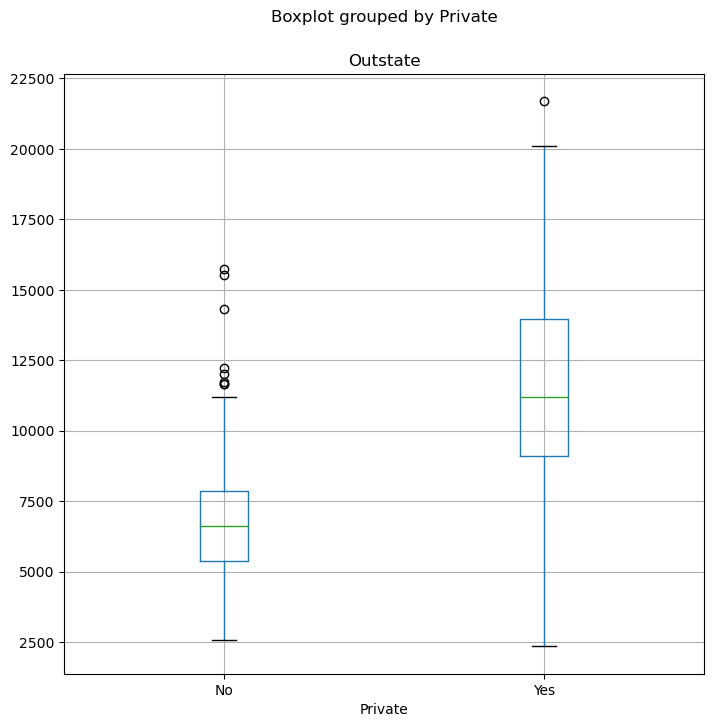
(e)

fig, ax = subplots(figsize=(8, 8))
college.boxplot('Outstate', by='Private', ax=ax);

(f)

college['Elite'] = pd.cut(college['Top10perc'],bins=2,labels=['No','Yes'])
#The exact formula provided by the exercise instructions did not work. In fact many observations 
#remained void.
college.value_counts(college['Elite'])
Elite
No     687
Yes     90
dtype: int64
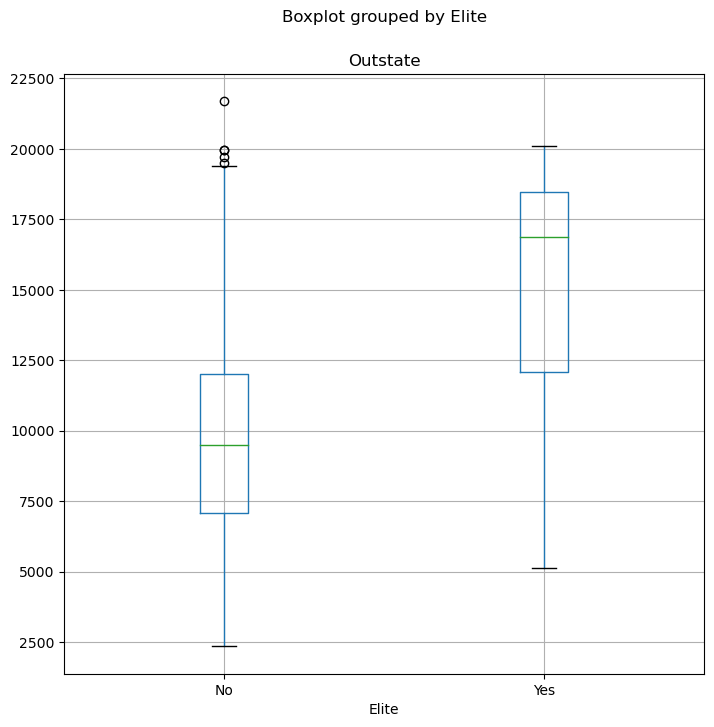
fig, ax = subplots(figsize=(8, 8))
college.boxplot('Outstate', by='Elite', ax=ax);

(g)

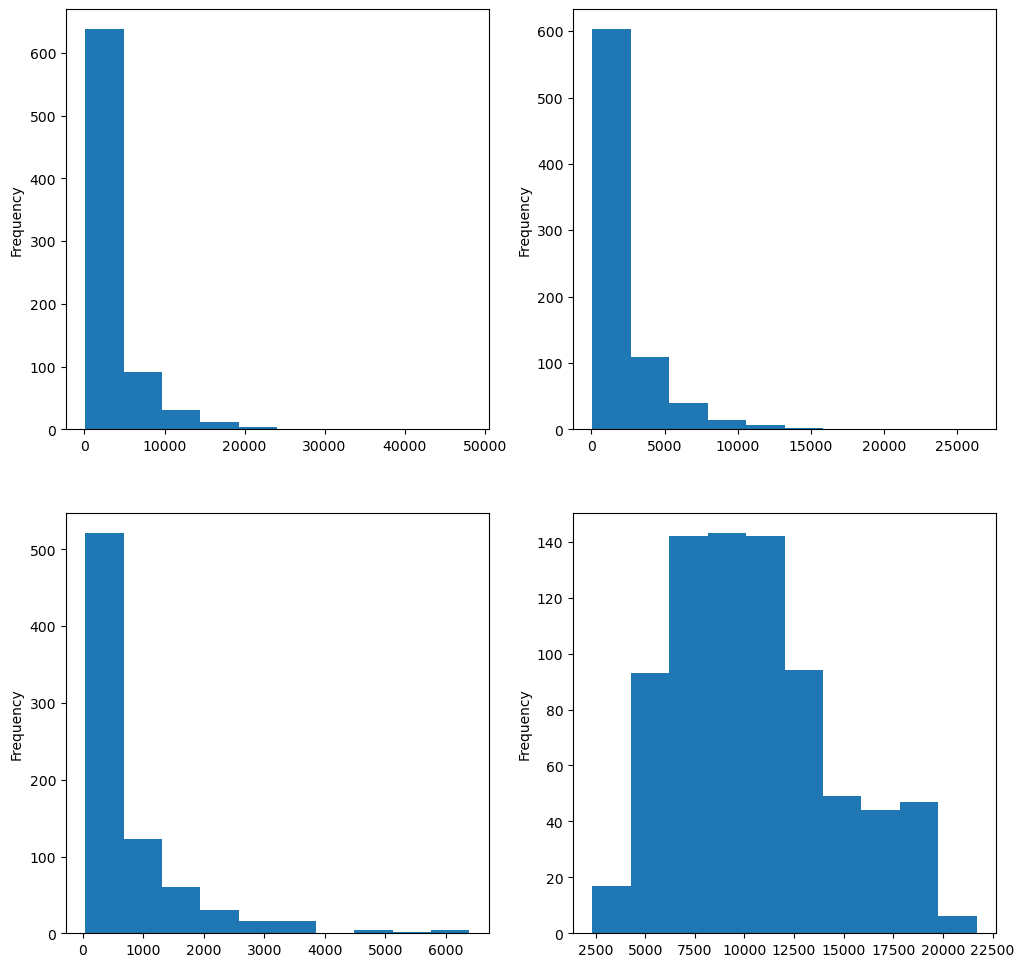
fig, axes =plt.subplots(nrows=2,ncols= 2,figsize=(12,12))
college['Apps'].plot.hist(ax=axes[0,0])
college['Accept'].plot.hist(ax=axes[0,1])
college['Enroll'].plot.hist(ax=axes[1,0])
college['Outstate'].plot.hist(ax=axes[1,1]);
# We can create bins for each of the plotted columns

(h)

First off, let’s explore the type of each of the data set features. We can use the info() fiunction for this.

college.info()
<class 'pandas.core.frame.DataFrame'>
Index: 777 entries, Abilene Christian University to York College of Pennsylvania
Data columns (total 19 columns):
 #   Column       Non-Null Count  Dtype   
---  ------       --------------  -----   
 0   Private      777 non-null    object  
 1   Apps         777 non-null    int64   
 2   Accept       777 non-null    int64   
 3   Enroll       777 non-null    int64   
 4   Top10perc    777 non-null    int64   
 5   Top25perc    777 non-null    int64   
 6   F.Undergrad  777 non-null    int64   
 7   P.Undergrad  777 non-null    int64   
 8   Outstate     777 non-null    int64   
 9   Room.Board   777 non-null    int64   
 10  Books        777 non-null    int64   
 11  Personal     777 non-null    int64   
 12  PhD          777 non-null    int64   
 13  Terminal     777 non-null    int64   
 14  S.F.Ratio    777 non-null    float64 
 15  perc.alumni  777 non-null    int64   
 16  Expend       777 non-null    int64   
 17  Grad.Rate    777 non-null    int64   
 18  Elite        777 non-null    category
dtypes: category(1), float64(1), int64(16), object(1)
memory usage: 116.2+ KB

The whole features pertain to numerical type except for ‘Elite’ and ‘Private’. Note that it is preferred to convert Private to ‘category’ type instead of object in order to avoid potential errors when using this feature in a determined function.

college['Private']=college['Private'].astype('category')

We define three possible segments for the data set: - ‘Faculty’ : this segment comprises all the features which relate to faculty. This includes features ‘PhD’, ‘Terminal’ and ‘S.F.Ratio’; - ‘Students’: This segment includes the features which interests the students. It includes the following features: ‘Apps’, ‘Accept’, ‘Enroll’, ‘Top10perc’, ‘Top25perc’, ‘F.Undergrad’, ‘P.Undergrad’ and ‘Grad.Rate’; - ‘Finance’ : This segment includes the features which give insight about the business model of the university. It encompasses the following features: ‘Private’, ‘Outstate’, ‘Room.Board’, ‘Books’, ‘Personal’, ‘perc.alumni’ and ‘Expend’.

A university might be interested in the number of enrolled students every year as the dependent variable. This could be a good indicator of performance about the popularity of the university. We choose to focus univariate analysis from this perspective.

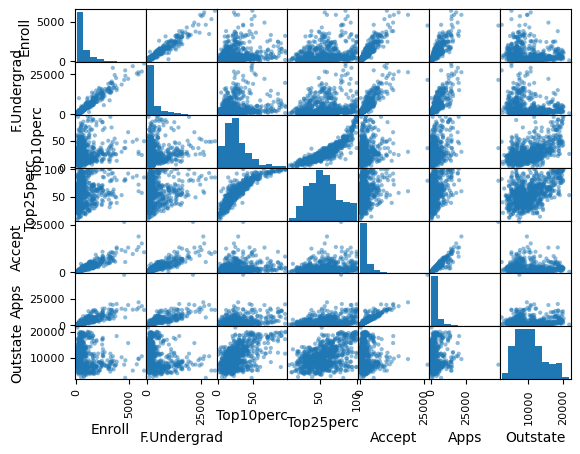
Our expectations related to Outstate tuition are the following: - The dependent variable msut be related to both Top10per et Top25perc - Attribute F.Undergrad play for sure an important role in the dependent variable prediction. - Attributes Apps and Accept must also be related to Enroll, since potential students will tend to apply more where they could be accepted and the enrollment numbers must then be at high levels. Let’s now check these hypotheses by drawing scatterplots.

pd.plotting.scatter_matrix(college[['Enroll','F.Undergrad','Top10perc','Top25perc','Accept',
                                    'Apps','Outstate']]);

As expected, Enroll looks positively correlated with Accept, F.Undergrad and Apps. However, the relationships with the other attributes look less evident. We should then focus on those three features as independent variables.

college.corr()
C:\Users\kabousselham\AppData\Local\Temp\ipykernel_17648\2850033496.py:1: FutureWarning: The default value of numeric_only in DataFrame.corr is deprecated. In a future version, it will default to False. Select only valid columns or specify the value of numeric_only to silence this warning.
  college.corr()
Apps Accept Enroll Top10perc Top25perc F.Undergrad P.Undergrad Outstate Room.Board Books Personal PhD Terminal S.F.Ratio perc.alumni Expend Grad.Rate
Apps 1.000000 0.943451 0.846822 0.338834 0.351640 0.814491 0.398264 0.050159 0.164939 0.132559 0.178731 0.390697 0.369491 0.095633 -0.090226 0.259592 0.146755
Accept 0.943451 1.000000 0.911637 0.192447 0.247476 0.874223 0.441271 -0.025755 0.090899 0.113525 0.200989 0.355758 0.337583 0.176229 -0.159990 0.124717 0.067313
Enroll 0.846822 0.911637 1.000000 0.181294 0.226745 0.964640 0.513069 -0.155477 -0.040232 0.112711 0.280929 0.331469 0.308274 0.237271 -0.180794 0.064169 -0.022341
Top10perc 0.338834 0.192447 0.181294 1.000000 0.891995 0.141289 -0.105356 0.562331 0.371480 0.118858 -0.093316 0.531828 0.491135 -0.384875 0.455485 0.660913 0.494989
Top25perc 0.351640 0.247476 0.226745 0.891995 1.000000 0.199445 -0.053577 0.489394 0.331490 0.115527 -0.080810 0.545862 0.524749 -0.294629 0.417864 0.527447 0.477281
F.Undergrad 0.814491 0.874223 0.964640 0.141289 0.199445 1.000000 0.570512 -0.215742 -0.068890 0.115550 0.317200 0.318337 0.300019 0.279703 -0.229462 0.018652 -0.078773
P.Undergrad 0.398264 0.441271 0.513069 -0.105356 -0.053577 0.570512 1.000000 -0.253512 -0.061326 0.081200 0.319882 0.149114 0.141904 0.232531 -0.280792 -0.083568 -0.257001
Outstate 0.050159 -0.025755 -0.155477 0.562331 0.489394 -0.215742 -0.253512 1.000000 0.654256 0.038855 -0.299087 0.382982 0.407983 -0.554821 0.566262 0.672779 0.571290
Room.Board 0.164939 0.090899 -0.040232 0.371480 0.331490 -0.068890 -0.061326 0.654256 1.000000 0.127963 -0.199428 0.329202 0.374540 -0.362628 0.272363 0.501739 0.424942
Books 0.132559 0.113525 0.112711 0.118858 0.115527 0.115550 0.081200 0.038855 0.127963 1.000000 0.179295 0.026906 0.099955 -0.031929 -0.040208 0.112409 0.001061
Personal 0.178731 0.200989 0.280929 -0.093316 -0.080810 0.317200 0.319882 -0.299087 -0.199428 0.179295 1.000000 -0.010936 -0.030613 0.136345 -0.285968 -0.097892 -0.269344
PhD 0.390697 0.355758 0.331469 0.531828 0.545862 0.318337 0.149114 0.382982 0.329202 0.026906 -0.010936 1.000000 0.849587 -0.130530 0.249009 0.432762 0.305038
Terminal 0.369491 0.337583 0.308274 0.491135 0.524749 0.300019 0.141904 0.407983 0.374540 0.099955 -0.030613 0.849587 1.000000 -0.160104 0.267130 0.438799 0.289527
S.F.Ratio 0.095633 0.176229 0.237271 -0.384875 -0.294629 0.279703 0.232531 -0.554821 -0.362628 -0.031929 0.136345 -0.130530 -0.160104 1.000000 -0.402929 -0.583832 -0.306710
perc.alumni -0.090226 -0.159990 -0.180794 0.455485 0.417864 -0.229462 -0.280792 0.566262 0.272363 -0.040208 -0.285968 0.249009 0.267130 -0.402929 1.000000 0.417712 0.490898
Expend 0.259592 0.124717 0.064169 0.660913 0.527447 0.018652 -0.083568 0.672779 0.501739 0.112409 -0.097892 0.432762 0.438799 -0.583832 0.417712 1.000000 0.390343
Grad.Rate 0.146755 0.067313 -0.022341 0.494989 0.477281 -0.078773 -0.257001 0.571290 0.424942 0.001061 -0.269344 0.305038 0.289527 -0.306710 0.490898 0.390343 1.000000

Both correlation matrix and scatterplots show that ‘Apps’, ‘F.Undergrad’ and ‘Accept’ are twin brothers. We should choose one of them and let it be ‘Accept’. We could also argue that there is a nonlinear relationship between the dependent variable and ‘Outstate’. The same thing could be noticed with ‘Top10perc’.

Our choice finally lands on ‘Accept’, ‘Outstate’ and ‘Top10perc’ as independent variables.

Hopefully there are no missing data as we can notice from previous outputs. The data set contains 777 entries and all the features show the same count of inputs.

Now let’s look for outliars. Unfortunately the process of finding outliers can be tieresome and not adapted to the question instruction. The process intails dectecting potential outliers using univariate, bivariate and multivariate analysis accross the whole data set, then trying to classify each potential outlier and spot the variable or the reasons behind it.
Consequently, we assume here that there is no aberrant outlier among all the potential ones. Hence, in order to preserve the generalizability of the population features they must all be retained.

Instead of searching outliars we check below whether there are inconsistant observations. The inconsistency can be found by comparing the triplet’Apps’, ‘Accept’ and ‘Enroll’ for each observation.
In fact, for every university the number of applications should logically be greater than number of accepted students which in turn should be greater than the number of students enrolled.
Below we discover that such inconsistencies does not exist in the data set.

college.loc[lambda college:college['Apps']<college['Accept']].count()
Private        0
Apps           0
Accept         0
Enroll         0
Top10perc      0
Top25perc      0
F.Undergrad    0
P.Undergrad    0
Outstate       0
Room.Board     0
Books          0
Personal       0
PhD            0
Terminal       0
S.F.Ratio      0
perc.alumni    0
Expend         0
Grad.Rate      0
Elite          0
standard       0
dtype: int64
college.loc[lambda college:college['Accept']<college['Enroll']].count()
Private        0
Apps           0
Accept         0
Enroll         0
Top10perc      0
Top25perc      0
F.Undergrad    0
P.Undergrad    0
Outstate       0
Room.Board     0
Books          0
Personal       0
PhD            0
Terminal       0
S.F.Ratio      0
perc.alumni    0
Expend         0
Grad.Rate      0
Elite          0
standard       0
dtype: int64

Further exploration can be left to the reader. Next steps can include the verfication of normality, homoscedasticity, correlated errors and linearty.
The interested reader can find more in the following references: - Data Preparation for Machine Learning Data Cleaning, Feature Selection, and Data Transforms in Python by Jason Brownlee; - Multivariate Data Analysis by Joseph F. Hair et al., 8th edition.

Exercise 9

Auto=load_data('Auto')
Auto.columns
Index(['mpg', 'cylinders', 'displacement', 'horsepower', 'weight',
       'acceleration', 'year', 'origin', 'name'],
      dtype='object')
for col in Auto.columns:
    template = 'Column "{0}" has {1} missing values'
    print(template.format(col,pd.isnull(Auto[col]).sum()))
Column "mpg" has 0 missing values
Column "cylinders" has 0 missing values
Column "displacement" has 0 missing values
Column "horsepower" has 0 missing values
Column "weight" has 0 missing values
Column "acceleration" has 0 missing values
Column "year" has 0 missing values
Column "origin" has 0 missing values
Column "name" has 0 missing values

There is no missing value in the data set.

(a)

Auto.info()
<class 'pandas.core.frame.DataFrame'>
RangeIndex: 392 entries, 0 to 391
Data columns (total 9 columns):
 #   Column        Non-Null Count  Dtype  
---  ------        --------------  -----  
 0   mpg           392 non-null    float64
 1   cylinders     392 non-null    int64  
 2   displacement  392 non-null    float64
 3   horsepower    392 non-null    int64  
 4   weight        392 non-null    int64  
 5   acceleration  392 non-null    float64
 6   year          392 non-null    int64  
 7   origin        392 non-null    int64  
 8   name          392 non-null    object 
dtypes: float64(3), int64(5), object(1)
memory usage: 27.7+ KB

All predictors are quantitative except for the ‘name’ feature.

(b) and (c)

#The method describe() does the job automatically for all quantitative columns
Auto.describe()
mpg cylinders displacement horsepower weight acceleration year origin
count 392.000000 392.000000 392.000000 392.000000 392.000000 392.000000 392.000000 392.000000
mean 23.445918 5.471939 194.411990 104.469388 2977.584184 15.541327 75.979592 1.576531
std 7.805007 1.705783 104.644004 38.491160 849.402560 2.758864 3.683737 0.805518
min 9.000000 3.000000 68.000000 46.000000 1613.000000 8.000000 70.000000 1.000000
25% 17.000000 4.000000 105.000000 75.000000 2225.250000 13.775000 73.000000 1.000000
50% 22.750000 4.000000 151.000000 93.500000 2803.500000 15.500000 76.000000 1.000000
75% 29.000000 8.000000 275.750000 126.000000 3614.750000 17.025000 79.000000 2.000000
max 46.600000 8.000000 455.000000 230.000000 5140.000000 24.800000 82.000000 3.000000

(d)

Auto_b=Auto.drop(Auto.index[10:85])
Auto_b.describe()
mpg cylinders displacement horsepower weight acceleration year origin
count 317.000000 317.000000 317.000000 317.000000 317.000000 317.000000 317.000000 317.000000
mean 24.374763 5.381703 187.880126 101.003155 2938.854890 15.704101 77.123028 1.599369
std 7.872565 1.658135 100.169973 36.003208 811.640668 2.719913 3.127158 0.819308
min 11.000000 3.000000 68.000000 46.000000 1649.000000 8.500000 70.000000 1.000000
25% 18.000000 4.000000 101.000000 75.000000 2215.000000 14.000000 75.000000 1.000000
50% 23.900000 4.000000 146.000000 90.000000 2795.000000 15.500000 77.000000 1.000000
75% 30.500000 6.000000 250.000000 115.000000 3520.000000 17.300000 80.000000 2.000000
max 46.600000 8.000000 455.000000 230.000000 4997.000000 24.800000 82.000000 3.000000

Differences are noticeable between both previous tables.

(e)

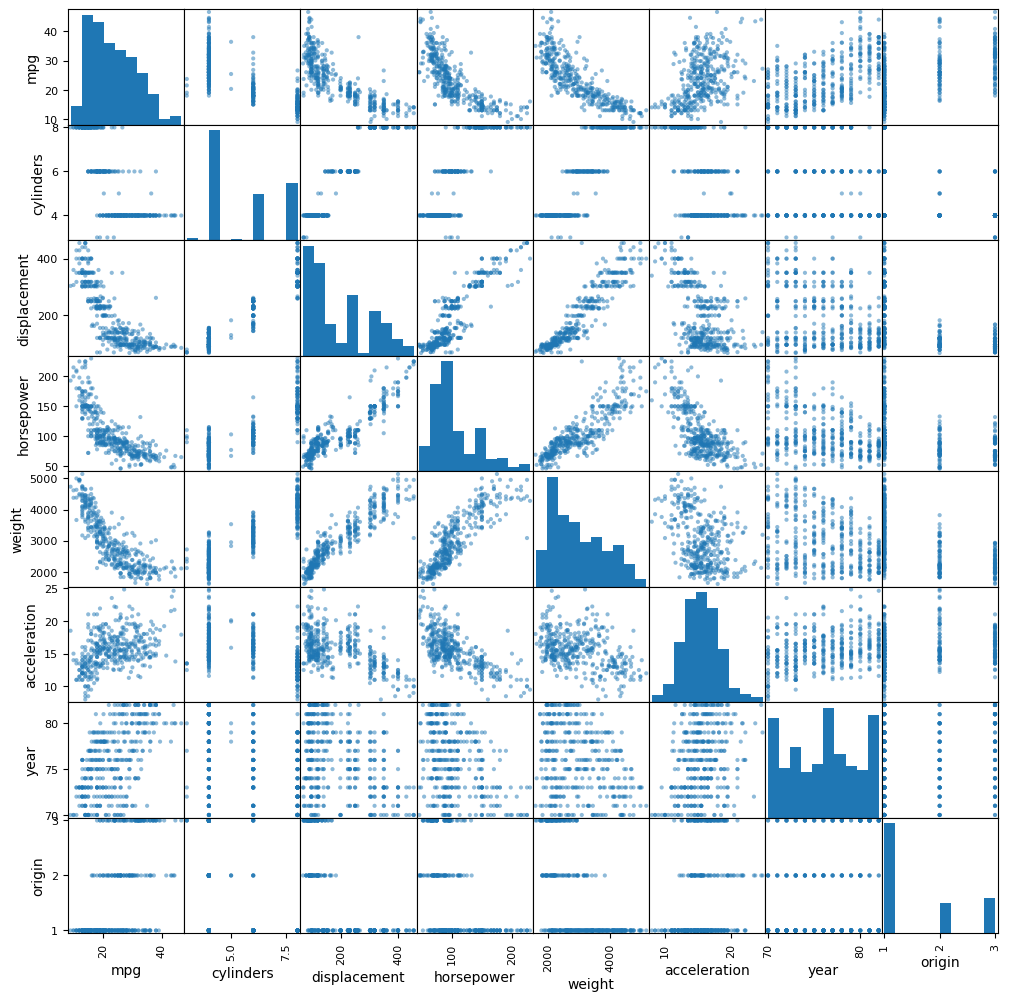
pd.plotting.scatter_matrix(Auto,figsize=(12,12));

From the previous scatter plot we can draw the following preliminary conclusions:
- While acceleration envokes a normal distribution, both weight and mpg show flat tails like normal distribution and skewness; - The couples (displacement,weight), (horsepower, weight) and (horsepower, displacement) show strong linear relationships; - The couples (mpg,weight), (horsepower, mpg) and (mpg, displacement) show non-linear relationships.

(f)

Based on the conclusions of the previous question, we elect the features ‘weight’, ‘horsepower’ and ‘displacement’ as to be predictors of ‘mpg’. Further investigations must be done to find the best model and evaluate whether the interlying relationships are significant.

Exercise 10

(a)

Boston=load_data('Boston')

(b)

Boston.shape
(506, 13)

The previous instruction shows that Boston data set contains 506 lines and 13 columns.
Each row is a town in Boston area. Columns are factors which can influence house prices.

(c)

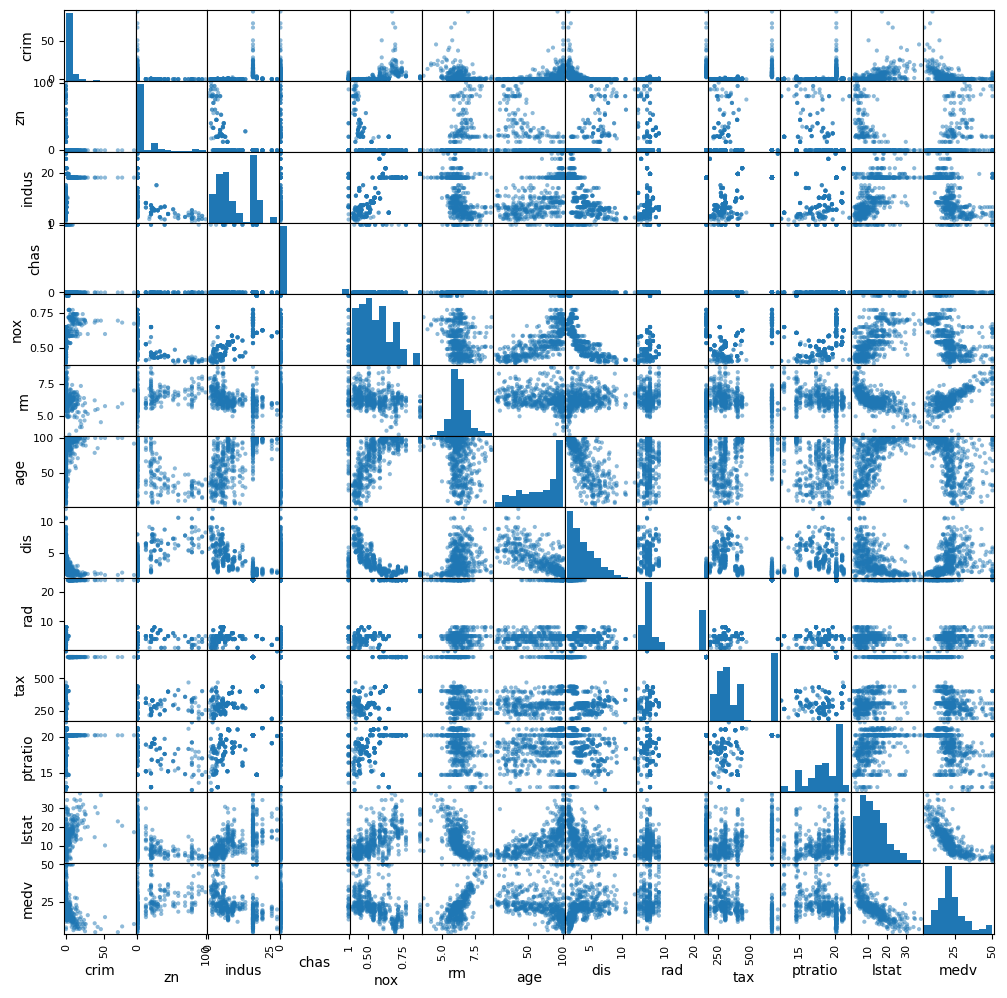
pd.plotting.scatter_matrix(Boston,figsize=(12,12));

From the previous scatter plot we can draw the following preliminary conclusions:
- While rm and medv probably stem from a normal distribution, features like dis, age, lstat, zn and crim may need transformations to satisfy normality; - The couple (rm, medv) shows a strong linear positive relationship; - The couple (rm,lstat) shows a negative non-linear relationship.

(d)

Boston.corrwith(Boston['crim'])
crim       1.000000
zn        -0.200469
indus      0.406583
chas      -0.055892
nox        0.420972
rm        -0.219247
age        0.352734
dis       -0.379670
rad        0.625505
tax        0.582764
ptratio    0.289946
lstat      0.455621
medv      -0.388305
dtype: float64

Most important correlations with ‘crim’ feature are discovered with both ‘rad’ and ‘tax’ features.
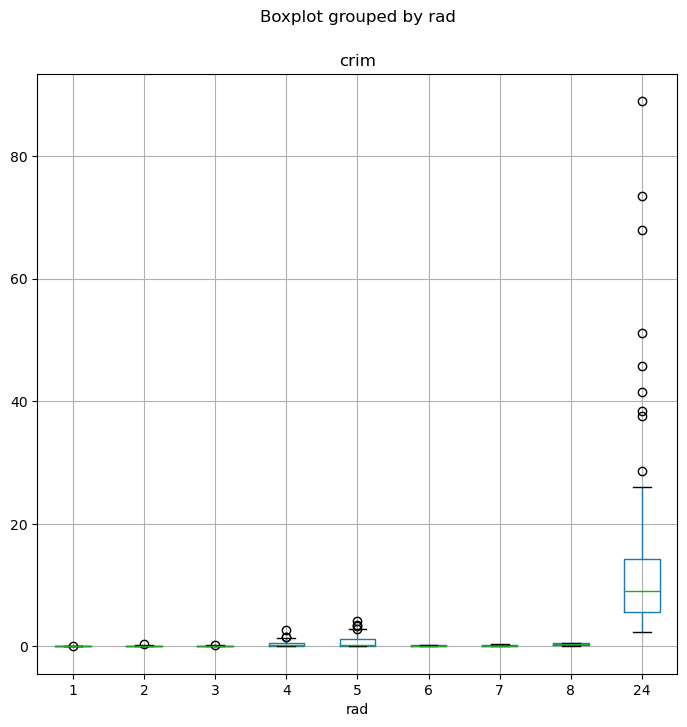
As per ’rad the adapted visualization is a boxplot, since this predictor take discrete values.

#Boxplot of crim by rad
fig, ax = subplots(figsize=(8, 8))
Boston.boxplot('crim', by='rad', ax=ax);

When the index of accessibility to radial highways is at the max (rad=24), the crime per capita rate is much higher both for median value and range.

#Boxplot of crim by tax
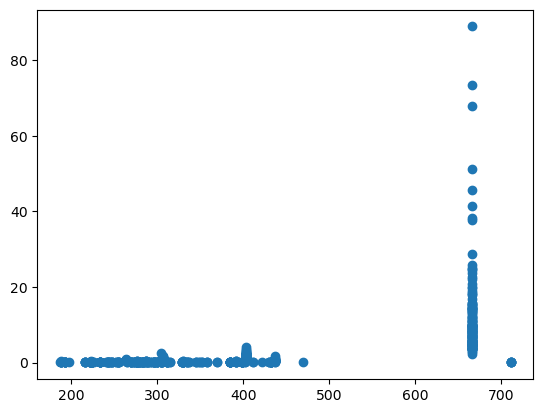
plt.scatter(Boston['tax'], Boston['crim']);

Boston['tax'].iloc[Boston['crim'].argmax()]
666

When the taxe rate is high (tax=666) the crime rate per capita reaches the max value as well as the largest range.

(e)

#Top ten suburbs with high crime rate
Boston.iloc[Boston['crim'].nlargest(10).index]
crim zn indus chas nox rm age dis rad tax ptratio lstat medv
380 88.9762 0.0 18.1 0 0.671 6.968 91.9 1.4165 24 666 20.2 17.21 10.4
418 73.5341 0.0 18.1 0 0.679 5.957 100.0 1.8026 24 666 20.2 20.62 8.8
405 67.9208 0.0 18.1 0 0.693 5.683 100.0 1.4254 24 666 20.2 22.98 5.0
410 51.1358 0.0 18.1 0 0.597 5.757 100.0 1.4130 24 666 20.2 10.11 15.0
414 45.7461 0.0 18.1 0 0.693 4.519 100.0 1.6582 24 666 20.2 36.98 7.0
404 41.5292 0.0 18.1 0 0.693 5.531 85.4 1.6074 24 666 20.2 27.38 8.5
398 38.3518 0.0 18.1 0 0.693 5.453 100.0 1.4896 24 666 20.2 30.59 5.0
427 37.6619 0.0 18.1 0 0.679 6.202 78.7 1.8629 24 666 20.2 14.52 10.9
413 28.6558 0.0 18.1 0 0.597 5.155 100.0 1.5894 24 666 20.2 20.08 16.3
417 25.9406 0.0 18.1 0 0.679 5.304 89.1 1.6475 24 666 20.2 26.64 10.4

The top 10 suburbs with crime rate all have a taxe rate of 666 and a ptratio of 20.2

#Top ten suburbs with high tax rate
Boston.iloc[Boston['tax'].nlargest(10).index]
crim zn indus chas nox rm age dis rad tax ptratio lstat medv
488 0.15086 0.0 27.74 0 0.609 5.454 92.7 1.8209 4 711 20.1 18.06 15.2
489 0.18337 0.0 27.74 0 0.609 5.414 98.3 1.7554 4 711 20.1 23.97 7.0
490 0.20746 0.0 27.74 0 0.609 5.093 98.0 1.8226 4 711 20.1 29.68 8.1
491 0.10574 0.0 27.74 0 0.609 5.983 98.8 1.8681 4 711 20.1 18.07 13.6
492 0.11132 0.0 27.74 0 0.609 5.983 83.5 2.1099 4 711 20.1 13.35 20.1
356 8.98296 0.0 18.10 1 0.770 6.212 97.4 2.1222 24 666 20.2 17.60 17.8
357 3.84970 0.0 18.10 1 0.770 6.395 91.0 2.5052 24 666 20.2 13.27 21.7
358 5.20177 0.0 18.10 1 0.770 6.127 83.4 2.7227 24 666 20.2 11.48 22.7
359 4.26131 0.0 18.10 0 0.770 6.112 81.3 2.5091 24 666 20.2 12.67 22.6
360 4.54192 0.0 18.10 0 0.770 6.398 88.0 2.5182 24 666 20.2 7.79 25.0

The top 10 suburbs with tax rate all have a particularly high ptratio between 20.1 and 20.2

#Top ten suburbs with high tax rate
Boston.iloc[Boston['ptratio'].nlargest(10).index]
crim zn indus chas nox rm age dis rad tax ptratio lstat medv
354 0.04301 80.0 1.91 0 0.413 5.663 21.9 10.5857 4 334 22.0 8.05 18.2
355 0.10659 80.0 1.91 0 0.413 5.936 19.5 10.5857 4 334 22.0 5.57 20.6
127 0.25915 0.0 21.89 0 0.624 5.693 96.0 1.7883 4 437 21.2 17.19 16.2
128 0.32543 0.0 21.89 0 0.624 6.431 98.8 1.8125 4 437 21.2 15.39 18.0
129 0.88125 0.0 21.89 0 0.624 5.637 94.7 1.9799 4 437 21.2 18.34 14.3
130 0.34006 0.0 21.89 0 0.624 6.458 98.9 2.1185 4 437 21.2 12.60 19.2
131 1.19294 0.0 21.89 0 0.624 6.326 97.7 2.2710 4 437 21.2 12.26 19.6
132 0.59005 0.0 21.89 0 0.624 6.372 97.9 2.3274 4 437 21.2 11.12 23.0
133 0.32982 0.0 21.89 0 0.624 5.822 95.4 2.4699 4 437 21.2 15.03 18.4
134 0.97617 0.0 21.89 0 0.624 5.757 98.4 2.3460 4 437 21.2 17.31 15.6

The top 10 suburbs with ptration have a low rates far away below the max value of 88.97%.

(f)

# The value of chas is 1 1 if the suburb tracts bounds river
Boston['chas'].value_counts()[1]
35

There are 35 suburbs which bound the Charles river

(g)

Boston['ptratio'].median()
19.05

(h)

Boston['medv'].argmin()
398
Boston.loc[398]
crim        38.3518
zn           0.0000
indus       18.1000
chas         0.0000
nox          0.6930
rm           5.4530
age        100.0000
dis          1.4896
rad         24.0000
tax        666.0000
ptratio     20.2000
lstat       30.5900
medv         5.0000
Name: 398, dtype: float64
Boston.describe()
crim zn indus chas nox rm age dis rad tax ptratio lstat medv
count 506.000000 506.000000 506.000000 506.000000 506.000000 506.000000 506.000000 506.000000 506.000000 506.000000 506.000000 506.000000 506.000000
mean 3.613524 11.363636 11.136779 0.069170 0.554695 6.284634 68.574901 3.795043 9.549407 408.237154 18.455534 12.653063 22.532806
std 8.601545 23.322453 6.860353 0.253994 0.115878 0.702617 28.148861 2.105710 8.707259 168.537116 2.164946 7.141062 9.197104
min 0.006320 0.000000 0.460000 0.000000 0.385000 3.561000 2.900000 1.129600 1.000000 187.000000 12.600000 1.730000 5.000000
25% 0.082045 0.000000 5.190000 0.000000 0.449000 5.885500 45.025000 2.100175 4.000000 279.000000 17.400000 6.950000 17.025000
50% 0.256510 0.000000 9.690000 0.000000 0.538000 6.208500 77.500000 3.207450 5.000000 330.000000 19.050000 11.360000 21.200000
75% 3.677083 12.500000 18.100000 0.000000 0.624000 6.623500 94.075000 5.188425 24.000000 666.000000 20.200000 16.955000 25.000000
max 88.976200 100.000000 27.740000 1.000000 0.871000 8.780000 100.000000 12.126500 24.000000 711.000000 22.000000 37.970000 50.000000

The suburb no 398 has the lowest median value of owner occupied homes.
As far as this suburb is concerned, the other predictors are located in the following quantiles: - Above 75% quantile we find crim, indus, nox, age, rad, tax, ptratio and lstat. Particularly, age, rad and ptratio attend their max values; - Below 25% quantile we find zn, rm, dis and medv. Particularly, both medv and zn attend their min value.

(i)

#More than average of 7 rooms per dwelling
len(Boston[Boston['rm']>7])
64
#More than average of 8 rooms per dwelling
len(Boston[Boston['rm']>8])
13
Boston[Boston['rm']>8].describe()
crim zn indus chas nox rm age dis rad tax ptratio lstat medv
count 13.000000 13.000000 13.000000 13.000000 13.000000 13.000000 13.000000 13.000000 13.000000 13.000000 13.000000 13.000000 13.000000
mean 0.718795 13.615385 7.078462 0.153846 0.539238 8.348538 71.538462 3.430192 7.461538 325.076923 16.361538 4.310000 44.200000
std 0.901640 26.298094 5.392767 0.375534 0.092352 0.251261 24.608723 1.883955 5.332532 110.971063 2.410580 1.373566 8.092383
min 0.020090 0.000000 2.680000 0.000000 0.416100 8.034000 8.400000 1.801000 2.000000 224.000000 13.000000 2.470000 21.900000
25% 0.331470 0.000000 3.970000 0.000000 0.504000 8.247000 70.400000 2.288500 5.000000 264.000000 14.700000 3.320000 41.700000
50% 0.520140 0.000000 6.200000 0.000000 0.507000 8.297000 78.300000 2.894400 7.000000 307.000000 17.400000 4.140000 48.300000
75% 0.578340 20.000000 6.200000 0.000000 0.605000 8.398000 86.500000 3.651900 8.000000 307.000000 17.400000 5.120000 50.000000
max 3.474280 95.000000 19.580000 1.000000 0.718000 8.780000 93.900000 8.906700 24.000000 666.000000 20.200000 7.440000 50.000000

There are 64 and 13 suburbs which have more than 7 and 8 rooms per dewilling respectively.
Furthermore, the average of crime rate for the 13 suburbs is lower than crime rate for the whole population. However, median value of owner-occupied homes is larger as expected.